
How to set reminders for Outlook emails – in and out
Outlook for Windows can set reminders to follow up on incoming emails but what’s less well known are the two options for follow up on emails you send out. Attaching a flag to an email you sent means Outlook will pop-up to remind you. For outgoing emails it’s a great way to remind yourself if […]

‘Flags to Me’ – reminders with your Outlook emails
When you send an email, Outlook can add a ‘Follow up’ reminder to appear later. This is a reminder for you, the sender. There’s a separate option to send a reminder to the email recipients. From an open email message go to Home | Tags | Follow Up For a quick flag with just a […]

Make outgoing email reminders in Outlook aka ‘Flag for Recipients’
Outlook for Windows (not Mac) can send an automatic reminder with an email. Ideally, this means the recipient will get a ‘pop-up’ reminder to do whatever you’re talking about in the email itself. In this article, we’ll show how to send a reminder with your email. We’ll look at how that reminder will appear to […]
Outlook apps have Shared Calendars
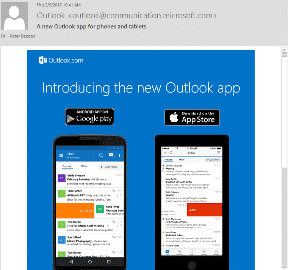
Shared Calendars is now available for the Outlook apps for Android and Apple devices. The Outlook app for iOS was recently updated to include shared calendars. This brings the Outlook apps into line with this important Outlook for Windows/Mac feature. Shared Calendars let one person make their appointments visible or even editable by someone else. […]
Outlook 2016 – there’s (at least) three!
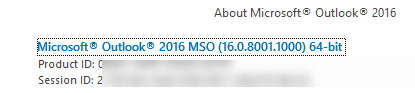
Amazingly, Microsoft has at least three programs that are called ‘Outlook 2016’. It’s not a trivial point, knowing which ‘Outlook 2016’ you have is important if you ask for help or tech support. Confused? Join the club. When Microsoft talks about ‘Outlook’ they probably mean ‘Outlook for Windows’. ‘Outlook 2016’ probably means ‘Outlook 2016 for […]

Entourage 2008 to Outlook 2016/Mac migration
Microsoft makes it hard for people to move from their Entourage program data to modern Outlook for Mac. Entourage was the email/calendar/contacts part of Office for Mac. Office 2011 replaced it with Outlook 2011 for Mac. Outlook 2011 had a conversion option that let former Entourage users move to the new software. That was dropped […]
IBM’s daft patent for ‘out of office’ emails
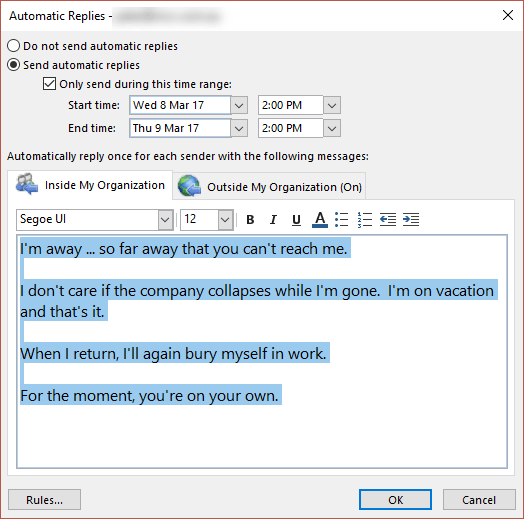
From the crazy bureaucracy department is the news that IBM has been granted a patent for Out of Office emails! That’s right, those automatic emails that go out when you’re poolside are now the property of IBM. From the patent application: “When the out of office agent is enabled, it automatically responds to e-mail that […]

Translator for Outlook but not for everyone
Last year we renewed one of our ongoing gripes with Outlook, the lack of an incoming email translation feature. See a ‘side-by-side’ translation of an email you’ve received. After many years, Microsoft has finally done something to fix this obvious gap, but they’ve done it in a typically self-serving way. Before you get too excited […]
AOL mail users – secure your email!
It’s not just politicians who get into trouble using public email services. They are just the headline-worthy tip of a much larger email problem. AOL has a way to secure a AOL mail account but too few people (and politicians <g>) use it. We’ve talked before about Two Factor Authentication as the essential to securing […]

Operation BugDrop hackers use Word documents
CyberX Labs has identified Operation BugDrop, which uses Word document to attack targeted businesses and steal corporate information. They send emails to the business they want to raid that trick people into enabling macros. Opening the hacked document displays the Security Warning and ‘Enable Content’ button are real; created by Word. But the sincere looking […]

Getting an image into Office – not as simple as you’d expect
You’ve chosen an image, now you have to get it into your Office document. You’d hope there was a single way to do that but, as usual, there’s plenty of options. Outlook has its own special needs, different from Word, Excel and PowerPoint. There’s also privacy and image size issues to consider. The simple way […]

What happens when you send an email
Check out this video from SciShow which goes some way to explaining how an email gets from your computer to another. Emails get routed through a series of computers to reach it’s destination. It’s not a direct connection from your computer to another. That’s important to all email users because it means: Privacy – any […]
Outlook.com Premium now available
The paid upgrade version of Outlook.com is now available with the usual, but enticing, opening offer. For an annual fee you get extras beyond the usual free offering: No Ads – on the browser interface version of your mailbox. Custom Domain – instead of using outlook.com, email addresses with your own domain. You can buy […]

Highlights of Feb 2017 updates for Office 2016 and Office 2013
Here’s the complete list of non-security updates for Office 2016 for Windows and Office 2013 plus our notes on some bug fixes that caught our eye. As usual, these updates will be pushed to most Office computers automatically. No action is necessary. Unexpected Issues Microsoft is always using different words to avoid saying ‘bug’. This […]

Try adding an .ics appointment into Outlook
Would you like to try adding an Outlook appointment, just to see how it works? We’ve made a simple test .ics you can download: Add a test appointment It’s a normal .ics file that can be added to Outlook for Windows/Mac or any other compatible programs (most calendar programs do). See Web Links Adding Outlook […]

Office Touch Bar support is happening soon – 3 months late.
Microsoft announced Touch Bar support with much fanfare back in October 2016. Over 3 months later and paying customers are still waiting. There’s been lot of talk about this feature including web sites with ‘tips’ on using Office with the Touch Bar without noting that it’s not got into ‘insider’ beta testing yet. New Macbook […]









