
Paste Icons or SVG from Office documents to other apps
Microsoft is expanding their support for SVG graphics by allowing these ‘Icons’ to be copied from Office documents into other third-party apps. Users can take an Office Icon or SVG and easily copy it to another app to use or change beyond Office’s in-built features. There’s no special menu item or feature, it’s part of […]
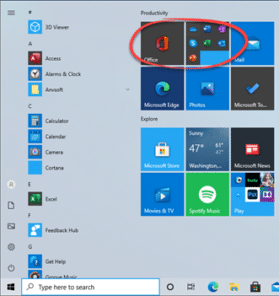
Office dropped onto Windows computers, in a new way
Microsoft is trying a new way to push Office or Microsoft 365 to new customers by dropping links into the Windows Start Menu. We’ve seen this on the Start Menu of Windows 10 preview releases. It’s a group of icons for Word, Excel, PowerPoint, Outlook, OneNote and Skype. Most of the links are to the […]

When and how to switch from Office 2010 – your questions answered
Office 2010 ends support on 13 October 2020 and we’ve been receiving questions from readers asking about switching to newer Microsoft Office. We’ll answer questions about when to update, what to replace Office 2010 and important factors to consider. We’re hearing concerns about privacy in modern Office, reliability and the constant, monthly, changes in the […]

Microsoft 365 offline! What happened and what you should do
Microsoft 365 suffered a major outage of their online and cloud services. Here’s what we know, where we stand now and how to reduce your risk of trouble with future problems. The online services from Microsoft could not be accessed from about 5pm Monday (US Eastern) that included Office logins, Outlook/Hotmail, Teams and more. It […]
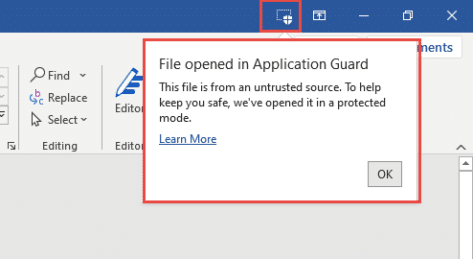
Do you have Application Guard for Microsoft Office?
Microsoft 365 Enterprise customers can now try Application Guard as a new way to protect against malicious documents infecting computers.What is Application Guard and what it means for Office 365 Application Guard is a combination of Windows 10 Defender and Office programs that opens a suspect document in a special way. With hardware virtualization, the […]

Nifty new adaptive mini-toolbar coming to Word 365
Microsoft Word is getting the adaptive mini-toolbar. The extension to the mini-toolbar appeared in preview versions of PowerPoint recently. Now it’s in Word previews as well. The buttons on the right change according to how you use Word. Compare that to the current Word mini-toolbar with a fixed list of buttons. The Word 365 adaptive […]

PowerPoint mini-toolbar expands with adaptive extras
PowerPoint for Windows is getting a new mini-toolbar with adaptive extra features. Some of the buttons will change depending on the tools you most commonly use. The mini-toolbar is in all Office apps, it appears whenever you select something. At the moment, the options are the same with basic formatting (font, size, color,bold, highlighting, Format […]

Easy Office document hacking with VBA Stomping or Purging
Common programming tools can be used to make malicious Office workbooks which bypass both online security checks and Microsoft’s own protections in Word, Excel, PowerPoint or Access. We’ll explain what’s happening and what Microsoft could do better. VBA Purging or VBA Stomping are clever tricks to make an Office documents (e.g. .xlsm Excel workbook) with […]

Customer login now required to use Microsoft 365 apps
There’s a change in the way Microsoft 365 works with a sign-in to a Microsoft account. This applies to Word 365, Excel 365, PowerPoint 365 and other Office apps. Up to recently, Microsoft 365 / Office 365 has worked normally either when signed into a Microsoft account or not. Having a Microsoft account wasn’t required […]

Left Right arrow ↔ in Outlook, Excel, PowerPoint and Word
Type the Left Right arrow ↔ into Microsoft Word, Excel, PowerPoint or Outlook. Both in Office for Windows and Office for Mac. How Left Right arrow ↔ looks in different fonts. Here’s some examples of how Left Right arrow ↔ looks in common Office fonts. Left Right arrow ↔ codes These are the important code […]
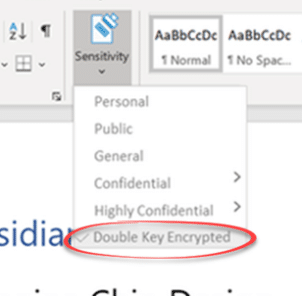
Double Key encryption coming to Microsoft 365
Microsoft is making an important step towards cloud storage security with the public preview of Double Key Encryption. That means, for the first time, Microsoft customers can secure their data from access, even by Microsoft itself. All the ‘secure’ cloud storage from Microsoft can be accessed by Microsoft. For all their talk about security, the […]

Get 11 Indian languages translated by Microsoft 365
Microsoft 365 Translator now has the language Odia (or Oriya), taking the list of Indian languages supported to 11. in Odia, according to Microsoft …. Microsoft 365 ଅନୁବାଦକ ବର୍ତ୍ତମାନ ଓଡ଼ିଆ ଭାଷା (କିମ୍ବା ଓଡ଼ିଆ) ଅଛି, ଯାହା ଦ୍ୱାରା 11ଟି ଭାରତୀୟ ଭାଷାର ତାଲିକା ଗ୍ରହଣ କରାଯାଇଛି । Microsoft Translator is a cloud-service so Odia is now on the list […]
Office 2010 – not long before it ‘dies’
Microsoft Office 2010 ends support later this year but there’s no need to panic. Here’s what to do, when to change from Office 2010 and what to replace it. Office 2010 countdown [ycd_countdown id=”31774″][/ycd_countdown] Office 2010 ends support on Tuesday, 13 October 2020 All the Office 2010 programs will keep working. No change there. Tuesday, […]
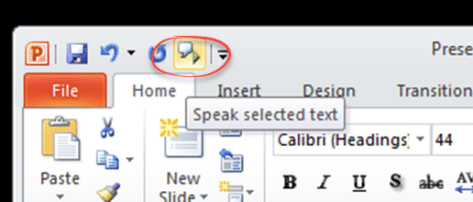
Powerpoint speaks aloud in Office 365, 2019, 2016 and earlier
PowerPoint 365 way back to PowerPoint 2010 all have a ‘text to speech’ or ‘Speak’ feature to read aloud the text in a slide. It’s hiding away behind the ribbon but works fine once you’ve found it. The PowerPoint Speak or Real Aloud feature is similar to the Speak option in Word. Speak button can […]

2020 – Year of the Icon?
2020 will be remembered for many things (big sigh) but from a design viewpoint, it could be the Year of the Icon. Many of those graphics are available either in Office directly or imported from elsewhere – we’ll show you both. Everywhere you go there are signs reminding us of the new life we have […]

Quick Fix for Office display problems
How to quickly fix display problems in Microsoft Office. When Word, Excel, PowerPoint or Outlook don’t show up on the screen correctly. It doesn’t happen often but occasionally Word, Excel, PowerPoint or Outlook open but as all grey. Clicking around the screen displays just a ribbon or menu but not the whole program. If other […]









