
Nekofont – the cat font
Headline your next document with cats! Looking for something really different to headline your next document or presentation – why not use ‘Neko Font’ the font made out of cats. Strictly this isn’t a font you can download, instead you type text into a web page, choose the size (Large, Medium, Small or Tiny) and […]

Surface Earbuds with Office
Microsoft’s Surface Earbuds are out now and have some extras for Word, Outlook and PowerPoint users. When we look past the hype there’s more than a few special conditions to keep in mind. Surface Earbuds have been some time coming, we first mentioned them about nine months ago. Now they are here, reviews have been […]

Animated GIF’s coming to Word, Excel and PowerPoint
Animated GIF support is coming (finally!) to Microsoft Word, Excel and PowerPoint. We discovered the new feature in a new Insiders build, Microsoft hasn’t announced anything. Here’s an animated GIF playing in Word 365. Paste or Insert an animated GIF now has play/pause buttons included (bottom left corner). The animation starts playing automatically when inserted. […]

Numbered List with Only Odd or Even Numbers in Word
If you want a list of numbered items using only odd or even numbers; how do you do that? Are you thinking of Word’s automatic numbering feature? The answer is “Yes” if you add little Word trickery. What exactly you need to do is use the Numbering features but leave the even (or Odd) numbers […]

When Microsoft’s AI takes over, watch out
When Microsoft announced it was firing news human editors and replacing them with ‘Artificial Intelligence’, it was only a matter of time before the AI system would get it wrong. No-one expected it to happen so soon, even before all the humans had left the building. There’s a lesson in that for all Microsoft Office […]
What’s new in Office for Windows – May 2020
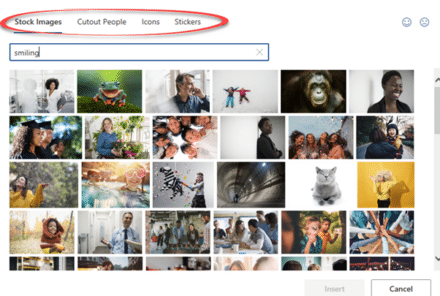
Some useful new features have now been rolled out to the public versions of Microsoft 365 (Office 365) for May 2020. Word, Excel, PowerPoint and Outlook all have improvements. Two we’ve already told you about, the other is new. Stock Images, Cutout People and Stickers Or what Microsoft calls “New images to bring your documents […]

Recovering lost Word for Mac documents
If you’ve lost or accidently deleted a Word for Mac document (or Excel or PowerPoint) there are various places to look for it some might not occur to you. This article is also helpful if you’re trying to find and delete any files or documents that must be removed for privacy reasons. Time Machine MacOS […]

More Rounded Corner tricks for Office
Some more tricks for improving or fixing rounded corner boxes in Office. Change the corner angle or roundness even to a stadium shape. Alter the border line a little or a lot. Make a Word text box with rounded corners explains the basics of making the rectangular box into something with ‘soft’ corners. This article […]

‘Tell me’ help now in Mac Office 365 with the same limitations
‘Tell me’ help box is now in Microsoft/Office 365 for Mac as a way to find features on the ribbon. However it continues to have the same limitations that are in the Windows version. Look for the lightbulb and ‘Tell me’ box beside the ribbon tabs. Type in a phrase and Office will show relevant […]
PowerPoint’s ‘Zoom out’ animation option
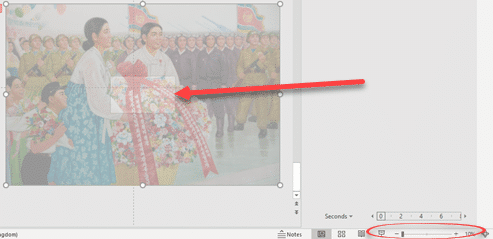
PowerPoint has an option to ‘zoom out’ on a still image from a close-up view to a wider look at the same picture. It’s not a great option and Microsoft could make it a lot easier. Here’s how to do a ‘Zoom out’ on an image This is an endnote on our series about adding […]
PowerPoint Ken Burns Effect complete – part 3
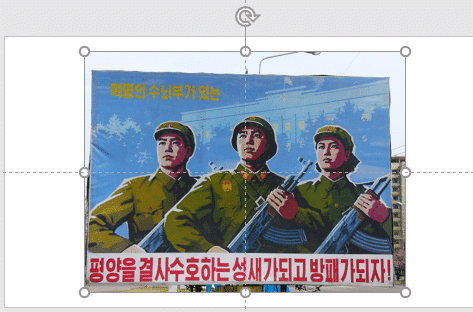
We continue our look at the options for the ‘Ken Burns Effect’ in PowerPoint by combining the pan and zoom animation features into a complete effect. It adds interest and movement to a still image with two separate animation effects available, in part, in PowerPoint. Ken Burns Effect in PowerPointThe zoom in or zoom in/out […]

Pinned Save folders in Microsoft 365
Word, Excel and PowerPoint 365 for Windows are getting better control over what appears on the new-style Save dialog. Folders can be ‘pinned’ to always be show up in the list and a quick way to share a document. But a major annoyance remains unchanged. On the ‘Save this file’ dialog under Choose a location […]
Combined Drawing Tools in Word 365 and other Office programs
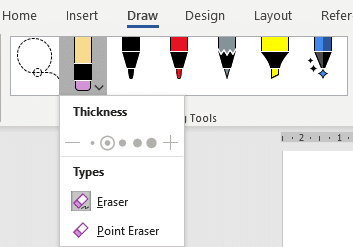
The Drawing Tools in Word 365 is now larger with separate tools like Lasso and Eraser now in a single combined gallery. There are other changes and new limitations on the Drawing Tools gallery, some of them undocumented. Compare that to the old Draw tab where the Lasso, Eraser and Add Pen were separate from […]

Pan across a still image in PowerPoint – Ken Burns effect part 2
Give a still image some interest and movement by adding a simple ‘pan’ animation across the photo. This continuing our look at making the Ken Burns or ‘pan and zoom’ effect in PowerPoint. We’ve already shown how to add a Zoom to a still photo – PowerPoint calls it ‘Grow/Shrink’. Now let’s look at the […]
Ken Burns Effect in PowerPoint
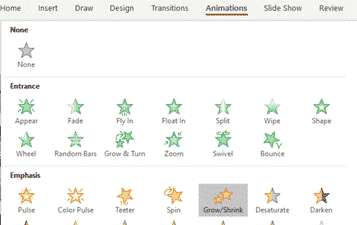
The ‘moving picture’ or Ken Burns effect can be done in PowerPoint for Windows or Mac. It converts a still image into a slowly moving ‘pan and zoom’ over the photo.. There are several ways to apply a ‘Ken Burns effect’ which we’ll explain starting with a very simple option which only takes a few […]

PowerPoint Background Animation or Ken Burns Effect in Mac only!
PowerPoint 365 for Mac has a background animation or ‘Ken Burns effect’ feature that’s not available in other PowerPoint’s. We have hidden tricks to improve Animate as Background beyond the simple defaults. Animate as Background adds a slow ‘zoom and pan’ effect to a still image, making it a moving ‘Ken Burns’ effect. We’ll show […]









