
Surface Pens turn on Office drawing automatically
Surface pens will now turn on the Draw tab in Word, Excel and PowerPoint automatically. When you pick up a Microsoft Surface Pen, the Draw tab in Office 365 will automatically appear to choose color, thickness of the digital ink. There are a few requirements, but they are pretty obvious: The Surface Pen has to […]

Finding all the Handouts options in PowerPoint with slides, notes and more
PowerPoint has many choices for printed/PDF handouts to go with a presentation. Here’s a guide to the options spread in different places on the PowerPoint ribbon and menus. Quick PowerPoint Handouts Under File | Print is the basic handouts option to print slides and lines for people to handwrite notes. However those options do NOT […]
Moving PowerPoint eulogy at mother’s funeral
A funny story from satirical ‘The Chaser’ shows what could happen when corporate PowerPoint presentations are taken too far. LinkedIn executive presents moving PowerPoint eulogy at mother’s funeral “Before a packed congregation of relatives and friends, the senior executive paid tribute to his mother through a series of bullet points, graphic charts and bold-font mission […]
Revealed! Office install/update errors and fixes
Here’s a list of the known Office install/update error codes with possible fixes. All thanks to a diligent and long-suffering Office Watch reader. Ron S has compiled these lists from web sites and forums based on experiences of other people. Doesn’t Microsoft have all this? Yes, they probably do but not for public consumption. Microsoft […]

Watermarks with text on PowerPoint Handouts
There’s no direct ‘watermark’ option for PowerPoint Handouts which is a shame because it would be very useful to add ‘Confidential’, ‘Draft’, ‘Private’ or other very obvious notices. You can fake it with a little PowerPoint trickery. Add a Watermark Picture In short, make an image with the watermark text. The image can have text, […]
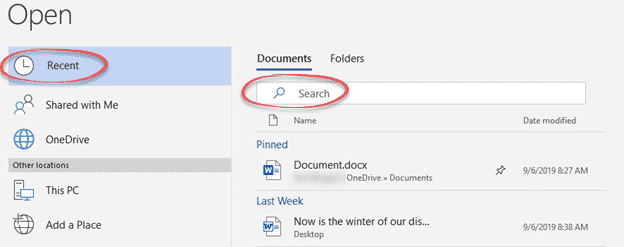
Expand your Recent Documents list in Word, Excel and PowerPoint
The newer File | Open panes include a Search option to quickly find Recent Documents by name. That means it’s practical to expand the Recent Docs list to a higher or maximum value in Word, Excel or PowerPoint. In any of the three programs go to File | Options | Advanced | Display. Over time, […]
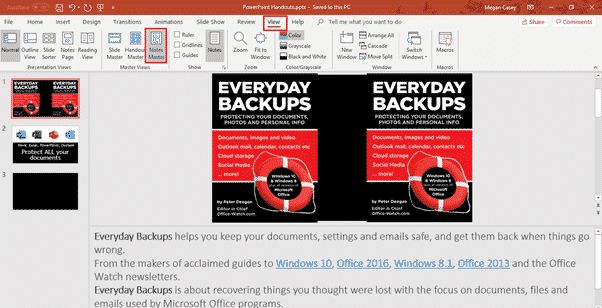
PowerPoint Notes Master for more handout control with slides
Just as there is a Handout Master to control how slide printouts look, there is also a Notes Master which has more control over how PowerPoint printed notes with slides will look. If you’ve used the Handouts Master, Notes Master will be warmly familiar to you. Notes Master is like a simplistic template with some […]

The realistic guide to fixing Office 365/Office 2019 update problems
The error messages on Office 365/2019 setup and update are notoriously unhelpful, so here’s a guide to fixing Office install or update problems that work out here in the real world. Error messages like the infamous ‘Something went wrong” should be taken with a large pinch of salt. The error message is often misleading and […]

“Something went wrong” fixing a bad Office 365 update
If you get an error message when installing or updating Office 365 or Office 2019 there’s little help available beyond Microsoft telling you ‘Something went wrong’. What looks like specific error message are general statements that don’t identify the problem. These troubles aren’t any surprise to experienced Microsoft Office users. Install or update of Office […]

Notes Print with PowerPoint Slides
While printing PowerPoint handouts for your audience with just the slides can be useful, sometimes you may want to give them your notes as well as the slides, which is where Notes Print comes in. Contrary to its name, Notes Print includes slides as well as your notes underneath them. To print the slides with […]

Master PowerPoint Handouts, make printouts look better
Handout Master lets you customize your presentation handouts more than the basics; changing the position and formatting of headers/footers, adding a background color or gradient. Maybe you can help uncover some unexplained mysteries of Handout Master, see below? Our Quick PowerPoint Handouts article showed you how to go to File | Print to print out […]

Quick PowerPoint Handouts
There are many ways to make a paper/PDF version of a PowerPoint slide deck, this is the quick ‘only a few clicks’ option. There are other choices that we’ll cover in upcoming articles. PowerPoint has some ‘Handouts’ features but they aren’t all in the same place and some aren’t even called ‘Handouts’! Why handouts? It’s […]
Microsoft and others listen to Skype calls … and what else?
Microsoft and some contractors listen to Skype calls but that shouldn’t be a surprise to anyone. And Microsoft’s response was quite typical – they refuse to stop. Microsoft can and does let it’s ‘associates’ listen and read from Office documents and voice data. Word, PowerPoint and Outlook users are also likely spied upon. The choice […]

New PowerPoint handout feature isn’t new at all
A supposedly ‘new’ feature in PowerPoint 365 for Windows is already in regular PowerPoint? The latest Insiders version of Office 365 for Windows has no truly new features. The only ‘new’ feature is something that’s already in Office 365. As we looked down the list of changes in version 1909 build 16.0.12013.20000 it was all […]
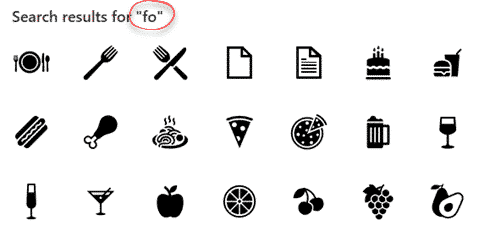
Search for Microsoft Office Icons
The desperately needed feature is coming to Microsoft Office … the ability to search for Icons. Microsoft added Icons to Office 365 and even more a few months ago … 300 more icons in Office, but which ones and where? The problem has always been finding the right icons from the long list. There are […]

Sensitivity settings add security for Office documents
Office now has sensitivity options to label Word, Excel, PowerPoint docs plus emails. Not ‘touch-feely’ sensitivity like ‘loving’ or ‘compassionate’ but instead corporate, privacy labels. It’s a new feature for Office 365 corporate hosted E3 or E5 accounts and the admins have enabled Sensitivity options. Sensitivity appears on the Home tab in Word, Excel, PowerPoint […]









