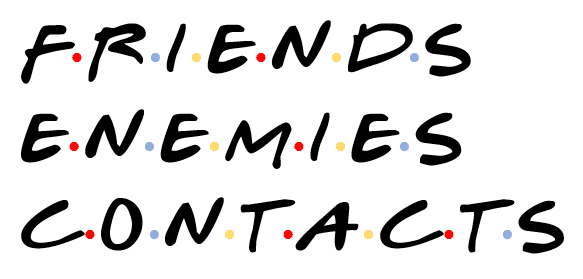
‘Friends’ logo or text complete in Word, PowerPoint and Office
Here’s how to add a taste of the logo or text from ‘Friends’ sitcom to a Word document, PowerPoint slide or other document. That includes the important dots between letters. All you need is available online plus a little Office trickery. Note for old-timers (like Peter, our Editor-in-Chief). ‘Friends’ was a televisual entertainment shown on […]
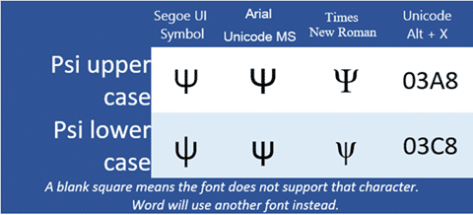
Psi upper Ψ or lower ψ symbols in Word and Office
How to insert the Psi upper case Ψ, and Psi lower case ψ symbols in Microsoft Word, Excel, PowerPoint, or Outlook. Both in Office for Windows and Office for Mac. Psi (uppercase Ψ / lowercase ψ) is the 23rd letter of the Greek alphabet. The symbols are commonly used within physics to represent wave functions in quantum […]

Xi upper Ξ or lower case ξ symbol in Word and Office
Insert the Xi upper case Ξ, and Xi lower case ξ symbols in Microsoft Word, Excel, PowerPoint, or Outlook. Both in Office for Windows and Office for Mac. Xi (uppercase Ξ / lowercase ξ) is the 14th letter of the Greek alphabet. The symbols are used within various contexts. The uppercase letter is often used in pure […]

File open bug in Word & Office for iPad! Try this
The latest releases of Office for iPad are crashing when opening documents. Here’s what to do while Microsoft fixes the bug. The problem appears to happen when trying to open documents from OneDrive, which is the vast majority of documents because Microsoft encourages use of OneDrive. The bug is reported in the latest releases of […]

Understanding the strange FollowedHyperlink style in Word
There are a few strange, non-standard, behaviors to the FollowedHyperlink style that Word uses for visited links. FollowedHyperlink is a hidden style which Word uses for any link which has been clicked or visited by the current user. Because it’s automatically applied it has some peculiarities that don’t apply to other styles, including its partner […]

Hyperlinks and link styles explained in Word
Word has special styles for hyperlinks which you can change from the standard blue, underlined look. Word link styles have some special behaviors to keep in mind. Word links can look very different or appear no different to regular text. All these are hyperlinks, believe it or not. Hyperlink and FollowedHyperlink Links have two modes […]

What’s so special about the Bahnschrift font?
Bahnschrift is a Windows font which is a little special and not fully compatible within Office. We’ll explain why it’s special, the extra care needed and the workaround. While it’s listed as an Office Cloud Font, Bahnschrift was originally included with the 2017 ‘Creators’ update of Windows 10. So, it might already be installed for […]

Star Wars in the Office dictionary
Since we’re talking about Star Wars, how does Microsoft Office 2016 for Windows handle the words and names from the famous films? A mixed bag. Most of the common names are in the MS Office dictionary but some surprising omissions. The evil Emperor isn’t included. Planet Tatooine has a major part in the movies but […]

Have your say on Word’s new default font
Microsoft has decided that Calibri is getting a little tired, so it’s asking customers to vote on which font will replace it. Calibri has been the default font since Office 2007. It’s familiar to most people whether they realise it or not because it appears in many Word documents. The two fonts, Calibri (body text) […]

Beware using the new iPhone and iPad emoji
The new iOS 14.5 has hundreds of new emoji but beware using them in emails and documents because they can look very different on other computers. We have examples of how a simple emoji can look very different in Word or Outlook. The new version of iOS for iPhone and iPad includes even more emoji. […]
Office 2019 for Windows – all the facts, prices and warnings
Here’s all about Office 2019 for Windows – the facts, prices and shortcomings. There’s a matching page about Office 2019 for Mac. Before you get too excited Do NOT buy Office 2019 if you have Microsoft 365 like Microsoft 365 Family (formerly Home), Microsoft 365 Personal or an enterprise plan. In other words, you pay for […]
Office 2019 for Mac – all the facts, prices and warnings
All about Office 2019 for Mac the facts, prices and warnings. There’s a matching page about Office 2019 for Windows. Before you get too excited Do NOT buy Office 2019 if you have Microsoft 365 plan like Microsoft 365 Family (formerly Home), Microsoft 365 Personal or an enterprise plan. In other words, you pay for […]
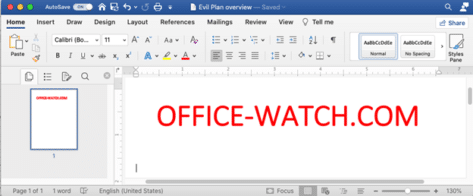
Office 2021 for Mac, your preview first look
Your first look at Office 2021 for Mac with Word, Excel, PowerPoint and Outlook, which is now out in public preview, showing off some of the new features. There’s only a Mac Office 2021 preview, no Office 2021 for Windows preview. Perhaps because there’s a few more innovations in a comparison of Office 2019 to […]

Office LTSC public preview now available
A public preview of the next perpetual licence Microsoft Office is now available. Called Office LTSC (Long Term Servicing Channel) it’s for volume customers only. Here are the options and how to get the preview. Office LTSC is the clumsily named non-subscription version of Office for organizations with volume licence agreement. See Office LTSC, first […]

Office LTSC, first look images
Here’s a first peek at Office LTSC for Word, Excel, PowerPoint, Outlook, Access, Publisher and OneNote which is now out in public preview showing off some of the new features. Office LTSC in it’s current preview is underwhelming, to put it mildly. But that’s what Microsoft is aiming for. Office LTSC (Long Term Servicing Channel) for […]

Choose the text to spell check & proof in Word 365 Editor
The new spelling, grammar and other suggestion Editor can now be used with selected text, not just the whole Word 365 document. It’s a little change but an important and useful one. Select a block of text, right-click and choose ‘Review selection in Editor’. Selecting text for the Editor is available in the Insiders Word […]









