
Word for Android reaches a real billion milestone
Microsoft Word for Android has reached a billion installs. That’s a real Billion not a Microsoft hype billion. It’s even more impressive than it seems. The billion number is counted by Google on Google Play. Microsoft loves quoting high numbers especially ‘Billion’ even when it makes little sense. But this is different. The statistic comes […]

Complete guide to adding placeholder or filler Text in Word
Microsoft Word has several ways to quickly insert placeholder text into documents. Sometimes you want to add some random text to a document as filler, but don’t want to think of something to write yourself. While there are websites that will generate placeholder text for you, it is also possible to do this directly within […]
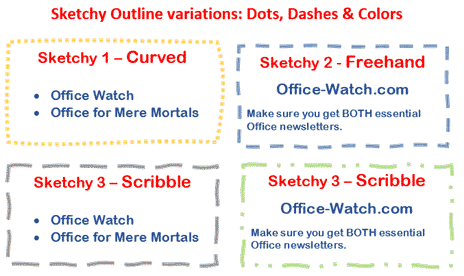
Now … Sketchy Shapes the video!
Sketchy Shapes, the new line option in Office 365 now has a little video to go with it. Sketchy line option in Office for Windows and Mac Sketchy or wriggly lines in Icons and SVG graphics Source: Microsoft
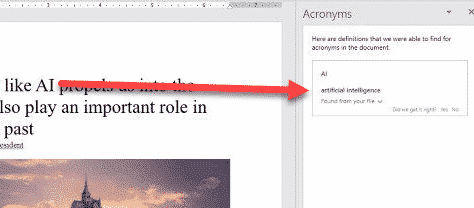
Word can understand acronyms
An upcoming feature in Word 365 for Windows (commercial editions) will be able to detect and define acronyms. When Word ‘sees’ an acronym it will try to show a definition based on it’s context in the document and how other people use the same acronym in the organization. Source: Microsoft plus some extra edits That’s […]

Why Venice invented italics … you can use that trick in Microsoft Word.
Back in the 16th Century, italic fonts were invented and that trick can still be used today in Microsoft Word. Italics let you fit more text into the same space. An innovative Venetian publisher, Manutius, needed to make small and affordable books. Paper was expensive so anything that put more text on the page was […]

Font gives away fake document but it’s blamed on time travel
Here’s another case of someone trying to backdate fake documents and being caught by hidden details in the file. The font is the giveaway but not in the usual way. It’s the ongoing saga of Craig Wright, once a big name in the cyber-currency game. He’s now involved in a court case about the alleged […]

Translate a whole Word document to another language
Word lets you translate an entire document in one go, either right click anywhere in the document, right click and select Translate, or go to Review | Translate | Translate Document. As with translating a selection, the Translator will open in a sidebar, where you can select the languages to translate from and to. Generally, […]
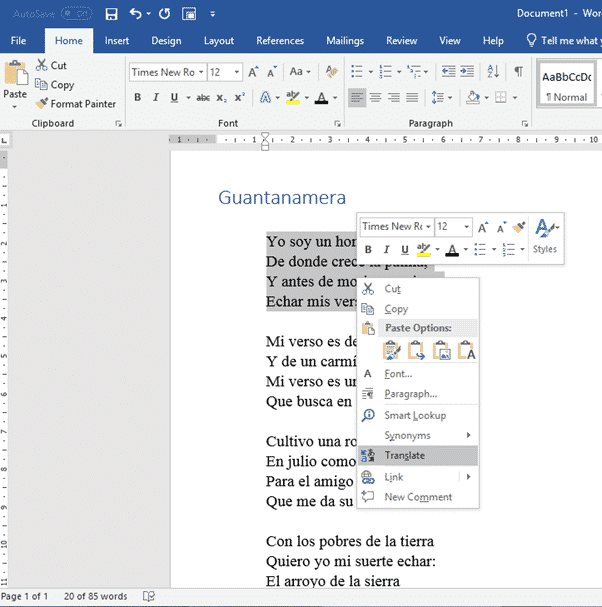
Translating selected text in Word
Word has a feature to translate text from one language to another. Whilst the translation may not be perfect, it does give you a starting point to understanding what the text says. You can either translate a selected piece of text, or the whole document. Translate works slightly differently depending on which you choose. Choosing […]
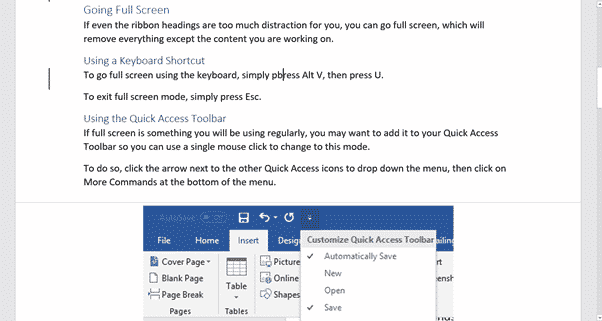
Make a distraction free Microsoft Word
If you’re the sort of person who’s easily distracted, or just want to focus on the content of your document without worrying about formatting, there are a number of ways you can clear the distractions from Microsoft Word, so you can focus on the text you’re writing. Minimize the Ribbon Remove the entire ribbon from […]
Office 2016/2013/2010 bug fix lists for July 2019
Here’s a summary of the July non-security updates for Office 2016, Office 2013 and Office 2010. These updates should be automatically installed via Microsoft Update or you can apply them manually. Install them now if there’s a listed bug you need fixing, otherwise play it safe. Leave some time for any bugs in the patches […]

Lame Icons in Office 365 isn’t helped by adding 300 more
Microsoft is hyping the addition of 300 more icons to Office 365 perhaps hoping to distract customers from the many problems finding and using the Insert | Icons feature in Office 365. We like the addition of SVG graphics (Icons) into Office because it opens up a much wider range of scalable graphics. Office lacked […]

300 more Icons in Office, but which ones and where?
Microsoft is boasting that the Office 365 ‘Icons’ collection now has 300 more graphics but no information on what they are and no help finding them. The release of more Icons just emphasizes the problems with this cloud feature. Icons is a cloud service that delivers SVG graphics to Word, Excel, PowerPoint and Outlook for […]

New Outlook Dark Mode feature and other Insiders news
The 21 June 2019 Office 365 for Windows Insiders release 11815.20002 has a new Dark Mode feature in Outlook plus some fixes. Here’s the details including Microsoft’s report on ‘Notable Fixes’. Outlook New features Outlook 365 for Windows now has a Sun/Moon button when using Dark mode and the black theme, Sun/Moon switches the reading […]

Office Insiders new Word feature and fixes
The 14 June 2019 Office 365 for Windows Insiders release 11807.20000 has a new feature in Word plus some fixes. Here’s the details including Microsoft’s report on ‘Notable Fixes’. Word – precision ink erasing PowerPoint already has small and medium ink erasers. They are now in Word too. In PowerPoint or Word go to Draw […]

Office 365 for Windows: Straight Talk
We’re delighted to announce a new ebook from Office Watch — all about Office 365 for Windows: Straight Talk. In-depth with Word, Excel, PowerPoint and Outlook 365 plus buying and configuration. For anyone with Office for Windows on an Office 365 subscription. It’s a truly independent guide to Office 365 for Windows. We take the […]

Other Word sorting problems, tricks and workarounds
Here’s some other problems with the Word Sort feature and tricks to work around them. Generally speaking, long or complex sorting is better done in Excel. Excel has much better data management features to split and sort. The final result can be copied into Word. Sort a list of names by surname or more in […]









