All the Office theme changes in Microsoft 365
Microsoft is changing more than just the font in Microsoft 365, there are also default color scheme and even line changes coming too. Here’s all the proposed changes and how to reverse them.
New Default Fonts
We’ve already talked about the new default fonts, Aptos and Aptos Display. New default font, Aptos, in Microsoft 365 and Word
Check out Heading fonts in Office, new and old side-by-side comparison shows the new Heading font (Aptos Display) has thicker and slightly darker lines than the current Calibri Light font.
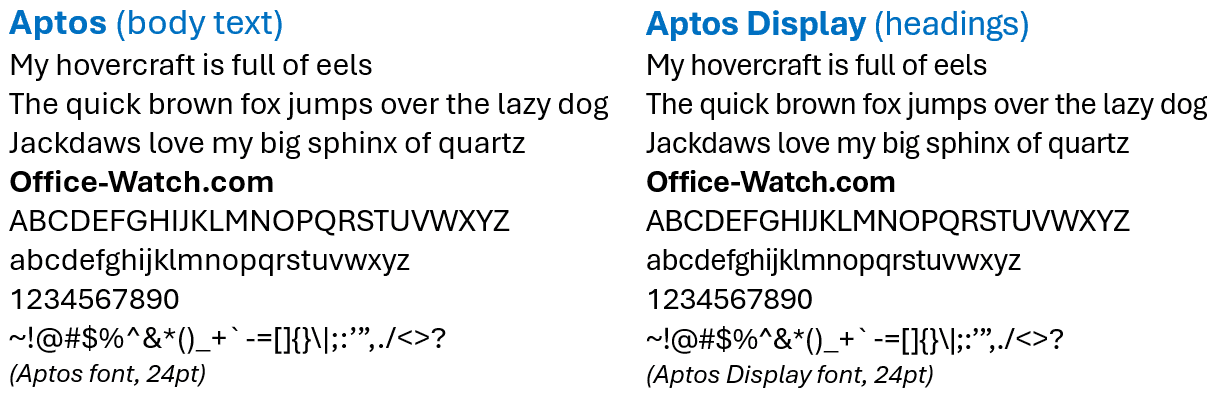
Default Style changes
There are new styles in Word, PowerPoint and Outlook and also Excel using the new Aptos fonts.

Switch to older Word format
If you don’t like the new Word document settings, you can revert to the previous Word format.
Go to Design | Document Formatting | choose the Word 2013 option (the labels are only on the mouse-hover tooltips).

Color Scheme / Theme
There’s also a new default theme in Microsoft 365, what many of us would call a color scheme, for lists, shapes and charts.
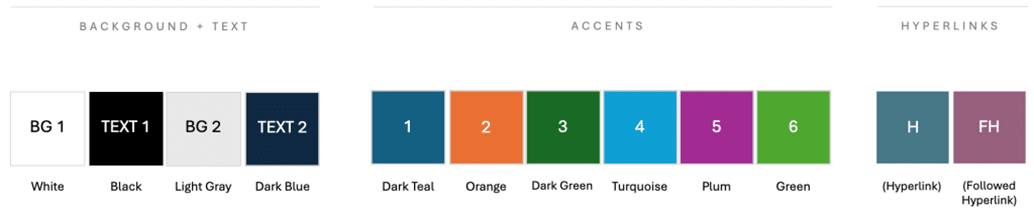
Microsoft says they have “researched popular color palettes and design trends”. More importantly the theme is accessible for those who have trouble reading docs, sheets or slides.
The new scheme appears at Design | Colors as the “Office” theme.

The older Office themes are still available on the same list:
- Office 2013-2022
- Office 2007-2020
There’s nothing wrong with the new or old Office Themes except that everyone else uses them. Too many documents, sheets and slides look the same because they use the Microsoft defaults
Outline colors and weight
The outline and line colors and weights (for example in Shapes) have also changed. Overall the lines are thicker and the colors darker. Yellow is gone in favor of Purple.

Here are larger images of the new theme colors and line options.


New default styles in Word, PowerPoint and Outlook
New default styles in Excel 365
New default font, Aptos, in Microsoft 365 and Word