Microsoft Kills Word’s Similarity Checker on October 3, 2026
Microsoft is deleting Word’s Similarity Checker, the plagiarism check built into the Editor pane, on October 3, 2026. That is three weeks away and there is no replacement. If you have a document with similarity results you still care about, open it and insert the citations now, because the flagged passages and their source links disappear with the feature. Here is what you lose, what stays in Word, and which plagiarism checkers are actually worth moving to.
This applies everywhere and all at once: consumer, business, government and defense customers from October 3, 2026.
Call it what it is. This is not a “retirement” in any gentle sense. The feature is being deleted from the Editor pane and there is no replacement.
Microsoft’s official reason is the standard meaningless blather: “… focus on experiences and capabilities that are more broadly used across Microsoft Word.” Translation: Similarity Checker is too expensive for Microsoft to maintain and not enough people used it.
Do it before October 3
If you have a document with similarity results you care about, review it and insert the citations now. Once the feature goes, the flagged passages and their source links go with it. The citations you have already inserted into the document stay put, because they become ordinary Word text and fields.
What you are losing
Similarity Checker sat in the Editor pane in Word for Microsoft 365 on Windows and Mac, plus Word for the web. You clicked Editor on the Home tab, scrolled to Similarity and chose Check for similarity to online sources.
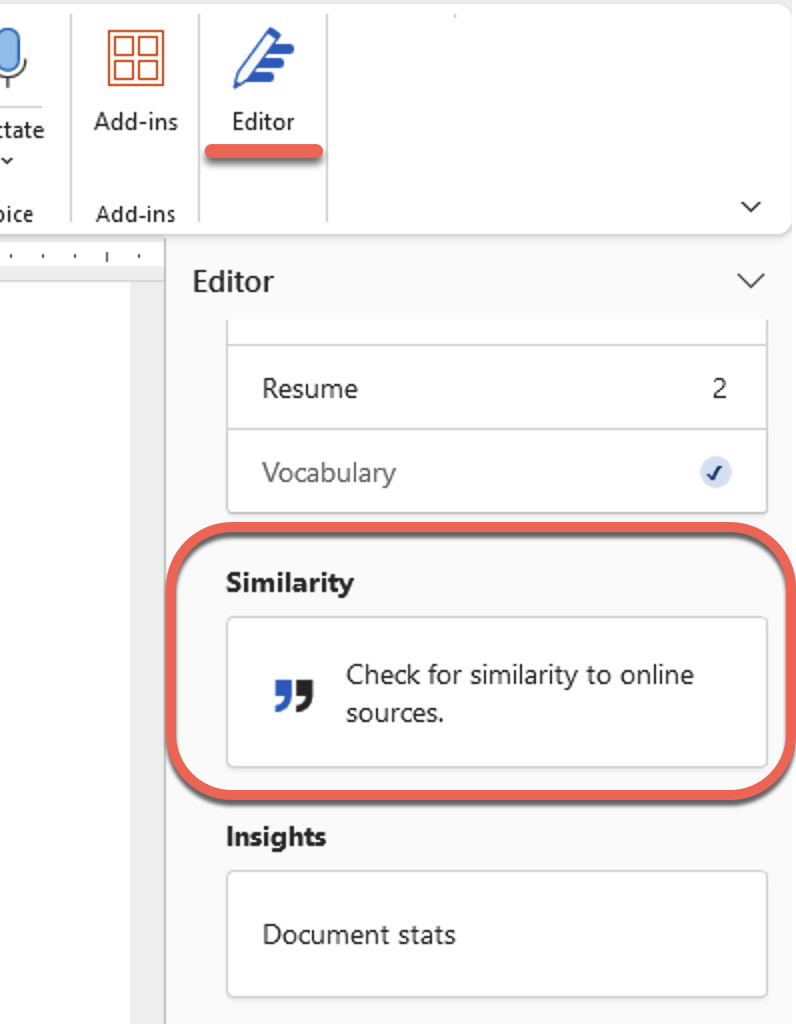
Word then showed a percentage for how much of your content matched text found online, plus the number of distinct passages to review. Each flagged passage offered a link to the source, a citation you could insert, or an Ignore button.
Similarity Checker wasn’t very reliable
Reliability was never its strong suit. Office Watch testing showed how rough the results were: a complete copy of the Gettysburg Address came back as only 38% similar to online sources.
The check ran your text against online sources using Bing. That was always its weakness. Bing only sees what Bing has indexed, so anything behind a paywall, in a private repository, or in another student’s unpublished essay was invisible. The feature also broke for an extended period in early 2024 after a change in Bing search, and Microsoft disabled it in the Editor pane while it was being fixed.
What still works
Everything else in Editor stays: spelling, grammar, clarity and style suggestions. Word’s citation and bibliography tools on the References tab are untouched, so you can still build a bibliography, insert citations and manage sources. Microsoft 365 Copilot in Word is unaffected.
Microsoft adds a pointed warning worth repeating:
Copilot is not a plagiarism or originality checking tool.
Do not ask Copilot whether a document is original. It will give you a confident answer that means nothing, because it is not comparing your text against any source database.
What this means for you
Students, check what your school actually requires. Most universities run submitted work through Turnitin or a similar system anyway, so Word’s checker was only ever a rough first pass before you handed something in. You are losing a convenience, not a requirement.
Teachers if you used this to spot copied assignments, you need something else before October 3. Realistic options:
- Turnitin or Copyleaks, if your institution already has a license. These search academic databases and previously submitted work, which Bing never could.
- Grammarly Premium, which includes a plagiarism check against web pages and academic databases.
- Quetext or Plagiarism Detector for occasional free checks.
- Paste a suspicious sentence, wrapped in quotation marks, into Google or Bing. Genuinely, for one paragraph this works about as well as Word did.
Professional writers or marketers, if you check your own work for accidental copying, any of the paid checkers above will do more for you than Similarity Checker ever did.”
IT admins, there is no action required, no data to migrate and no compliance angle. Just tell people it is going and strip references to it out of any training documents or internal guides.
More on Word’s Writing and Citation Tools
Before you write off Similarity Checker entirely, it is worth seeing how it actually performed. Our original testing in Word’s Similarity Checker warns about plagiarism is where the 38% Gettysburg Address result came from, and it explains why the Bing based scoring was never trustworthy enough to hang a grade on.
The citation tools on the References tab are staying put, and they are the part of Word that actually matters for academic writing. Start with Understanding Citations and Sources in Microsoft Word if you are setting up sources for the first time, then use Using the Source Manager for citations in Word to keep a master list you can reuse across every assignment or report.
When the writing is done, Add a Bibliography to Word documents covers the one click finish, and Custom Bibliography formats or styles in Word is for the awkward case where your department demands a format Word does not ship with. If Word’s citation system is too basic for the volume of sources you handle, Citation and Bibliography tools beyond Word looks at JabRef, BibTeX and the other options.
The rest of the Editor pane survives this cut, and most people have never touched its settings. Word Grammar Checker Settings Explained for You shows how to switch off the suggestions that annoy you and keep the ones that help.
Microsoft’s warning about Copilot is not an isolated bit of caution either. Six More Warnings Hidden in Copilot’s Legal Fine Print sets out the disclaimers on accuracy and copyright that apply every time you use Copilot in Word.