Microsoft 365 – the subscription / annual fee plan for Microsoft Office on Windows, Mac, iPhone, iPad and Android.
Includes Word 365, Excel 365, PowerPoint 365, Outlook 365 and many other ‘365’ programs, apps and services.

Easy file transfer from Outlook to Teams
It’s been a slow process, but now it’s possible to move a file from Outlook to Teams across both web clients and programs. Users have been asking Microsoft for years to be able to quickly copy an Outlook attachment to a Teams area. Customers had to save the attachment to a local drive then upload […]
Spilt view arrives for Excel on the iPad
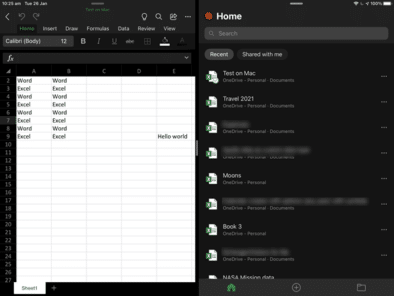
Excel for iPad now has Split View, allowing two workbooks to be seen side-by-side. That’s catching up with Word and PowerPoint for iPad which got Split View in mid-2020. iOS 13 is required for Split View on iPad. Get more about Office on iPad and iPhone from Office Watch for Apple – Mac, iPhone, iPad. […]

Presenter Coach now in PowerPoint for iPad
Presenter Coach or Rehearse with Coach is now available in PowerPoint for iPad. You can practice your presentation with Microsoft’s systems ‘listening’ and giving advice on how to improve. Presenter Coach is already in PowerPoint 365 for Windows or PowerPoint Online on the web. See Presenter Coach makes for better presentations to explain the details […]

Excel’s case of the disappearing feature – Show Changes
For a short time, Microsoft hinted at an important improvement to Excel. But this promise was quickly removed, leaving Excel customers hanging. The feature is/was ‘Show Changes’ and would let you see a history of changes in an individual cell. Show past values or formula in that cell. “Excel can now show you the changes […]

Meet the man behind Excel’s Flash Fill
Excel users owe thanks to Sumit Gulwani . He’s the guy who turned the Flash Fill feature from a vague dream into something that makes life easier for Excel and other Microsoft customers. Flash Fill is a way to join, split or reformat text in Excel without coding. You type in examples and Flash Fill […]

Black ‘Not Allowed’ circle/line symbol
Continuing our series on the ‘Not Allowed’ symbol, let’s make a version with a black background and white center graphic. This isn’t part of the official ISO specification for the symbol but it’s widely used. It’s done by adding a black circle under the main circle/line & graphic (which is changed to white, naturally). An […]

Text and formatting tricks for Excel
Entering blocks of text in Excel is quite easy. What’s not obvious are all the options to make the text easier to enter and look better. Just typing in a cell will enter text. By default it will extend into any unfilled cells. If there’s something ‘in the way’ the text will just stop. Wrapping […]

Project Monarch or One Outlook to rule them all
You may have heard about ‘Project Monarch’, Microsoft’s plan for a single Outlook program for Windows, Mac and maybe other platforms. This is what we know so far about Microsoft’s ‘vision’ for ‘One Outlook’ Project Monarch is an early Progressive Web App (PWA) which will have email, contacts, calendar and perhaps other ‘Outlook-like’ features. In […]

Install the latest Outlook as a standalone web app
Here’s how to install Outlook as a standalone web app or PWA. This looks like Outlook in a browser but it’s not, it’s Outlook as a standalone Progressive Web App (PWA). It’s available now in Windows 10. It’s not the upcoming Project Monarch but a part-way step in that direction. See Make Microsoft Office a Progressive […]
Make Microsoft Office a Progressive Web App or PWA
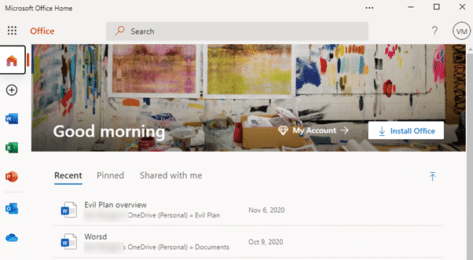
Microsoft Office (plus Word, Excel and PowerPoint) can be installed as a standalone web apps or PWA. We’ll explain how and the current limitations. This looks like the Office.com web page but it’s not, it’s Office as a standalone Progressive Web App (PWA). It’s available now in Windows 10 with the Edge (Chromium) browser. To […]

What Office users need to know about the new Windows 10X
Windows 10X is coming and you’ll hear a lot about it in the coming months. Let’s see what Windows 10X is, how it will run Office (Word, Excel, PowerPoint, OneNote and Outlook) and why most people won’t need to worry about Windows 10X. What is Windows 10X? Windows 10X is a very scaled-down or lightweight […]

Special tricks to add iCloud accounts into Outlook 365 for Mac
iCloud accounts can now be added to the new look Outlook 365 for Mac but there are limitations and it’s harder than Microsoft’s ‘help’ says. Outlook for Mac has always been able to link with iCloud using IMAP. Now Outlook 365 for Mac with the new interface can automatically setup a synchronization with iCloud account. […]

Arrived! The first Office bug fixes for 2021
Microsoft announced 83 security bug fixes for January 2021, the count is really 96 once you add the Edge browser patches from last week. At first look, it seems there’s only five Office related patches including two each for Word and Excel. It’s important to keep both Office and the underlying operating system patched. The […]

Great UK deal on Microsoft 365 Family – save £30
Amazon UK has a good deal on Microsoft 365 Family (six user). For the next week only save £30 on the regular price for new and existing customers. Pay £49.99 for (another) year of Microsoft 365 Family, instead of £79.99 which is what Microsoft charges for automatic renewals. Click here for the Amazon UK deal. […]

Using Benford’s Law magic with Excel
Benford’s Law is an amazing tool that is simple to use in Excel. Benford’s Law is one of those mathematical laws that seems to defy common sense but works for most naturally occurring number sets. It says that in most groups of naturally occurring numbers, the leading digit 1 will occur more than 2 as […]

Better ‘Not Allowed’ red circle/line symbol with text
Continuing our series on the ‘Not Allowed’ symbol, let’s make a versions with text instead of a graphic or icon. Check out our article on Make a ‘Stop’ circle / diagonal symbol in Word, Excel & PowerPoint about creating, resizing and coloring the basic shape. Text in circle Instead of the usual symbol, let’s add […]