Microsoft 365 – the subscription / annual fee plan for Microsoft Office on Windows, Mac, iPhone, iPad and Android.
Includes Word 365, Excel 365, PowerPoint 365, Outlook 365 and many other ‘365’ programs, apps and services.

Two ways to get one line of Word with left and right aligned text
Two ways to put left and right aligned text on the same line in Microsoft Word. There’s the commonly used option and the less well-known choice. BONUS: putting left, center and right aligned text on one line. We’ll show how to make Left and Right aligned text looking like this. You’ll often see it in […]

FAX ℻ symbol in Word, Excel, PowerPoint and Outlook
Type the Facsimile sign or Fax symbol ℻ into Microsoft Word, Excel, PowerPoint or Outlook. Both in Office for Windows and Office for Mac. FAX ℻ symbol is a single character with the letters FAX, normally used to prefix a telephone number in a letter heading or footer. For younger readers: a Fax machine was a […]

Eight places to find missing OneNote pages or notebooks
Occasionally OneNote pages or whole notebooks go missing … here’s eight places to try finding them again. Don’t Panic OneNote saves everything … it was designed that way from Day One. It’s unlikely that something has truly been erased. More likely that the page, section or notebook is hiding somewhere in the depths of OneNote, […]

Draw or scribble on your Outlook emails
Outlook for Windows lets you draw into emails. It’s an extension of the existing drawing features in Word, Excel and PowerPoint for Microsoft 365, Office 2021 and Office 2019. Outlook’s message ribbon has Draw tab but unlike Word (where you can draw directly onto the document), the drawing tools only work in certain situations. Drawing […]
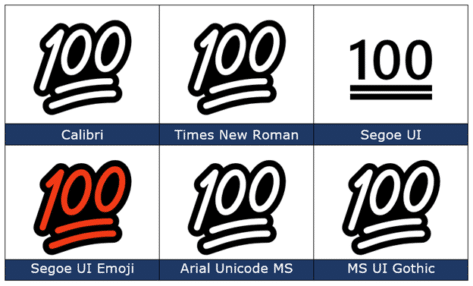
100 points 💯 emoji in Word, PowerPoint and Office
Type the Hundred points 💯 emoji into Microsoft Word, Excel, PowerPoint or Outlook. Both in Office for Windows and Office for Mac. 100 points 💯 symbol is also known as ’100’, ‘Keep it 100’ or ‘Keeping it real’. How 100 points 💯 looks in different fonts. Here’s some examples of how 100 points 💯 looks in […]

Face with Tears of joy 😂 emoji in Word, Office
Type the Face with Tears of joy 😂 emoji into Microsoft Word, Excel, PowerPoint or Outlook. Both in Office for Windows and Office for Mac. Face with Tears of joy 😂 emoji is one of the most popular, if not THE most commonly used emoji. Also known as Laughing Crying, Laughing Tears, LOL (Laugh Out Loud) or […]

Make your own blue checkmark Twitter ‘verified’ in Office
You can add a Twitter blue or gray checkmark to your Microsoft Office documents including Word docs, PowerPoint slides. We’ll show you how to add the ‘verified’ graphic at any size you need with the exact blue, gray or some other color. Oh, and save yourself $8 a month <kidding>. We’ve all seen the Twitter […]

Inside Microsoft Create, the new Office templates site and more
Microsoft Create is a new part of Microsoft 365 that will replace the existing Office templates site and more. Office Watch explains how to use the Create site now, the many categories available and what’s to come. Cut through all the usual Microsoft Hype™ like “ultimate creator launchpad” and the dreadful phrase “uplevel your creative […]

Where does Microsoft’s money come from … and go to (hint, a lot of profit)
A fascinating graphic shows were Microsoft (MSFT) makes money, how much profit it makes and tax paid. App Economy Insights https://twitter.com/EconomyApp made some charts comparing the Income and Spending of Apple, Google, Amazon and Microsoft. As you can see, the biggest money maker for Microsoft isn’t the traditional cash-cows Windows and Office. It’s Microsoft’s cloud […]

Do it while you can, a personal email address with Outlook.com
For a limited time, you can setup your own personal email address with your own domain name, using Outlook.com. The personalized email address feature means that you can have your own email address, such as Sherlock@Holmes.com or John@DrWatson.co.uk using the Outlook.com system as your mailbox. This personal email feature of Outlook.com has been around for […]
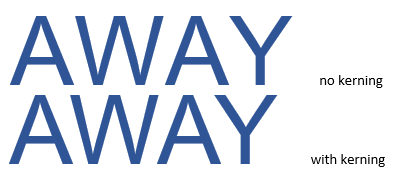
Kerning text simply explained for Word and Powerpoint
Kerning is a font setting that’s important in Word and PowerPoint. We’ll explain kerning and why you mostly don’t have to worry about it except for large size text like titles and headings. Kerning adjusts the horizontal space between letters so they look right to the human eye. It’s necessary because letters take up different […]
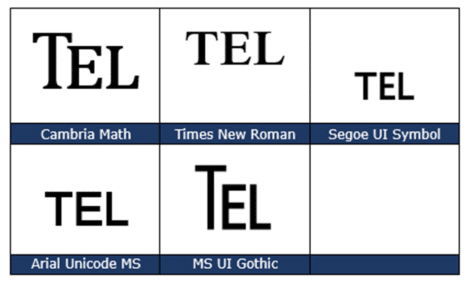
TEL – Telephone ℡ symbol in Word, Excel, PowerPoint and Outlook
Insert the TEL – Telephone symbol ℡ into Microsoft Word, Excel, PowerPoint or Outlook. Both in Office for Windows and Office for Mac. TEL – Telephone ℡ symbol is a single character with the letters TEL, normally used to prefix a telephone number in a letter heading or footer. How TEL – Telephone ℡ looks […]

A OneNote app dropped from the Microsoft Store
The lesser of the two Windows OneNote programs has been dropped from the Microsoft Store. It’s part of the planned obsolescence of one OneNote app and the focus on a single Windows program for OneNote. Despite this change, there’s still plenty of Microsoft created confusion around OneNote apps. The Tale of Two OneNotes – short […]

Saving battery life in your Apple Pencil
Apple Pencil is great, expensive, but still the best digital pen option for iPads. Managing it’s battery life needs simple trickery. The Apple Pencil doesn’t have an on/off option. That means that the Pencil keeps a connection and drains a little battery life all the time. When the Pencil is new, that’s not a problem. […]
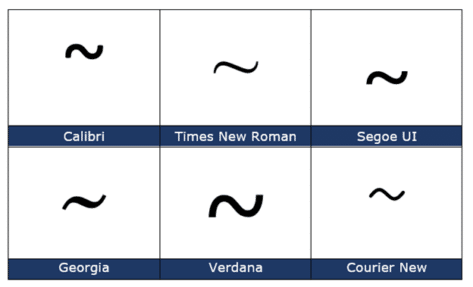
Tilde ~ symbol in Word, Excel, PowerPoint and Outlook
Type the Tilde ~ into Microsoft Word, Excel, PowerPoint or Outlook. Both in Office for Windows and Office for Mac. Plus an emoji alternative to Tilde. Tilde is used to mean ‘approximate’ as in “ ~30 minutes late”. In maths it means ‘similar order of magnitude’ e.g. “ a ~ b “. Tilde ~ symbol […]

Good advice for buying an iPad
The Verge has some good advice on buying an iPad and choosing between the many models available. Now’s the time to buy last year’s iPad by Dan Seifert cuts through the messy collection of Apple iPad models with this core advice … … thing that remains the same is it is an iPad. There might be […]









