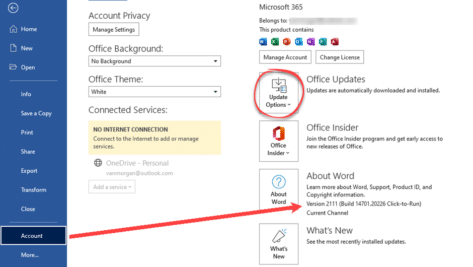
Who and how to get the new look Office for Windows
The gradual rollout of the new look Office for Windows (Microsoft 365 and Office 2021) continues. More users, but not all, can now try the revamped Office interface. We’ve had a lot of feedback from Office Watchers about the new look. Some approve, others definitely don’t. Some users are eager to try the new look […]

Nasty Excel XLL files are spreading like crazy
A lesser known Excel file, the .XLL, is being used to spread password stealing malware across the Internet by email and online contact forms. As reported by Bleeping Computer, emails and online forms are getting spammed with links to fake and malicious web sites which entice people to download the malware. The malware is contained […]

Approximately Equal To ≅ symbol in Word, Excel, PowerPoint and Outlook
Type the Approximately Equal To ≅ into Microsoft Word, Excel, PowerPoint or Outlook. Both in Office for Windows and Office for Mac. Approximately Equal To ≅ symbol with a curvy line above the usual = symbol is commonly used within Mathematics to refer to approximate equality between two values, congruence or isomorphism. Not to […]
Excel Charts are better looking with pictures
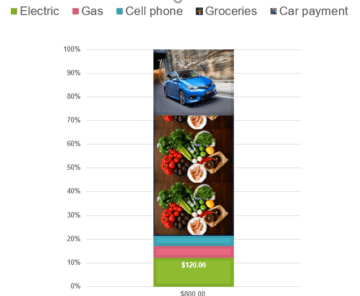
Excel Charts can be even better looking by completely replacing those plain color blocks with pictures. We’ve already shown how to overlay an Excel Chart with an image now we’ll replace the block with a picture. Although commonly differentiated by differing colors like this, how about we look at different images instead? First, click on the plot area within the column, here we’ve selected the brown ‘Car Payment’. This will display […]
Workaround for styles with table cells in Word
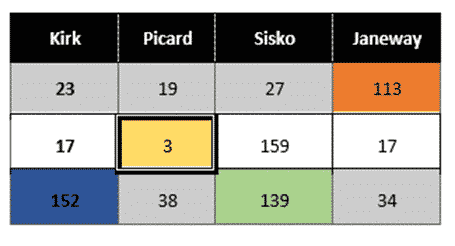
There’s a limitation in Word’s Table Styles; no individual cell styles within a Word table We’ll explain the problem and several options to workaround it. Along the way it’s a chance to dig into some interesting parts of Word and Office and make them do things that might not have occurred to you. There’s a […]

Inside the new look and defaults in Office 365
The look of Microsoft Office 365 for Windows is changing with new features beyond the simple design changes. Here’s what you can do with the new look, mostly changes to the Quick Access Toolbar and important changes to Office default settings. Note: what you see in Office 365 might not match our description. The Office […]
Approximately Equal or image of ≒ in Word and Office
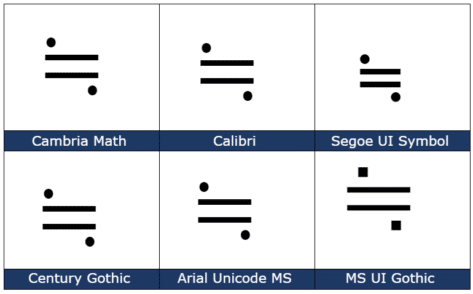
How to insert the Approx Equal or the image of symbol ≒ into Microsoft Word, Excel, PowerPoint or Outlook. Both in Office for Windows and Office for Mac. Approximately Equal To or the Image Of ≒ symbol is commonly used Japan, Korea and Taiwan to indicate two values are approximately equal, but not exactly equal. How Approximately Equal ≒ looks in different fonts. Here are some examples […]
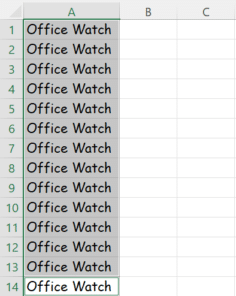
Fast typing the same thing across many Excel cells
Sometimes when you are filling out the cells in an Excel worksheet, the same thing must be written repeatedly. There’s a fast way to do it using a surprising Excel shortcut. Luckily, there’s an easier shortcut around it. Previously we have spoken about Auto Fill hidden tricks in Excel, but you might not be aware of this simple trick. Firstly, […]

Nine hidden tricks for Auto Fill in Excel
Typing or formatting cells of repetitive data can be very boring, but Excel has an Auto Fill feature to make it easier by automatically filling in data for you. We thought we knew Auto Fill, but just found nine surprising and useful tricks. Auto Fill goes beyond simple incrementing numbers or dates which is what […]
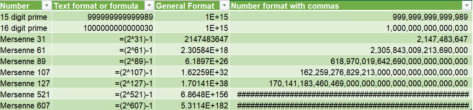
Big numbers are rounded without warning in Excel
It’s not easy working with Excel and really large numbers. In fact, Excel doesn’t do a great job with larger numbers. Up to 15-digit integers, Excel is fine, but once you go over that, it quietly rounds numbers. Basically, data above 15 digits stop being accurate. As a result, Microsoft hides that inaccuracy by displaying the number in scientific notation […]

New Prime Number is too big for Excel
In 2013 they discovered a new Prime number but not for Excel. The GIMPS project has discovered a new prime number – that’s a number that can only be divided by itself and one. The new arrival is a bouncing bonny number 257,885,161-1 which is 17 million digits long. Prime numbers aren’t just mathematical curiosities, they […]
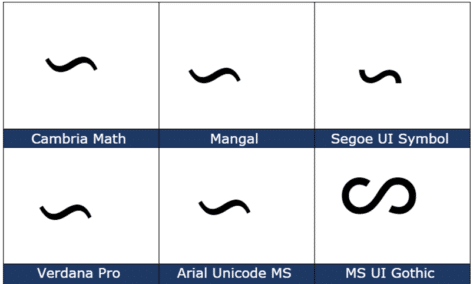
Reversed Tilde ∽ symbol in Word, Excel, PowerPoint and Outlook
Type the Reversed Tilde ∽ into Microsoft Word, Excel, PowerPoint, or Outlook. Both in Office for Windows and Office for Mac. Reversed Tilde ∽ symbol is the vertically flipped version of the usual tilde ~ symbol. A tilde starts with the downward curve while the reversed tilde has a rising curve at left. How Reversed […]
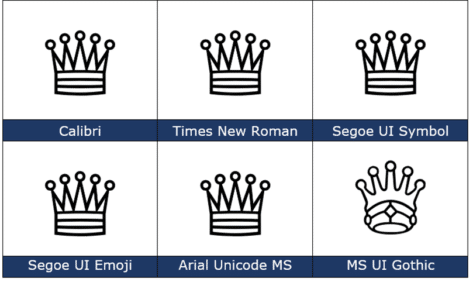
White Chess Queen ♕ symbol in Word, PowerPoint and Office
How to insert the White Chess Queen ♕ into Microsoft Word, Excel, PowerPoint or Outlook. Both in Office for Windows and Office for Mac. White Chess Queen ♕ symbol is useful for users that want to represent the chess piece as a symbol, rather than an image. Or just a generic ‘Crown’ graphic. How White Chess […]

Beyond simple Undo in Microsoft Office
There’s a lot more to Undo than just reversing the last thing you did in Microsoft Office The UNDO command is surely one of the greatest time-saving inventions of the digital age. According to Jensen Harris, the head honcho of the Microsoft Office User Experience Team back in 2008 , undo is the fourth-most used […]
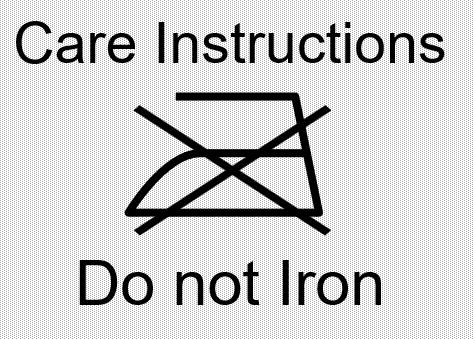
Best Laundry label text font for Microsoft Office
Which font to use if emulating a true laundry care or clothing text label in Word, PowerPoint or other Office program? We’ve already talked about how to put standard laundry care symbols in Word, Excel or PowerPoint but what about the text that usually goes with the icons? In our research we couldn’t find any […]

All about check in and check out in Microsoft Teams
Checking in and out of documents for Teams isn’t well understood. Using it can end in tears with lost changes or a seemingly stranded document that’s not available to others. What is Check in / Out? In a multi-user environment where lots of people might want to edit a file at the same time, check […]









