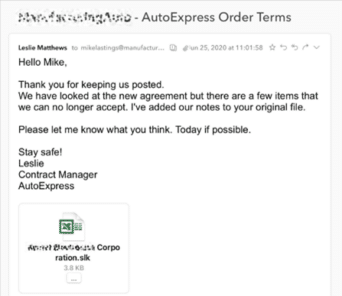
SLK files used to hack into Excel, again
Despite fair warnings, Microsoft has allowed an old Excel format .SLK to get past their email security and infect Excel for Windows computers. As reported by Avanan, criminals have found a way to bypass the email security for Office 365 hosted mailboxes (possibly Outlook.com as well), allowing an infected email attachment to reach Microsoft’s customers. […]

Quick Fix for Office display problems
How to quickly fix display problems in Microsoft Office. When Word, Excel, PowerPoint or Outlook don’t show up on the screen correctly. It doesn’t happen often but occasionally Word, Excel, PowerPoint or Outlook open but as all grey. Clicking around the screen displays just a ribbon or menu but not the whole program. If other […]
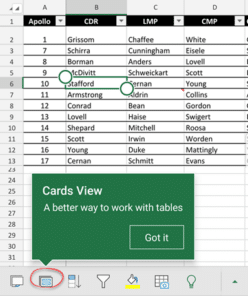
Excel Table Cards for smartphones
Excel for iPhone and Android smartphones have a useful extension of Excel Tables called Cards. It’s a better way to view tables on a smaller screen with larger text and easier editing. Instead of scrolling right/left on the small screen, all the info for a single table row can be seen and edited as a […]

Tricks inside Money in Excel
Microsoft’s Money in Excel is worth looking at even if you don’t want to use it. There are some useful features and formula tricks you can use in your own workbooks. Group Columns Grouping columns or rows is normally for bringing together lists rows or columns. Grouping days into a week or weeks into a […]

Animated GIF’s coming to Word, Excel and PowerPoint
Animated GIF support is coming (finally!) to Microsoft Word, Excel and PowerPoint. We discovered the new feature in a new Insiders build, Microsoft hasn’t announced anything. Here’s an animated GIF playing in Word 365. Paste or Insert an animated GIF now has play/pause buttons included (bottom left corner). The animation starts playing automatically when inserted. […]
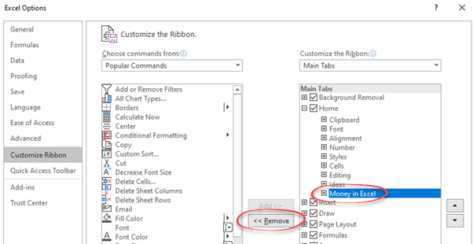
Getting rid of Money in Excel
Money in Excel shows up on the Home tab once you’ve opened the Microsoft template. Here’s how to remove its button from the ribbon or completely remove the add-in from Excel. As soon as you open and use Money in Excel, it adds itself to the Home tab on the extreme right. Microsoft probably thinks […]

Money in Excel goes public
Microsoft has gone public with their Money Excel template to import and manage financial transactions from bank accounts. There are some undocumented tricks available and an important security recommendation that Microsoft overlooks. Money in Excel can import transaction details (US bank accounts only) and show current balances. And convert that into snapshot views to see […]

Exchange Rate support in Excel 365
The latest global exchange rates can go directly into Excel 365 for Windows and Mac. No plugins or extras are necessary because it’s in Excel 365 though it’s hiding away. Foreign exchange rates are part of the Stock data type. They weren’t part of the original Stocks data feed but have been added very quietly. […]

What’s new in Office for Windows – May 2020
Some useful new features have now been rolled out to the public versions of Microsoft 365 (Office 365) for May 2020. Word, Excel, PowerPoint and Outlook all have improvements. Two we’ve already told you about, the other is new. Stock Images, Cutout People and Stickers Or what Microsoft calls “New images to bring your documents […]

Recovering lost Word for Mac documents
If you’ve lost or accidently deleted a Word for Mac document (or Excel or PowerPoint) there are various places to look for it some might not occur to you. This article is also helpful if you’re trying to find and delete any files or documents that must be removed for privacy reasons. Time Machine MacOS […]

‘Tell me’ help now in Mac Office 365 with the same limitations
‘Tell me’ help box is now in Microsoft/Office 365 for Mac as a way to find features on the ribbon. However it continues to have the same limitations that are in the Windows version. Look for the lightbulb and ‘Tell me’ box beside the ribbon tabs. Type in a phrase and Office will show relevant […]
Fantasy Football ranking and analysis in Excel
Microsoft Excel is the perfect tool to analyze and rank your fantasy football ranking. This article explains how to import players, other rankings and add your own opinion. How to Build Your Own Fantasy Football Rankings “There is no reason to re-invent the wheel by typing out all of the players, positions, teams, and analyst […]

Pinned Save folders in Microsoft 365
Word, Excel and PowerPoint 365 for Windows are getting better control over what appears on the new-style Save dialog. Folders can be ‘pinned’ to always be show up in the list and a quick way to share a document. But a major annoyance remains unchanged. On the ‘Save this file’ dialog under Choose a location […]
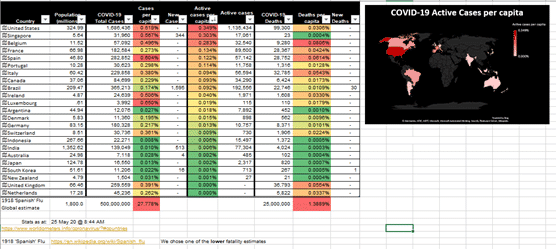
Coronavirus global statistics, Excel workbook update
A friend of Office Watch has enhanced our latest COVID-19 global statistics workbook and offered to share it with all our readers Phil Y from Sydney is interested in the number of active Coronavirus cases and how many new cases. That data was in the external connection so he made a different worksheet with the […]
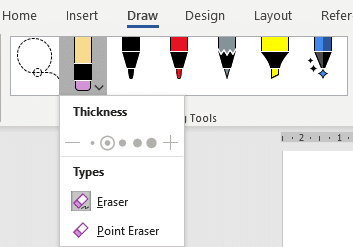
Combined Drawing Tools in Word 365 and other Office programs
The Drawing Tools in Word 365 is now larger with separate tools like Lasso and Eraser now in a single combined gallery. There are other changes and new limitations on the Drawing Tools gallery, some of them undocumented. Compare that to the old Draw tab where the Lasso, Eraser and Add Pen were separate from […]

Get in line for Money in Excel
Microsoft is testing a new feature or template, Money in Excel. You can apply to be one of the first to try it. Money in Excel is a separate Excel ‘premium’ template that will connect with bank accounts, import transaction information and display as charts and lists. Transactions Bank accounts can be linked into Excel […]









