
Dubai Font alternatives
If you can’t get the new Dubai font, there are many alternative fonts. The closest match we could find was FF Fago by Ole Schäfer. Among the fonts supplied with Windows/Office, the most similar is Lucida Sans. It’s on the drop-down list of fonts in Windows and Mac. Here’s Lucida Sans on the Office for […]

How Microsoft makes security problems worse for you
Microsoft puts corporate pride and weasel words ahead of their customers safety and security. Hackers take advantage of Microsoft’s patch release scheduled to release a virus as widely as they can in the days before fix was available. The Dridex security bug was known to Microsoft but they stubbornly stuck to their ‘Patch Tuesday’ schedule […]
Docs.com vs OneDrive – what’s the difference?
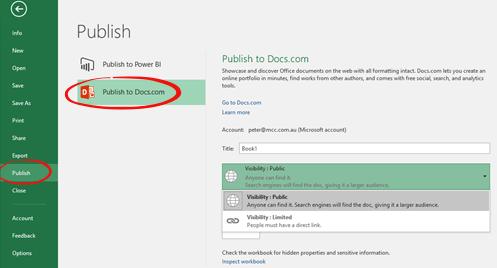
After the recent docs.com scare we’ve had a few readers asking the basic questions: What is docs.com? What’s the difference between docs.com and OneDrive? In short, use OneDrive for all your cloud storage needs. Consider Docs.com, if you have a document that you’d like to share with the public or a wide group of people. […]

Keep the deleted Crayola color in your Office documents
One of the colors in the Crayola box is being dropped. Never fear, the color Dandelion can be part of your Office documents as can any other Crayola color. It’s not the same as the smell and feel of a Crayola crayon but it’s better than losing the color entirely. Dandelion is being removed from […]
Safely using Docs.com
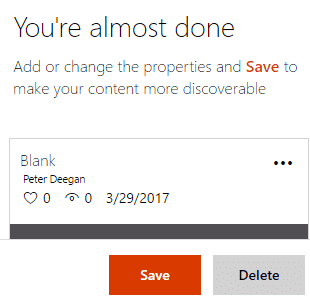
Even today, despite the public outcry, a document saved to docs.com will automatically be available to everyone. The privacy choices aren’t obvious and the ‘public’ default isn’t clear either. Here’s what you see when uploading to docs.com You have to click the ‘three dots’ menu button then scroll down a long list of options to […]
Protect your Docs.com account
If you’ve ever used http://docs.com it’s a good idea to check what’s saved there and what public access is set. Login with your Microsoft account (or other login) and check the list of saved documents (click on your name at top right. Depending on your wishes you can: Leave as ‘Public on the web’ Change […]
Faulty patch kills Excel 2010
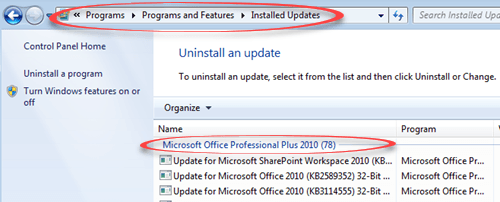
One of the latest Excel patches causes more trouble than it’s supposed to solve. Patch ‘KB3178690‘ is supposed to fix some non-security bugs in Excel 2010, ironically bugs that cause Excel to crash in certain situations. Guess what the patch does to Excel 2010? That’s right – Excel 2010 crashes. Microsoft explains that Excel 2010 […]

Google Docs can default to Microsoft Office formats
The Google Docs apps have a useful option for making new documents, worksheets and presentations that are Microsoft Office compatible. JR Raphael at ComputerWorld pointed out the option in the Google Docs app for Android, we poked around to find the equivlalents in Google Sheets and Google Slides Under Settings there’s the choice to make Word […]

Getting an image into Office – not as simple as you’d expect
You’ve chosen an image, now you have to get it into your Office document. You’d hope there was a single way to do that but, as usual, there’s plenty of options. Outlook has its own special needs, different from Word, Excel and PowerPoint. There’s also privacy and image size issues to consider. The simple way […]

Highlights of Feb 2017 updates for Office 2016 and Office 2013
Here’s the complete list of non-security updates for Office 2016 for Windows and Office 2013 plus our notes on some bug fixes that caught our eye. As usual, these updates will be pushed to most Office computers automatically. No action is necessary. Unexpected Issues Microsoft is always using different words to avoid saying ‘bug’. This […]

Office Touch Bar support is happening soon – 3 months late.
Microsoft announced Touch Bar support with much fanfare back in October 2016. Over 3 months later and paying customers are still waiting. There’s been lot of talk about this feature including web sites with ‘tips’ on using Office with the Touch Bar without noting that it’s not got into ‘insider’ beta testing yet. New Macbook […]
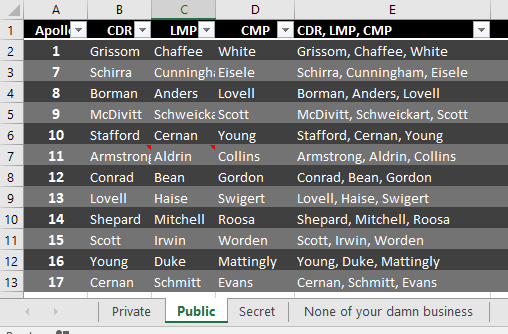
Link an Excel worksheet into a shared workbook
In How to share a single Excel worksheet or tab we explained how to send or share a single Excel worksheet or tab from a larger workbook. That’s OK as a one-off measure to send out a sheet but how can you do it easily as a share or ongoing collaboration? The answer is a little […]
Office updates for Apple devices
The latest updates to Word, Excel and PowerPoint is the usual mix of good news and a mystery. The good news is for Excel and PowerPoint. You can now format multiple objects at once. Move, resize, or format them by taping and holding, then tap another object. It’s the equivalent of holding Ctrl or Shift […]

Excel 2016 Compatibility issues
David Ringstrom writing at Accountingweb.com makes some good points about how the shifting versions of Office 2016 can cause trouble. The problem is most acute in Excel 2016 but can happen in Word and PowerPoint too. When you share a workbook or document, the receivers Office has to be compatible with all the features used […]

New Office 2016/Win features near release
Microsoft has released a new version of Office 2016 for Windows to the ‘Slow’ insiders. This means Office 365 customers have more goodies to look forward to in coming months. You’ll need Office 2016 Version 1612 (Build 7628.2048) or above. The new features, as described by Microsoft are: View and restore changes in shared files: […]

Real-Time Excel gets Bitcoin and more
Office-Watch.com ebooks give great value to our readers. The low price is just the start. There’s also free updates to the book available to past and new customers. Real-Time Excel has just been updated to include more chapters and example documents. The update is available now to past purchasers who login to their ebook account […]









