All about Microsoft Office for Apple Mac. Word, Excel, PowerPoint, Outlook on macOS, Microsoft 365 for Mac, Office 2021 for Mac and earlier versions.

Calendars Galore from Microsoft Office!
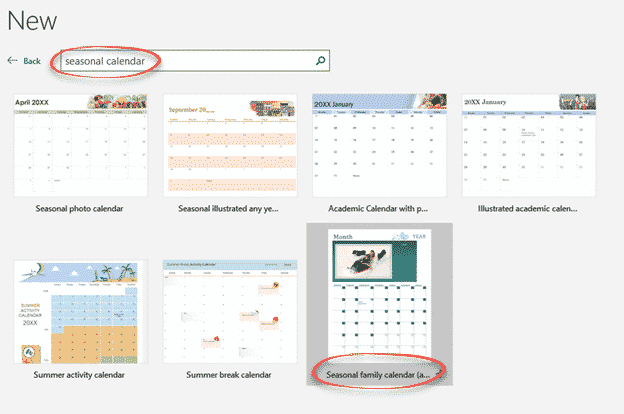
Microsoft Office has many, many print calendars to choose from, if you know where to look. There’s a trick to choosing the right calendar for your needs, made by Word, Excel, Outlook or PowerPoint. Printing out calendars or adding them to documents/slides is possible in Microsoft Office though the selection is spread across Word, Excel […]
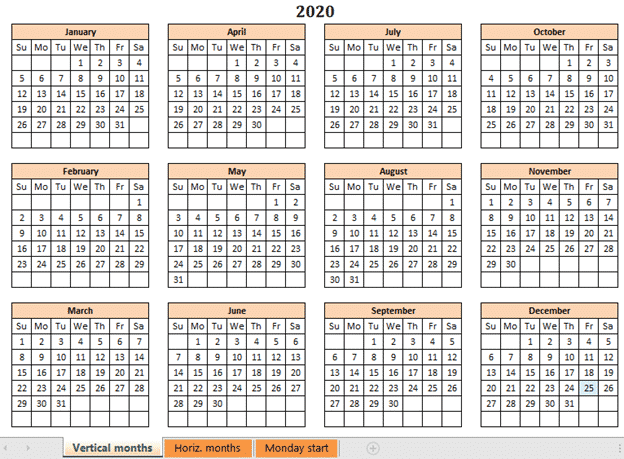
A better Excel Calendar Creator for Office Watch readers
Here’s a better and more flexible version of the Calendar Creator with both Sunday and Monday start of week. Office Watch reader, David Peel, has made a better, more compatible Calendar Creator. We added some different versions to suit other calendar formats. We’ve told you about The Mystery of Excel’s Calendar Creator template which doesn’t […]
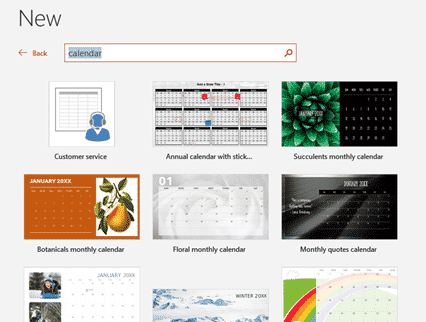
2024 Calendars in your PowerPoint slides
There are 2024 calendar templates available for PowerPoint, giving you landscape oriented calendars but less options overall. Landscape calendars PowerPoint calendars aren’t just for presentations. They offer printable landscape orientation calendars not usually available in Word or Excel. Look for the overall layout you want, change the images and colors to suit. Just like Word […]
Make Excel calendars better for you
Excel can make calendars from some supplied templates. Some templates are labelled with a specific purpose however a few simple changes can make them better and suit what you need. Sadly, the help with the templates can be wrong or misleading. Here’s just one example to show what’s possible to make a specialist Excel calendar […]

Make your own Yearly calendars and more in Word
Microsoft Word can make Yearly and Monthly calendars quite easily and they have better configuration options than you might expect. We’ve already looked at the Outlook printing options , customizing them including blank Weekly and Monthly calendars. Outlook doesn’t have a yearly calendar option, so we’re turning to Word. We’ll look at just one option available […]

How to Find inside Text Boxes for Microsoft Word
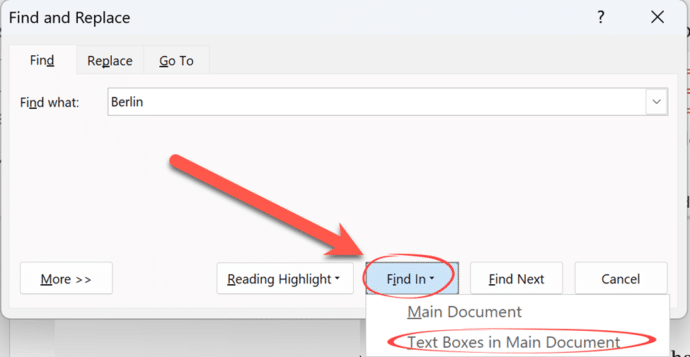
All about Find in Microsoft Word Text Boxes. Text Boxes in Word have special needs when you’re either looking for text inside Text Boxes only or just the main document. What’s inside Text Boxes is handled separately to the main document, depending on the options you’ve chosen for the search. Find in Text Boxes Standard […]
How to Find and Replace in Word Text Boxes
Find and replace inside Microsoft Word Text Boxes is something that Word can’t do directly but is possible in two different ways. As we’ve already explained, Word can only find text inside Text Boxes as either part of a search of the entire document or just the content of Text Boxes. The trouble comes if […]

Find has clever options in Microsoft Word
Let’s go deeper into the Microsoft Word ‘Find’ function, looking specifically at a number of options that can be accessed in the Word “Find” feature (Ctrl+F) and clicking its “More” button. In a recent issue of Office for Mere Mortals we looked at how to search within a Word document. There is a lot of hidden […]
Excel SUM anomaly
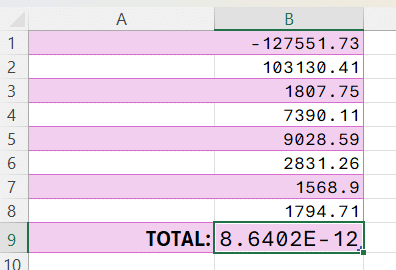
Excel can’t add up reliably and it never has. It’s an important limitation of computer software that everyone needs to be wary of. Phil N sent us an interesting Excel worksheet. He’s simply adding a column of numbers starting with a negative number then positive numbers – the total should be ‘a wash’ – that […]

PowerPoint Cameo gets an important upgrade with Placeholders
PowerPoint’s ‘camera in slide’ feature ‘Cameo’ is getting a welcome boost, if not an essential piece of Cameo. Cameo placeholders can be added to Slide Masters. Cameo is Microsoft’s name for putting a live camera image into a PowerPoint slide presentation. It’s ideal for online presentations. That was fine but the cameo video had to […]

A new way to reach Outlook and Office in a browser
Microsoft has added new web links to access Microsoft 365 mailboxes in a browser as well as some other unpublished new domains to reach Office apps in a browser. The web links are https://Outlook.cloud.microsoft or https://Outlook.microsoft Use one of those links and login to your Microsoft 365 mailbox (e.g. Business, Enterprise or other plan). It […]
A ‘Yes Minister’ Christmas card
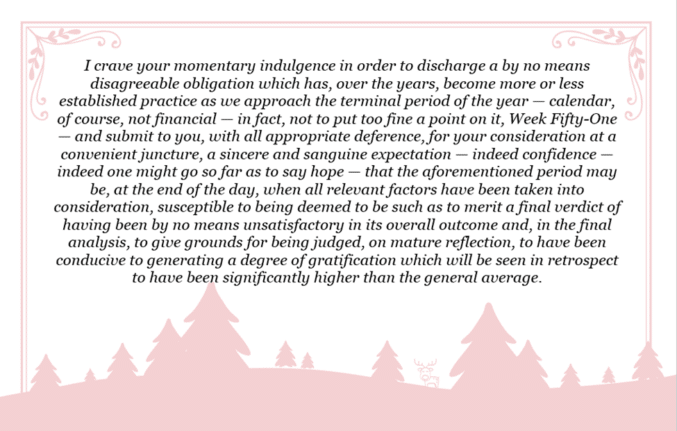
A scene from a famous UK sitcom could also be used as a unique and overly literate Christmas card. ‘Yes Minister’ is a famous UK sitcom set in the British Public Service and politics. Sir Humphrey Appleby (played to perfection by the late Sir Nigel Hawthorne) gave amazingly convoluted explanations for the simplest things. This is […]

Five snowflake ❄ symbols in Word, Excel, PowerPoint and Outlook
Five ways to add a Snowflake ❄ symbol into Microsoft Word, Excel, PowerPoint or Outlook. Both in Office for Windows and Office for Mac. There are three snowflake symbols plus two Office icons. Snowflake ❄ symbols are normally used to show, well, a snowflake or generally to indicate cold or snow. Maybe also as a […]

Fix the kerning settings in Microsoft Word and Office
How to use the font kerning settings in Microsoft Office, Word and PowerPoint and fix the default setting for Heading styles in Word. Kerning letters makes a difference as the letters get larger so the setting is more important for headings and titles in Word and PowerPoint. Here’s common Arial font without and with kerning […]

Try out the Meta image maker – Imagine
Meta has joined the ‘text to image’ AI race with Imagine. Here’s how to use it to make interesting pictures quickly and bypass its current limits. There are so many AI tools out there, in particular ‘text to image’ makers, Microsoft has ‘Generate Image’ in Designer and a separate Image Creator as well as the […]
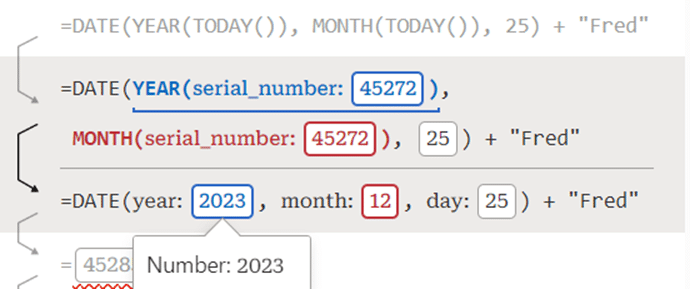
Debug to understand and fix Excel formulas
Excel Labs has just added a nice formula Debug option that helps you understand the steps inside a formula and fix errors. There are already three ways to look inside a formula; Evaluate Formula, F9 to calculate part of a formula and the recent Visual Preview. Now Microsoft’s Excel Labs Advanced Formula Environment has a […]