All about Microsoft Office for Apple Mac. Word, Excel, PowerPoint, Outlook on macOS, Microsoft 365 for Mac, Office 2021 for Mac and earlier versions.
Office Watch annual fundraising drive with Thank You gift
If you enjoy the stuff we do here at Office Watch we’d really appreciate you chucking a few dollars at our annual fundraising drive – and we have a new 2023 ebook for all contributors as a special gift. Donate via Paypal or credit card. The financial support of readers is the only thing keeping […]

Table of Contents basics in Word
Let’s explore the basic options for making a Table of Contents (TOC) in a Word document. Table of Contents is very easy to do in Word and it’s not just for people who are making books. TOC’s can be useful in any long document such as a contract. Beyond the simple Table of Contents there […]

Choose the words to show in a Word Table of Contents
Choose specific words from a heading to appear in the Table of Contents (TOC) of a Word documents, instead of the whole heading. Welcome to the strange world of Word’s Style Separators. We’ve already explained Lead in emphasis which is easy to use. Simply select the text you want at the start of a paragraph […]

Table of Contents styles in Word
There are many different ways to change the look a Table of Contents from a Microsoft Word document. The standard ways, taught in most classes, force you to format your document in a way that suits Word. We’ll show you how to get a Table of Contents (TOC) from a document formatted the way you […]
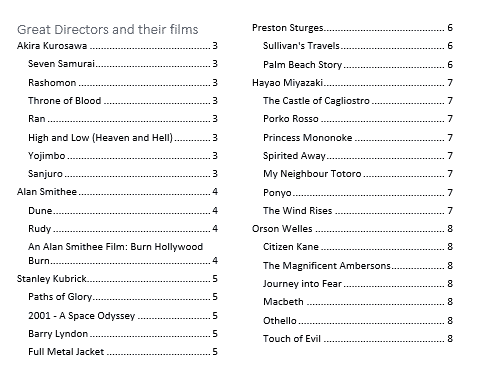
Four Word tricks to shrink a Table of Contents
Four simple Microsoft Word tricks to squeeze a Table of Contents (or Table of Figures etc) into fewer pages. Here’s an example of a Table of Contents (ToC) that’s grown too big using Word’s default settings. It’s creeped over to a second page. We’ve seen ToC’s for big documents that take up many, many pages. […]

All Word’s Table of Contents options
Microsoft Word has many Table of Contents options, a lot of them hidden away. Here’s a complete list of all the switches available with a Word {TOC … } field code. We’ve covered the basics of Table of Contents and some Table of Contents tricks already, here we’ll go in-depth with the TOC field codes […]

Tricks to using YouTube videos into PowerPoint
Online videos from YouTube and other sources can be played within a PowerPoint slide and there are tricks to make the presentation better and work around some limitations. The ability to insert online videos from YouTube and other sources has been in PowerPoint for some time. Insert | Media | Video | Online Video But […]
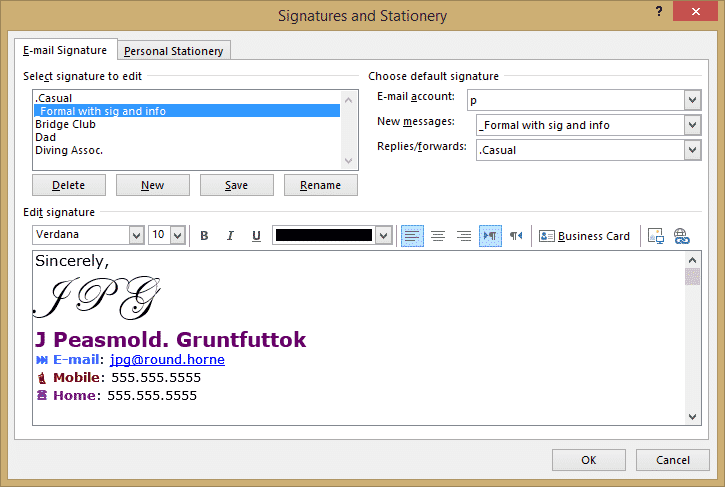
Signatures for all occasions in Outlook
How to have email signatures in Outlook for all the different roles in your life. Most of us wear different ‘hats’ – a family member, friend, person, employee or volunteer. Each of those ‘hats’ can have a different Outlook email signature. Which Outlook signature you use depends on the situation and, perhaps, the email account […]

Essential keyboard shortcuts for the Office Selection Pane
Use these essential keyboard shortcuts to make best use of the Selection pane in Microsoft Office. Alt + F10 Open Selection Pane F6 Move the keyboard focus through the major regions until reaches the Selection Pane Tab Navigate by keyboard through the buttons in the pane and then into the list Up arrow, down arrow […]

How to use Excel’s Business Assist – Forecast
Business Assist – Forecast is a new Excel add-in from Microsoft which forecasts future volumes based on past data. How to use the add-in, if you can and understand its limitations. From the promotion, Business Assist – Forecast sounds like a useful tool but it’s a different story when we tried the add-in for ourselves. […]

2001 movie design: using in Office, Word or PowerPoint
Make your own Word or PowerPoint designs inspired by the movie ‘2001: A Space Odyssey‘. See 2001 A Space Odyssey – in Word and PowerPoint and 2001: A Space Odyssey and font kerning for details on the fonts, colors and styles used in Kubrick’s famous movie. PowerPoint slides Moving from film stills to PowerPoint slides […]

Designer home page changes are a welcome improvement
The Microsoft Designer home page has a major update that highlights some of its hidden features. These changes aren’t just cosmetic, but are a welcome boost to the functionality and usability of the opening page. The new Designer home page is in two parts: Get Started and My Projects. Get Started Get Started has links […]

Is OpenAI’s Sam Altman move a good thing for customers or Microsoft?
It seems Sam Altman might be joining Microsoft to work on their artificial intelligence technologies with maybe 500+ of his staff following him. Is that really a good thing for customers wanting to get the most from AI technology. Microsoft actions over the last few days suggest it’s not the best move for them either. […]

Patch Tuesday – Two November 2023 highlights
Here’s just a few of the security breaches that caught our eye from a total of 63 security flaws patched in this months dump of fixes from Microsoft. Including five ‘zero-day’ bugs plus another 20 Edge browser security bugs fixed earlier in November. We’ve included links to more detail and specific patches for each version […]
More real Microsoft Word history
An Office Watch reader has added his own suggestions for important parts of Microsoft Word history (and Office) that Microsoft has forgotten and would like paying customers to ignore in their revisionist history of Word. All these remarks result from Microsoft’s increasing demands for more money from customers. Lot’s of little changes all focused on […]

Does Microsoft Word grok, Grok?
The word ‘grok’ is back in the news, thanks to Elon Musk. As long time Word users and classic science-fiction readers, we naturally wanted to see if Word’s spell check recognized the word. In other words, does Microsoft Word grok the word Grok? Grok is a word made up by Robert Heinlein for his classic […]