All about Microsoft Office for Apple Mac. Word, Excel, PowerPoint, Outlook on macOS, Microsoft 365 for Mac, Office 2021 for Mac and earlier versions.
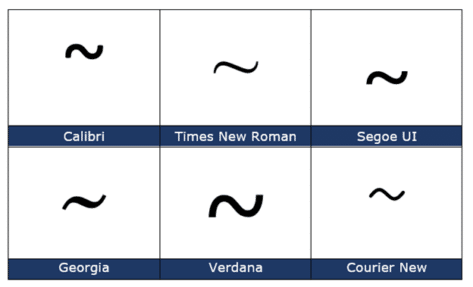
Tilde ~ symbol in Word, Excel, PowerPoint and Outlook
Type the Tilde ~ into Microsoft Word, Excel, PowerPoint or Outlook. Both in Office for Windows and Office for Mac. Plus an emoji alternative to Tilde. Tilde is used to mean ‘approximate’ as in “ ~30 minutes late”. In maths it means ‘similar order of magnitude’ e.g. “ a ~ b “. Tilde ~ symbol […]

Good advice for buying an iPad
The Verge has some good advice on buying an iPad and choosing between the many models available. Now’s the time to buy last year’s iPad by Dan Seifert cuts through the messy collection of Apple iPad models with this core advice … … thing that remains the same is it is an iPad. There might be […]

How to view and delete your Outlook.com attachments
There’s a way to view the attachments to items in a Outlook.com mailbox either in the web browser or, the better option is Outlook desktop software (Windows or Mac). Finding attachments is useful for recovering a lost file or past version of a document. Also vital to reducing the mailbox size when it’s reaching the […]
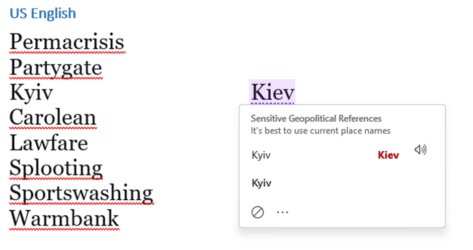
Are the 2022 Words of the Year recognized in Microsoft Word?
The 2022 Word of the Year is “Permacrisis” according to one dictionary, is that and other new words recognized in the Microsoft Word dictionary? Surprisingly, one of the 2022 words is and there’s another strangeness in the Word Grammar and Style checks. According to the Collins Dictionary, the 2022 Word of the Year is “Permacrisis” […]

Microsoft Word isn’t censoring your politically incorrect language
Yet again, Microsoft finds itself accused of “censoring” some “politically incorrect language” in another outbreak of the culture war. It puts Office Watch in the unusual situation of defending Microsoft, using some facts about how Microsoft Word really works. There are all sorts of accusations being spread, most of which could be debunked simply by […]

Manage Styles and display order in Word for Mac
Managing Styles and priority / order settings in Word for Mac is harder but possible if you’re willing to dig in document or template settings. Word for Mac has two style lists available, just like Word for Windows. The Quick Style Gallery across the ribbon Home tab (called Style Gallery in WinWord) and the Styles […]

Change single space after sentence to double space in Word
Word can check if you use a single or double space after a sentence (fullstop/period) but how can it be changed single space to double throughout a document? The Sentence Spacing settings (single, double or don’t care) is in Word’s Grammar settings see Sentence Spacing in Word. These days, sentences more commonly separate with a […]
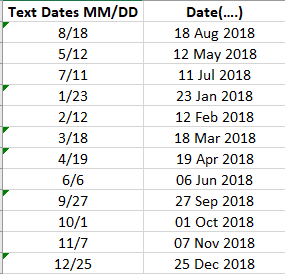
Converting Text with month and year into Excel dates
Ronny, a loyal Office Watch reader asks “OK, I now understand that entering dates in Excel as plain text isn’t a good idea. How do I convert my cells with MM/DD text into proper Excel dates?” It’s a trap for Excel novices. Typing in a date as plain text seems simple and easy … until […]

Share a video, even a large one, in an email
These days it’s quite simple to share a video or any large file via email, here’s how. You’ll need a cloud storage service, Google, iCloud or OneDrive. We’ll use OneDrive because it comes with Microsoft 365 and it’s well integrated with Outlook. The same steps apply to any large file you want to share via […]

Easy Visa calculator for European visitors – with Excel
Here’s a handy Excel worksheet for visitors to Europe, including UK citizens. It’ll help you stay within the legal limits for ‘short stays’ by visitors to the EU Schengen zone. Most visitors to Europe are allowed to stay in the Schengen group of countries for 90 days out of the previous 180 days. It’s a […]

Pray / Thank You 🙏 emoji in Word, Excel, PowerPoint and Outlook
There’s a Pray / Thank You 🙏 emoji you can drop into Microsoft Word, Excel, PowerPoint or Outlook. Both in Office for Windows and Office for Mac. Pray / Thank You 🙏 symbol in Western cultures can be used to show prayer or devotion more generally as well as thanks or appreciation. The official Unicode […]
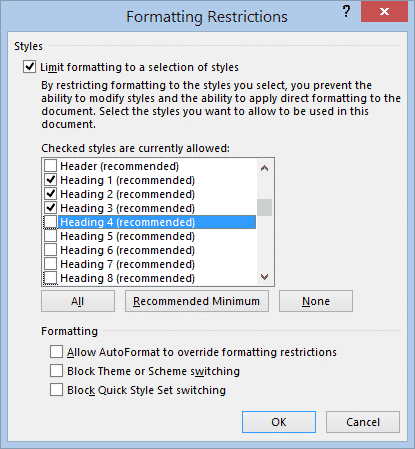
Limit editing and collaboration within a Word document
There are options in Microsoft Word to limit access a document in different ways. It’s more fine-grained control of what people can do in the document rather than the entire Word document permissions options we’ve mentioned before. Restrict Editing options let you collaborate on a document more broadly without the risk that important parts will […]

Stop copying of your signature as a picture
There’s no way to stop someone copying a picture of your signature (or any image) but there are some tricks to stop the image being misused. Thanks to Office Watch reader, Tim P. for the excellent question: “I liked your article on inserting signatures. In relation to inserting a picture of my signature, I was […]

Insert a signature picture into a Word document
There are some nifty tricks to inserting a picture of your signature into a Word or other document. Tips that make the result look realistic and professional. We’ve already explained the many ways to get a picture of your ink signature into Office. Now you have a picture of your signature, it’s ready to be […]

All the ways to sign a digital document in Word and more
Adding your signature or signing a document digitally is possible in different ways using Microsoft Word or other Office programs. Before we start, let’s clarify some terminology because ‘signing a document’ can mean several things in the computer world: Adding a signature to a document. Inserting a copy of a human written signature into an […]

15-Month Microsoft 365 Subscription: Smart Deal or Marketing Gimmick?
Microsoft’s 15-month Microsoft 365 offer looks like a bargain at first glance, promising extra value compared to standard annual plans. But when you break down the pricing, renewal terms, and fine print, this “bonus” subscription may not deliver the savings many users expect. Here’s what you need to know before buying an extended Microsoft 365 […]









