All about Microsoft Office for Apple Mac. Word, Excel, PowerPoint, Outlook on macOS, Microsoft 365 for Mac, Office 2021 for Mac and earlier versions.

Nice variations for Stop shape in Word, Excel & PowerPoint
There’s plenty of scope for variations on the basic Not Allowed symbol (red circle with diagonal) using the tools in Microsoft Office. See Make a ‘Stop’ circle / diagonal symbol in Word, Excel & PowerPoint for how to insert the basic ‘Not Allowed’ shape and change to suit your needs. Line Direction The line across […]

Office Watch most popular articles of 2020
Well, that’s been an ‘interesting’ year for all of us <sigh> . Here’s some of the articles that have been popular with our worldwide audience over 2020. Getting more from online video calls With the global lockdown, Office Watch switched roles for a while and added lots of advice for online video calls. We’ve been […]

Hurry! Half price Microsoft 365 Family in the UK
Argo UK is offering Microsoft 365 Family for just £39.99 saving £40 or half the regular price of £79.99. But there’s no deadline given so we suggest you grab one or more packs asap. UPDATE The price has changed to £59.99 which is still a good deal on a 12-month Microsoft 365 Family. £79 is the […]

Editor look & feel changes coming in Word and Outlook
Microsoft has announced some changes to the Editor feature in Word and Outlook to improve access to spell-check and grammar tools. Look for these changes in upcoming releases of Word and Outlook for Windows and later for Mac. Many reports on these changes say that the Editor is a ‘new grammar checker’ in Word 365, […]
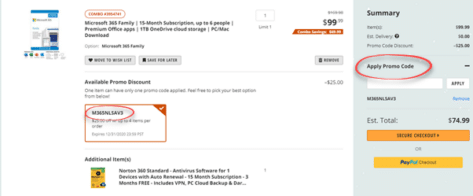
Hurry! Save more than $20 on Microsoft 365 Family only until the end of 2020
NewEgg is offering a 15-month new or renewal of Microsoft 365 Family for just $75 saving about $45. There’s a special discount or promo code that we’ll tell you below. UPDATE The price has changed to $99 which is still a good deal on a 15-month Microsoft 365 Family. $99 is the official price for […]

Personal and work quick switching in Teams
Commercial users of Microsoft Teams can now quickly switch to a personal account without shutting down the app or browser window. Personal Teams can keep in contact any group of people, family, extended family, school friends, study group, class, sports team or club. See Teams gets personal for families and groups With a personal Teams […]

Pantone 2021 colors in your Word, Excel and PowerPoint
Pantone has announced not one but TWO ‘colors of the year’ for 2021 and, as usual, we’ll explain how to use those exact colors in Word, Excel, PowerPoint and Outlook. The colors of 2021 are … Illuminating and Ultimate Grey As usual what’s more amazing than the color is the description that goes with the choice. […]

Get your Holiday ‘sweaters’ for Teams, PowerPoint & more
Microsoft has released some ‘sweater’ backgrounds for Christmas, Hannukah or anytime of year. The PNG images are intended as backgrounds for Teams calls but can be used anywhere. A PowerPoint slide, Word background, Zoom call background or whatever. Adding Virtual Background or blurred video to TeamsAdd your own background image to a Teams call They […]
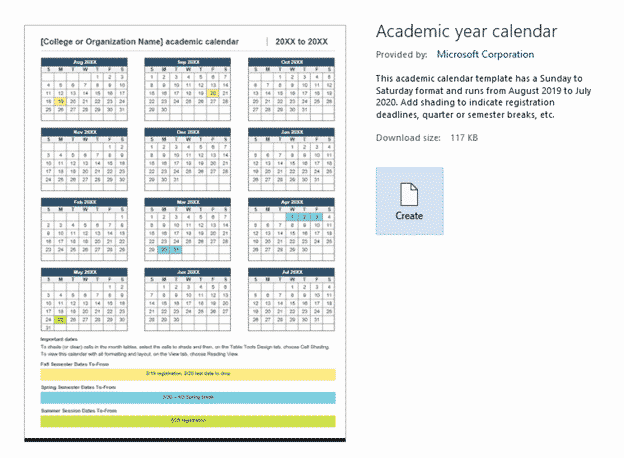
2020/2021 Academic calendar in Microsoft Word
The only specific 2020/2021 calendar template in Microsoft Word is an academic calendar from August 2020 to July 2021, here’s how to use it and make it better. In File | New search for ‘academic calendar’ there are a few options. We’re looking at ‘Academic year calendar’. A few notes before moving on. Ignore what […]
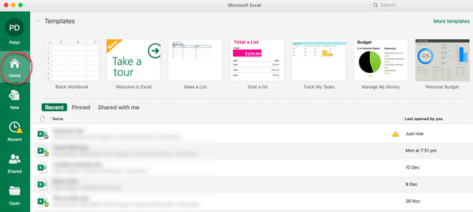
New look in Microsoft 365 for Mac coming in early 2021
Microsoft 365 for Mac is getting a revamped look for the Home or Start menu in early 2021. Here’s all the new and old features in the Home pane or as Microsoft calls it “Office Start experience” (no kidding) The Home panel changes to be more consistent with what’s visible in Microsoft 365 for Windows […]

Office for Mac now supports M1 chips directly
Microsoft Office 365 and 2019 for Mac (Word, Excel, PowerPoint and Outlook) now work directly on the new M1 chip. There are a few ‘gotchas’ but support for Apple Silicon is almost complete. Apple is moving away from Intel chips to their own ‘Apple Silicon’ hardware, starting with the M1 chip. As we’ve explained, Microsoft […]

PowerPoint Outline tricks with Word
You don’t have to write directly onto each PowerPoint slide. Instead write an outline of headings and text, then convert into slides. There are two ways to do it, with Word or directly into PowerPoint. Outline View View | Outline View shows each slide title with bullet points within a slide. Slides can be made, […]

Beware MacOS backdoor hack with fake Word document
Mac computers aren’t immune to hacking and viruses. There’s a new backdoor infiltration out there posing as a Word document and directly targeting Macintosh computers. OceanLotus is interesting because it targets MacOS, trying to open a backdoor through which hackers can get data from Mac computers. Another noteworthy part of the hack is that the […]
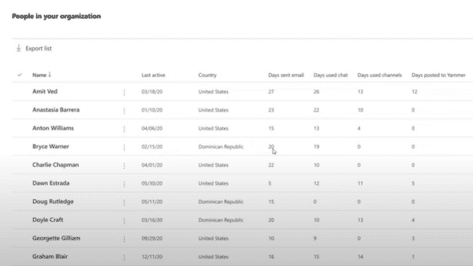
How bad is the Microsoft 365 Productivity Score really?
The Microsoft 365 Productivity Score has been raising concerns about staff privacy and intrusion into their ‘Work from Home’ life. We’ll look at what Productivity Score actually does, how it’s changed after public pressure and why administrators might prefer to be intrusive. Productivity Score applies to Microsoft 365 hosted organizations. People or small businesses with […]

Microsoft 365 executive logins sold on the dark web
The Microsoft 365 logins on top executives are being sold on the dark web, allowing hackers direct access to the emails and files of chief executives, directors and managers. ZDnet is reporting that a forum for hackers has an offer to sell login details for Microsoft 365 / Office accounts for, so-called, C-level staff like: […]

Save over £30 on UK deal for Microsoft 365 – but hurry!
Discounts on Microsoft 365 Family (formerly Home) are rare these days but Amazon UK has a Cyber Monday offer worth grabbing. Save more than £30 on the regular price of a one year renewal. Amazon UK are selling the £79.99 package for just £47.99 on Monday 30 Nov only. The deal ends at midnight Monday […]









