All about Microsoft Office Word, Excel, PowerPoint and Outlook, Microsoft 365, Office 2021 and earlier versions.

Microsoft 365 executive logins sold on the dark web
The Microsoft 365 logins on top executives are being sold on the dark web, allowing hackers direct access to the emails and files of chief executives, directors and managers. ZDnet is reporting that a forum for hackers has an offer to sell login details for Microsoft 365 / Office accounts for, so-called, C-level staff like: […]

Save over £30 on UK deal for Microsoft 365 – but hurry!
Discounts on Microsoft 365 Family (formerly Home) are rare these days but Amazon UK has a Cyber Monday offer worth grabbing. Save more than £30 on the regular price of a one year renewal. Amazon UK are selling the £79.99 package for just £47.99 on Monday 30 Nov only. The deal ends at midnight Monday […]

Special offer for Microsoft 365 Business Premium or an even cheaper option
If you’re thinking about getting Microsoft 365 email hosting with full Teams and SharePoint, Microsoft has a limited time offer this week only. However, before you jump into their deal, there’s another very similar option that’s even cheaper. Until 30 November 2020, Microsoft is offering 25% discount on their Business Premium service for small businesses. […]

The latest Office ‘Insiders’ names changes
Microsoft can’t help themselves when it comes to naming their ‘Insiders’, ‘Preview’ or beta test versions. The names change for no good reason and timing is different for each platform rather than all Office apps changing at the same time. The latest changes are for MacOS, iOS (iPhone/iPad) and Android devices. They’ve happened months after […]

Now there’s Stock videos for your PowerPoint slides
Short Stock videos are coming to PowerPoint 365 slides and backgrounds. Instead of searching the web or making your own little videos, they are now available from PowerPoint itself. All the videos are short (around 10 seconds) and automatically loop by default. Here’s four of them as a sampler .. They seem intended as backgrounds […]

We’ll miss Claude Almer
Claude Almer 1950-2020 We’re devastated to report the passing of Claude Almer who died in Sydney, Australia, on November 19, 2020 after a long illness Claude was technical and personal support for Office Watch since well before the newsletter started in 1996. Whenever in-depth analysis of some virus code was needed, Claude would dive in […]

Bring a great library into your home
The famous Bodleian Library in Oxford is a lovely place to work and now you can pipe that ambience into your ‘Work from Home’ area. More than a few Office Watch articles are written in libraries including the old British Library Reading Room (alas been closed for some years), the Edinburgh Central Library and the […]
Office 2010 updates are still available, here’s how
0Patch is stepping in where Microsoft has left by offering continued security updates for Office 2010 after official support was dropped a few months ago. Newly discovered high risk security bugs in Office 2010 will get micropatches from 0Patch. These unofficial updates change the existing program files to prevent the new security lapses troubling your […]

Putting a Command on the Quick Access Toolbar
The Quick Access Toolbar (QAT) is located on the left side of the Word, Excel, PowerPoint or Outlook title bar. You can add commands, options and even symbols for easy and quick obvious access By default, the QAT only has Save, Undo, Redo and Touch/Mouse commands but you can cut down on unnecessary keystrokes by placing […]
Reader’s suggestion for typing a tick in Office
A quick way to type a ü tick or check mark character in Word. Another great Autocorrect suggestion from Morris B. ” … the one that I have found the most useful is to replace ‘./’ with a tick (wingdings 252 – or wingdings 254) “ Using the fullstop/period is a clever Autocorrect prefix since […]
Quickly add any special characters in Office
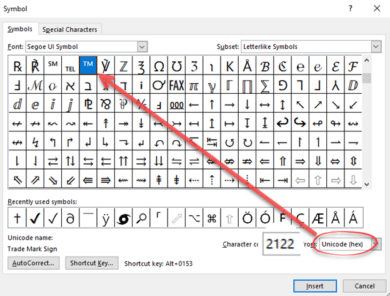
One of the eternal questions to Office Watch is about adding characters to an Office document. Symbols and characters not on the keyboard. The most common requests are for adding currency symbols like Pound £ Euro € or Yen/Renminbi ¥ but can also include the @ symbol which can, even these days, be missing from […]
Excel is getting better Conditional Formatting with much needed improvements
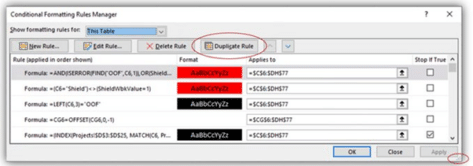
Excel’s Conditional Formatting is getting two small but much needed changes that will make it a lot easier to use. According to Microsoft, the latest Insiders releases of Excel 365 for Windows has two changes to the Conditional Formatting Manager dialog. Resizable The dialog is now resizable from the handle at bottom right. That means […]

All you need to know about Microsoft Office and Big Sur MacOS
Apple is releasing a new version of MacOS, for all Mac computers, called ‘Big Sur’ or version 11. What does that mean for Microsoft Office compatibility and stability? Big Sur is the latest MacOS operating system (version 11) for Mac computers. It’s rolled out from 12 November but you can decide to switchover when you’re […]
Is Microsoft Office ready for Apple Silicon Macs?
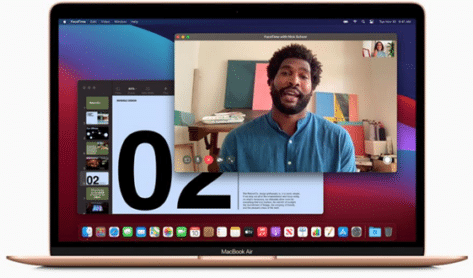
Apple’s new Macbook’s use a totally new type of chip, the M1 or Apple Silicon. What does that mean for Microsoft Office and other programs? We’ll explain what Apple Silicon Macs are and why they are better. Microsoft Office compatibility with the new machines (it’s messy at the moment) and whether to buy an Apple […]
Inside the new Designer for Microsoft Word
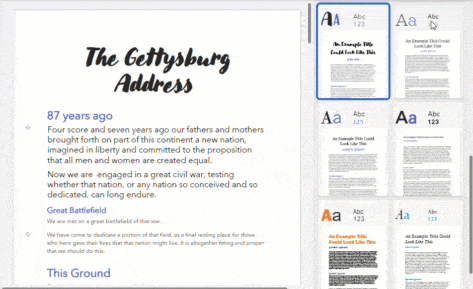
Designer, a quick formatting feature in PowerPoint is now available in Microsoft Word. Here’s how to find and use the new feature. Word’s Designer works a little differently to the PowerPoint Designer but the basics are the same. A side-pane offers some templates that will reformat the entire document. Some Microsoft clever coding (they call […]
New Apple emoji available now but be careful
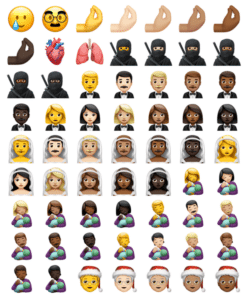
The new Apple iOS 14.2 adds 117 new emoji to use but be careful now you use them because not even all iPhone and iPad can handle them, let alone non-Apple devices. We explain how they work, how the emoji appear on receiving devices and include a full list of the newcomers. The new emoji […]