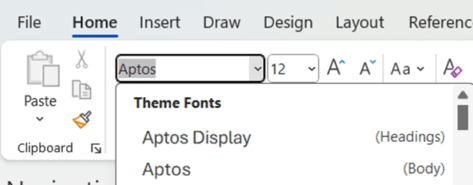
New default styles in Word, PowerPoint and Outlook
The change of fonts in Microsoft 365 also means a change of default styles (normal and headings) are also changing. Here’s what the new styles look like and the exact settings Microsoft has chosen for Word, PowerPoint and Outlook. At the moment, these fonts and styles are in Microsoft 365 Insiders builds for Windows and […]

Another Microsoft Exchange failure
There’s been yet another failure of Microsoft’s Exchange Online service (aka Microsoft 365 hosted email) affecting customers around the world by stopping or delaying outgoing messages. Microsoft hid the extent of the problem by spreading the details across two separate bug reports. The first most people knew of the problem was sending messages that gave […]
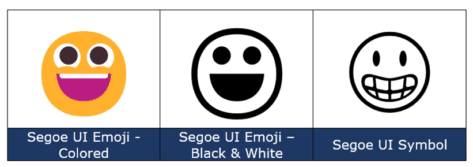
Grinning Face 😀 emoji in Word, Excel, PowerPoint and Outlook
How to insert the Grinning Face 😀 emoji into Microsoft Word, Excel, PowerPoint or Outlook. Both in Office for Windows and Office for Mac. Grinning Face 😀 emoji is usually depicted as a yellow face, with open eyes and a wide smile. Conveys good cheer or humor, often to make it clear that the sentence […]

More Word Find / Search tricks
Some more Microsoft Word Find tricks. Select and Find, finding blank lines, search for special characters/emoji, find a certain font or formatting plus wildcard options. This article follows on from our introduction Find pane search secrets in Word Select and Find If you select some text in a document then use the Ctrl + F […]

Moai 🗿 or stone statue emoji, 3D model and more in Word, Excel, PowerPoint and Outlook
Add the Easter Island stone statue (Moai/Moyai) 🗿 symbol, 3D model or photo into Microsoft Word, Excel, PowerPoint or Outlook. Both in Office for Windows and Office for Mac. Moai 🗿 symbol represents the famous stone statues of Easter Island. It can be used to show a deadpan, ‘straight face’ or ‘stone face’ (literally) expression. […]
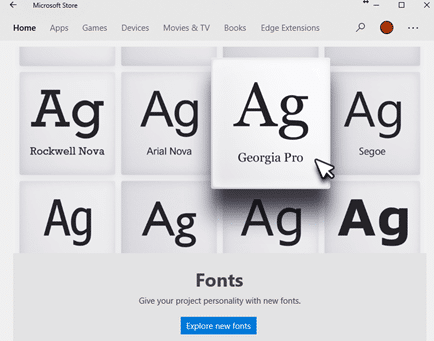
Why there’s three font locations in Windows 11 and 10
With the sale of fonts via the Microsoft Store and cloud fonts there’s now a complication in the familiar way fonts are managed in Windows 11/Windows 10 and how Office for Windows handles new fonts. There are now three different locations that fonts can be saved. For as long as anyone can remember, all Windows […]

Outlook and Office might be blocked by anti-virus software
A Windows 11 update might stop Outlook or other Office apps from working because of a conflict with anti-virus software. The trouble started with KB5027231 a Windows 11 update released 13 June 2023 which, among other things, fixed a file copying bug. 15 days later Microsoft admitted there was a bug in the bug patch. Not […]
What you’ll need to use Copilot with Microsoft Office
Microsoft has released some information about what you’ll need to get their AI tools (called Copilot) when they are eventually released. Copilot is Microsoft’s name for their upcoming AI tools integrated into Office apps (Word, Excel, PowerPoint and Outlook) plus other services like Teams. As with all Microsoft’s Copilot announcements, it’s a strange mix. The […]

Designer Erase is a picture edit opportunity for all Office users
Microsoft Designer now has an image editing tool that’s been missing from Microsoft Office. Erase in Designer lets you edit images in an important way that’s not possible in Word, Excel, PowerPoint or Outlook for Windows or Mac. Picture editing in Office has a lot of features but they mostly effect the whole image, there’s […]

Outlook bug workaround for hang or slow startup
Microsoft is offering some workarounds for a bug in Outlook for Windows which leaves it hanging on the opening screen and very slowly opening properly. According to Microsoft the bug is in the Outlook software part of Microsoft 365 for Windows. We suspect a similar problem might also be in Outlook 2021 for Windows since […]

Three ways to prepare for a Microsoft 365 email outage
What can you do if there’s an outage or breakdown in Microsoft 365 email cloud services? If you’re prepared, you can continue working and communicating until Microsoft fixes the outage. Microsoft 365 breaks down occasionally, so do other online services. These outages have and will happen to even the best of cloud services. You can […]
Microsoft outages hurt lots of paying 365 customers
Microsoft Outlook and Teams had a horror Monday (and now into Tuesday) with cloud service outages affecting many paying and unhappy customers. The peak trouble was around 11am (US Eastern time) Monday 5th June. UPDATE: As we type this, there’s a new Exchange Online (Microsoft 365 hosting) outage. According to Microsoft “Users may be intermittently […]

Stop ‘Try the new Outlook’ button appearing
Hide that ‘Try the new Outlook’ option appearing in Outlook for Windows and why you should not click that button … not yet anyway. Microsoft has released the ‘new Outlook’ to some customers as an option because they want lots of unpaid ‘guinea pigs’. Each ‘new’ feature added to the software gets a blog post […]
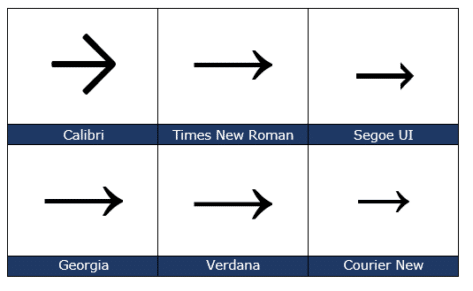
Right arrow → symbol in Word, Excel, PowerPoint and Outlook
Insert the Right arrow → into Microsoft Word, Excel, PowerPoint or Outlook. Both in Office for Windows and Office for Mac. The official Unicode name is ‘Rightward Arrow” → but it can be called ‘Right pointing’ ‘Right facing’ or just ‘Right Arrow’. Want more arrows or pointers? Check out all 200+ Arrow or Hand pointing […]

All the right pointing hand symbols in Word and Office
Word and Office have several right “pointing hand” symbols available in some fonts. Here’s the Unicode options, index, backhand, sideways in white or black, all explained and shown. Want more arrows or pointers? Check out all 200+ Arrow or Hand pointing symbols and more in a searchable list. Index, Backhand or Sideways? The Unicode system […]

Three ways to run an Office macro direct, from the ribbon or toolbar
There are three main ways to run a macro in Microsoft Office (Word, Excel, PowerPoint or Outlook). From the Macros list, from a button on a ribbon or from the Quick Access toolbar. We previously spoke about how to install an Office VBA macro, here’s how a macro can appear on the ribbon or Quick […]









