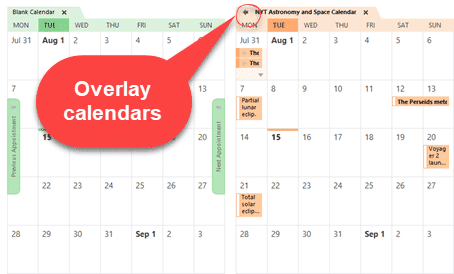
See multiple calendars in Outlook
In Microsoft Outlook you can view two calendars ‘side-by-side’ or overlaid to look like a single calendar. Select two calendars from the left-side pane of a Calendar view. Choose from ‘My Calendars’ or ‘Other Calendars’. The selected calendars appear ‘side-by-side’ in different colors. Overlaid with other calendars Click on the little ‘left arrow’ button on […]

How to clear all formatting in Office documents
Sometimes text formatting can get confusing in Word, PowerPoint, Outlook, Publisher and OneNote. There are several ways to clear the additional formatting and return to original settings. The formatting styles in your text can be easily restored to their default settings by clearing all formatting. Users can waste a lot of time trying to change […]

How to protect your accounts from a password spray attack
A recent attack on Microsoft 365 organizations has highlighted the danger of ‘password spray’ attacks that try to get into your account and perhaps get a foothold into an organization. There’s a simple fix that can protect you and your organization. Regular Office Watch readers will know what we’re going to say! Password Spray is […]
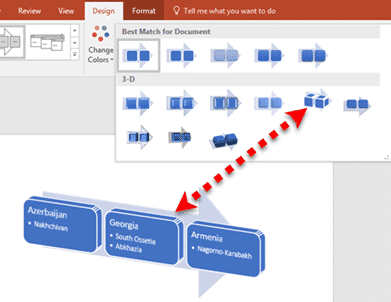
Much better lists with Office SmartArt
SmartArt is available in all Office desktop programs for Windows and Mac. They let you turn a plain boring text list into something more compelling and understandable. SmartArt works and options do vary between the programs, especially PowerPoint. Office for Mac menus look a little different but the primary features are there. This article is […]
How to open a mystery file with no extension
What can you do with a file attachment that has no file extension? Sometimes you get a file, probably an email attachment, that has no file extension. Without something after the dot/period (.doc .docx .xlsx .pptx etc.) Windows doesn’t know what program to use. This is most likely to happen with files sent from Mac […]

Changing text and icons on Office Quick Access Toolbar
Improve your Word, Excel, Outlook or PowerPoint Quick Access Toolbar (QAT) beyond the small changes allowed by Microsoft directly. This works in all modern Office for Windows including Microsoft 365, Office 2016/2019/2021/LTSC. You’ll be able to shorten the overly long text labels or change icons (because too many are the same) with a short list […]

New look for Microsoft 365 and Office 2021
From Tuesday 5 October 2021, a new look is be available to Microsoft 365 and Office 2021. Don’t worry, it’s not a major change. Everything on the tabs, ribbon and dialogs remains exactly where they are. Microsoft grandly calls it a ‘visual update’ we call the changes ‘a new coat of paint’. 5 October is […]
Office 2021 prices now revealed plus ‘generous’ extras
Microsoft has confirmed the prices for Office 2021 to consumers and announced some ‘extras’ which aren’t really anything new and, in one case, self-serving for Microsoft. Office 2021 prices Office 2021 is the new perpetual license, single payment or non-subscription version of Microsoft Office. The replacement for Office 2019. It has fixed features compared to […]

New and better features in Office 2021 and Office LTSC
Here’s the new and improved features in Office 2021 and Office LTSC which apply across all the major apps; Word 2021, Excel 2021, PowerPoint 2021 and Outlook 2021. We’ve checked Microsoft’s list of new Office 2021 features against the actual software. See all about Office 2021 for Windows & Mac plus The good and bad in Office LTSC There are stock images, icons […]
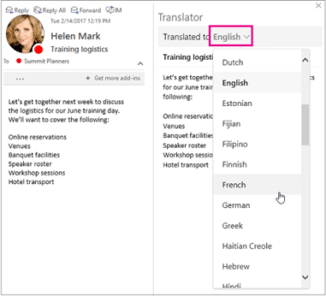
New Features in Outlook 2021
In addition to the general Office 2021/LTSC features there are some useful additions to Outlook 2021/LTSC including a better search box, translation of emails. See all about Office 2021 for Windows & Mac plus The good and bad in Office LTSC Here’s what’s new/changed in Outlook 2021 in addition to the overall updates that apply […]
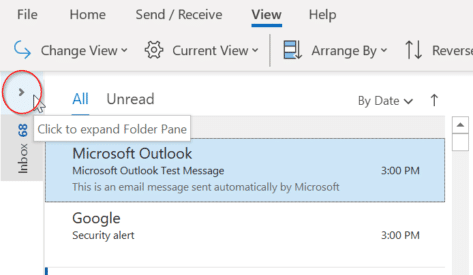
How to keep the Folder Pane expanded in Outlook
Outlook’s Folder Pane displays all folders which lets you quickly move between folders and views. Minimise the Folder pane, you will no longer be able to see your folders. As a result, some users get puzzled as to how they can bring back the expanded Folder Pane view. There are a few ways that you can do this: Change […]

Tips for better and easier printing emails
Printing email messages is something that we all do at various times, and in theory it should be as simple as clicking the Print icon in your email program – but what if the message won’t print out properly? Sometimes the printed version of an email message (or web page) comes out with strange formatting. […]
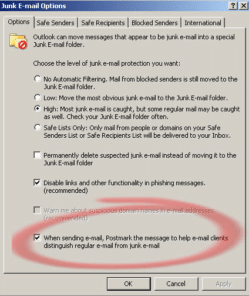
Postmarking your email in Outlook
Outlook 2007 has a feature which may help your outgoing messages be distinguished from spam. There’s a lot of talk about anti-spam measures but less talk about legitimate messages being mistaken for spam. When this happens your message might be overlooked in the receivers ‘Junk’ folder but at worst will be deleted by your email […]

Better voices for Office Read Aloud
The Read Aloud feature in Word 365 and Outlook 365 is getting fewer but much better and realistic sounding voices. Read Aloud is how documents can be read to you. Great for ‘reading’ without adding more eye-strain or proof reading against an original document. These options are at Review | Read Aloud in Word. Message […]

Bumper month for new features in Office 365
The September 2021 release preview has a lot more than usual new and updated features in Office 365 for Windows. Almost as if Microsoft has been saving them up for a bumper surprise! It’s all in the ‘Current Channel (Preview)’ release v2109 build 14430.20088 that’s out now. This is the last stage before the updates […]
Warning! Older Outlook soon stop links to Microsoft mailboxes
Soon older versions of Outlook won’t be able to connect to Microsoft hosted mailboxes, even though both the software and service come from the same company. Here’s what’s happening, why, who is affected and what to do. Microsoft is finally ending older, insecure, ‘Basic’ authentication connections to their Microsoft 365 mailboxes including Outlook.com. The change […]









