
Outlook patch leaves security hole exposed
Microsoft’s half-hearted attitude to security matters is demonstrated yet again with a new patch for Outlook. The patch has taken over a year to be released and doesn’t properly block the security lapse. It all started back in November 2016 when Microsoft was informed of a problem with RTF documents with an external link to […]
European Office 365 outage stops customers cold
Last Friday, Office 365 customers in Europe and especially the UK had to stop working as the Microsoft hosting servers stopped working. When trying to use email online, users only saw an ‘AADSTS90033’ error, and the message: “Service is temporarily unavailable. Please retry later.” As usual, Microsoft’s communications were mixed. The company doesn’t want to […]
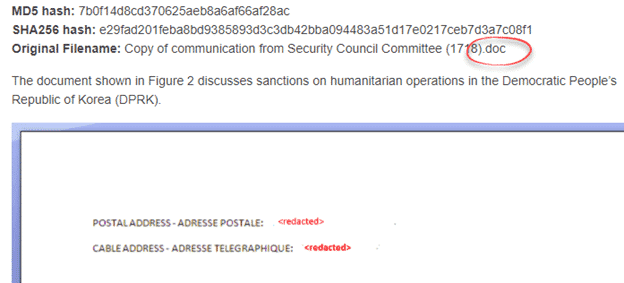
Why you should delete .doc .xls or .ppt files
If we’ve said it once, we’ve said it a thousand times … ignore or delete any .DOC .XLS .PPT files you get via email or shared. The main carrier of virus infection is Microsoft Office documents, a fact that Microsoft doesn’t like to talk about. What Microsoft doesn’t say is that the major source of […]
What can you do about Winmail.dat email attachments?
One thing we can rely on a Office-Watch.com is the regular flow of emails asking about Winmail.dat attachments to emails. What they are and what to do about them. Winmail.dat is part of Microsoft’s own Rich Text Format for emails. RTF has been mostly superseded by the more open HTML based email format but RTF […]

What is the cloud and what does it have to do with Microsoft Office
You’ve all heard about “The Cloud” as if everyone knows what it is. It’s clear from recent reader messages that not everyone knows about The Cloud. Or they think they know. Or they don’t realize how much the cloud can and will do. Office-Watch.com explains the cloud and how it applies to Microsoft Office. What […]

Outlook’s appointment location annoyance
Outlook has a really annoying and inconsistent physical address glitch that Microsoft has ignored for years while it’s rival at Google got it right from the start. The problem comes when you paste an address into the Location field of an appointment. Very often, addresses are formatted across two or more lines like this: As […]
Microsoft drops Outlook Mobile to force people to their Outlook app
Microsoft has announced that the long standing Outlook Mobile App is being dumped from 15 May 2018. A thinly-disguised attempt to get more people using their insecure Outlook App. Naming of Microsoft’s email services is (deliberately) confusing so here’s a quick primer Outlook Mobile App (OMA) is a app/application to connect with Exchange Server mailboxes. […]
Can Outlook open infected attachments without you? The German government thinks so
Politico EU is reporting that Microsoft Outlook was used to trigger a hack on the German government’s computer network. There’s the horrible possibility of an email attachment opening in Outlook without human intervention. The article and the original source at Süddeutsche Zeitung are light on details but the attack seems a bit different from the usual. […]
Automatically marking Office Watch etc as ‘not spam’ at your mail host
Every mail host has a spam filter, but how they work and the options depend on each company. We’ve given specifics for Office Watch received at Outlook.com, Exchange Server and Gmail. The same principles apply to any other place you get your email like mail hosted at an Internet Service Provider (ISP). More than one […]

Automatically marking newsletters as ‘not spam’ at Gmail
Here’s how to stop Office Watch, or other newsletters, from being moved from the Gmail Inbox to the ‘Spam’ folder or their ‘Promotions’ tab. At the moment neither Office Watch nor our friends at Popbitch are considered ‘spam’ by Gmail, but that can change. Any changes you make to Gmail’s settings have to be made […]

Microsoft security holes at record high even in the latest Word, Excel and PowerPoint
A new report confirms what most Microsoft Office customers know; there’s more security patches in Microsoft products, despite years of promises. Not just the latest Word, Excel and Powerpoint but even new products like the Edge browser are increasingly vulnerable. An Avecto report shows 87 vulnerabilities in 2017 – a record high. A dozen of […]
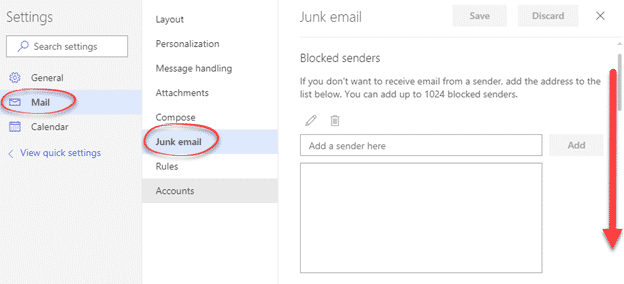
Automatically mark newsletters as ‘not spam’ at Outlook.com
Here’s how to stop Outlook.com/Hotmail from wrongly marking email as spam. These are messages that end up in the Junk Email folder. We’ve already explained how to move messages from the Junk Email folder to your Inbox. But that doesn’t stop future messages from the same sender going to the Junk Email folder. The option […]

Improved Office translation for Hindi, Bengali/Bangla and Tamil
Microsoft has announced better Hindi, Bengali (Bangla) and Tamil online translation using AI enhancements in Microsoft Office, Bing and other online services. The company has dropped their latest buzzwords like “artificial intelligence” and “deep neural networks” but what does it really mean for Microsoft’s customers? Our headline translated into Hindi, Bangla and Tamil, according to […]

Office desktop now available via Microsoft Store for Windows 10
After a seven month testing period, Microsoft Office desktop programs are available for Windows 10, especially Windows 10 S users via the Microsoft Store. Until now, the cheaper Windows 10 S machines could only run the ‘Mobile’ or UWP apps not the full-featured Office desktop programs. Now Word 2016, Excel 2016, PowerPoint 2016, Outlook 2016, […]
Unpatched Office software still being used to attack computers
You might be forgiven for thinking that Microsoft Office isn’t so much software as a ‘trojan horse’ allowing hackers the opportunity to destroy, copy or ransom your valuable information. That’s overkill, of course, but each week there’s yet another new attack on millions of computers relying on Microsoft Office. If it’s not a newly found […]
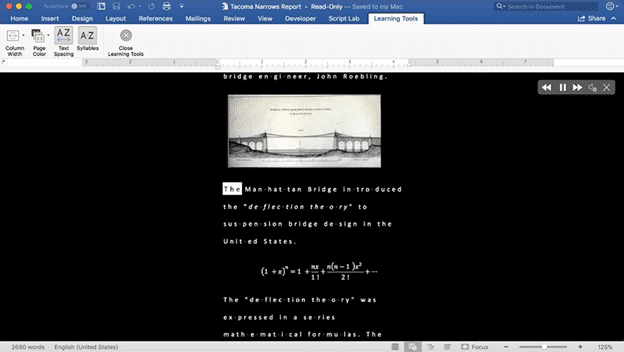
Office ‘Learning’ features are good for everyone
Microsoft has previewed new Office features targeted at students and teaches, however many are good for the wider public too. For example, Dictation is coming to Word for Windows, Word Online, PowerPoint for Windows, Outlook Desktop, OneNote Windows 10, and OneNote Online with support for at least nine languages. Source: Microsoft It’s being hyped as […]









