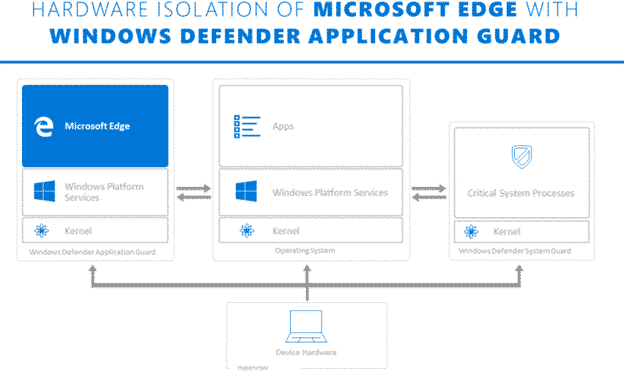
What is Application Guard and what it means for Office 365
Microsoft is touting Application Guard as a defence against Office 365 macro viruses. What is it and will it truly prevent viruses in Word, Excel or PowerPoint documents? Application Guard is already in the Edge browser and Microsoft has announced that it will be extended into Office 365 sometime in early 2020. They’ve not said […]
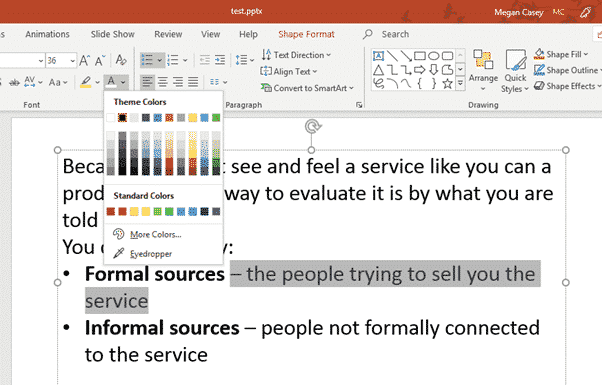
Hiding Text in PowerPoint
PowerPoint has options for hiding slides and also hide & reveal text or content within slides. We have looked previously at hiding things in Word and Excel, and PowerPoint also allows you to hide things, although the approach is a little different. The most common reason to want to hide text on a PowerPoint slide […]
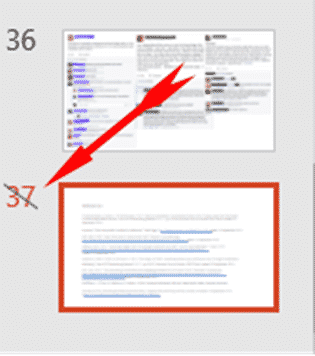
Hide a PowerPoint Slide
If you have a slide that you want to keep in your PowerPoint deck but don’t want to show them in a presentation, you can hide those slides. Go to the strip of slide thumbnails down the side of your project and select the slide you want to hide. You can select multiple slides using […]

Microsoft Bluetooth keyboard – with Office and Emoji keys
The Microsoft Bluetooth Keyboard is one of two new models with dedicated Office key and Emoji key. What’s this new keyboard like … aside from those innovations? We bought a Microsoft Bluetooth Keyboard with our own money and gave it a long hard look. Source: Microsoft Note: this is the Microsoft Bluetooth Keyboard released in […]

Office Key, all about Microsoft’s new keys
Two new Microsoft keyboards have a dedicated Office key. Office-Watch.com has tested one of these keyboards to see how the new Office key really works. We have a full list of Office key shortcuts plus how it works inside Word, Excel and PowerPoint and geeky hardware info. Hard information about the new key has been […]

Whiteboard app now accepts Word pages or PowerPoint slides
The Microsoft Whiteboard app can now import pages from Word documents or selected slides from a PowerPoint deck. The new feature is better than it’s promoted because you can select pages/slides not just entire documents or decks. Start from the Insert menu where there are now options for Word document and PowerPoint document. The PDF […]

Surface Buds work with Microsoft Office
Microsoft’s new Surface Buds are earbuds with links to Microsoft Office for voice control and transcription. The new product is a rival to the Apple Airpods and many other similar cordless earphones. What’s different is the touch surface with allow more integration with Windows and especially Office. Source: Microsoft It’s unclear what, if anything, is […]
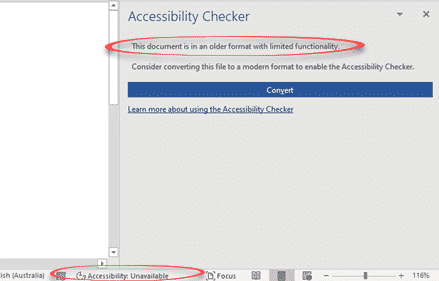
Accessibility Checker and document conversion in Office 365
Soon, Office 365 will warn you when the document, worksheet or presentation uses a document format that doesn’t support modern accessibility features. Accessibility features like alt text in images, color contrast, heading consistency, table structures are only available with the modern Office document formats ( .docx .xlsx .pptx etc). Office 365 for Windows from Insider […]

Special Office and Emoji keys coming to a keyboard near you
Microsoft is releasing two new keyboards with new keys; an Office key and a dedicated Emoji key. Back in June we talked about the plans for an Office key to go alongside the existing Windows key. Here it is … Source: Microsoft The Office and Emoji keys are on the right of the spacebar. Source: […]

What about iTunes for Windows?
iTunes has been replaced with separate programs on the new MacOS ‘Catalina’ release. What does that mean for the future of iTunes for Windows? Most people use iTunes for Windows to sync music and videos with their iPad or iPhone. It has many other uses but Windows has it’s own tools for the playing of […]

The price trap for Office users in the new iPad
The new iPad has a great price tag and good features but a hidden price trap for Microsoft Office users. It has a 10.2” screen with support for important accessories like an external keyboard and Apple Pencil. Source: Apple. The trap is in the screen size, at 10.2” it’s 0.1 inches more than Microsoft allows […]
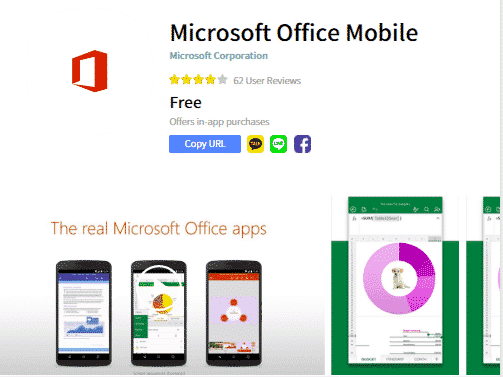
Combined Office Mobile app coming to smartphones
Microsoft is pushing out a new Office app for iPhone and Android devices however most Office users won’t need to bother with it. Paid Office 365 subscribers already have better choices as part of their annual plan. The new app is called ‘Microsoft Office Mobile’ and it’s a single app with the basic features of […]
Outlook blocks more attachments, but not the most dangerous one
Outlook on the web is now blocking another 38 email attachments because they can be carriers of viruses. But Microsoft doesn’t block the most commonly used files for infecting computers. Far and away the most common infected email attachment is old-style Word documents, with .doc extensions. Excel .xls worksheets and PowerPoint .ppt presentations are similarly […]

How the US government accesses your OneDrive and Outlook info with NSL
A recent forced disclosure by the US government demonstrates the use of NSL’s which access your personal data from Microsoft OneDrive and Outlook without a warrant or regular oversight, let alone notice to you. Microsoft, Google, Facebook and many other tech companies (including gaming services) have received National Security Letters which demand information about a […]

Files Needing Attention to replace the Upload Center in Office
The Upload Center, that annoying little extra in modern Office is being closed down. It’s being replaced with ‘Files Needing Attention’ alerts within Word, Excel, PowerPoint, Publisher and Visio. The Upload Center controls documents being uploaded from Office to online storage like OneDrive and SharePoint. If you haven’t noticed Upload Center, it appears as a […]

More secrets left in Office documents
As we suspected, there are more holes in the Office Document Inspector. Our clever readers came up with some possibilities for revealing secrets in documents, worksheets and presentations. Document Inspector is good but could be better. As you’ll see, there really should be a warning about objects with multiple layers. The biggest problem with Document […]









