Sentence spacing in Word – one, two or don’t bother?
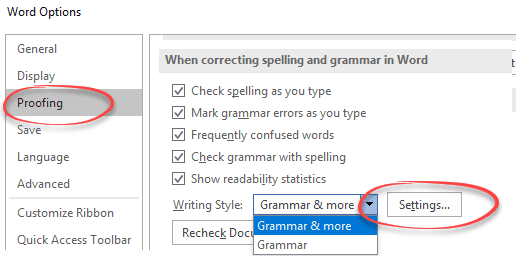
Is there one space or two between sentences? Word lets you check the sentence spacing or ignore it completely. It’s a useful option for those of us who learnt on manual typewriters where double sentence spacing was standard. Switching to single spacing is hard for your fingers to remember. One Space or Two People can […]

‘Punctuation required with quotes’ in Microsoft Word
‘Punctuation required with quotes’ is the most commonly changed Microsoft Word grammar and style setting. It checks is for the location of commas etc. when used with a quotation. Here’s two similar sentences to demonstrate: In US usage, the sentence punctuation mark go inside the quotation marks. In standard British /Commonwealth usage, the comma is outside […]

Oxford Comma in Word 2016 isn’t as good
Microsoft Word can check for the Oxford Comma in your lists and it now uses that name in Word 2016 for Windows or Mac. Sadly, Word 2016’s options have been degraded from earlier versions. Word 2016 can only warn you if the Oxford Comma is NOT there … good for people who prefer the ‘Comma required […]

Why Word’s Alphabetical order is different from a dictionary
Which version of alphabetical order does Microsoft Word use? I thought that alphabetical order was, well, alphabetical order. That’s what I was taught at school and apparently I was taught wrong. There are at least three ways, two used by dictionaries, another by Microsoft and that’s for English alone! Reading Sue Butler’s delightful book ‘The Aitch […]

Opening Office documents from removable storage
Can or should you open Office documents directly from removable storage like portable hard drives, USB ‘memory sticks’ or even floppy disks? Since we wrote about removable drives and drive letters we’ve had long time Office users asking about opening documents directly – should it be done at all. Many years ago, it wasn’t a […]

Handwrite into docs on Office apps for iPad
Handwrite direct into Office apps for iPad, converting your writing into text right away, courtesy of the iOS Scribble feature. What you’ll need, how to setup and the new thing to look for on the Draw tab of the Word, Excel and PowerPoint apps. Microsoft has integrated the Scribble feature into some Office for iPad […]

“Word Window” in trouble with Microsoft
Microsoft has dropped down hard on a UK teacher with a little bit of plastic helping dyslexic students read. It seems the company can’t learn from past mistakes. “Word Windows” is a small plastic reading tool which makes a little window so readers can focus on a word or letters without distraction. All great until […]

Make transparent images in Office for Windows
Microsoft 365 and Office 2021 for Windows can make images transparent in Word, Excel, PowerPoint and Outlook. Text or other graphics can show through the picture. Pictures can be made transparent to reveal what’s behind in lower layers of the document, slide or worksheet. For any image go to Picture | Format | Adjust | […]

Get the Game of Thrones look in Word and PowerPoint
Here’s how to get the Game of Thrones or House of the Dragon look in Word documents and PowerPoint slides. Plenty of people have borrowed the Game of Thrones or GoT look, including a certain US President. All these uses are contrary to various trademarks by HBO. Despite legal complaints there are many ‘tip of […]

Understanding the \s switch in Word’s {SEQ} code
The \s n switch inside the { SEQ } field code isn’t easy to understand so here’s an example of how it resets numbering after a Heading style. Use {SEQ \s n } to restart numbering from 1 after a chosen Heading style. E.g. { SEQ Identifier \s 1 } to reset after Heading 1 […]
Word’s SEQ field code – all the options and switches
Get the most from the SEQ (Sequence) field code in Microsoft Word using these options and switches. Office-Watch.com has tested all the {SEQ} features and found a few things that are different from the official Office documentation. To start with {SEQ } check out Why Word’s SEQ code is a godsend { SEQ Identifier [Bookmark ] [Switches ] } Identifier […]

Can’t access Microsoft 365 Stock Images …
A Monday morning glitch by Microsoft has accidently disabled access to most Microsoft 365 Stock images and more. At 5:30pm UTC (12:30pm NYC): Microsoft 365 Stock Content is now available on our test machines in the UK and USA. Give your Insert | Pictures | Stock Images a try with fingers crossed! The expired digital […]
Custom Bibliography formats or styles in Word
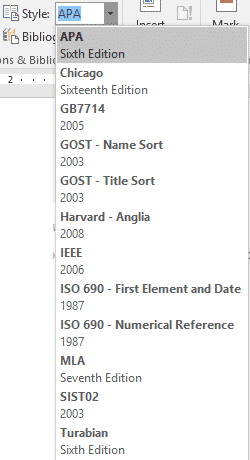
Microsoft Word has many supplied Bibliography formats or styles to choose from. You can add your own custom formats to suit your needs (or your professors). First, a quick look at how Word figures out how to format or arrange a citation. See: Add a Bibliography to Word documents Citations for everyone in Word Note: this […]

Orthodox Cross ☦ in Word, Excel, PowerPoint and Outlook
Type the Orthodox Cross ☦ into Microsoft Word, Excel, PowerPoint or Outlook. Both in Office for Windows and Office for Mac. Orthodox Cross or Russian Othodox Cross ☦ symbol is widely seen in Russia and in particular the Russian Orthodox Church. There’s also a Christian or Latin Cross ✝ symbol available. How Orthodox Cross ☦ […]
Marriage Symbol ⚭ in Word, Excel, PowerPoint and Outlook
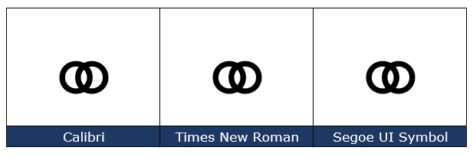
Type the Marriage Symbol ⚭ into Microsoft Word, Excel, PowerPoint or Outlook. Both in Office for Windows and Office for Mac. Marriage Symbol ⚭ symbol is two interlocked circles with obvious symbolism. It can be used for any situation you like, perhaps when two items or groups merge or an alternative bullet symbol. How Marriage […]
Why Word’s SEQ code is a godsend
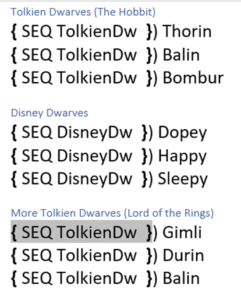
Whenever someone has a numbering or list problem in Microsoft Word, the solution usually revolves around the little known but oh so flexible SEQ code. SEQ lets you do things in Word that aren’t possible with the numbered or multi-level list features. Even the powerful ListNum field has to give way to the power of […]









