Office 2021 is the personal and small business ‘perpetual licence’, non-subscription version of Microsoft Office. For Windows and Mac.
Office LTSC (Long Term Servicing Channel) is the volume licence ‘perpetual licence’, non-subscription version of Microsoft Office for organizations, companies and governments. Also for Windows and Mac.
The features in Office 2021 and Office LTSC are very similar, if not the same.
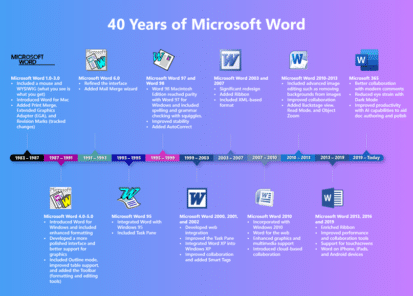
Revisionist History of Microsoft Word
Microsoft noted the 40th anniversary of Microsoft Word with a typically glossy and highly selective history plus some vague platitudes about the future of Word. Their graphic does show how far Word has come from its early days. Of course, plenty has been skipped over in this sanitized history. Like the, literally, thick book of […]

How to quickly switch between Word and Office windows
Often you need to switch between windows of the same program, so there should be a quick keyboard shortcut to do that. Here are your options in Windows or Mac. Whether you’re moving between Word documents, Excel workbooks or PowerPoint decks or Outlook emails, the need is the same. You want to quickly move between […]

Satellite 🛰 emoji in Word, Excel, PowerPoint and Outlook
Insert the Satellite 🛰 emoji or icon into Microsoft Word, Excel, PowerPoint or Outlook. Both in Office for Windows and Office for Mac. How Satellite 🛰 looks in different fonts. In Windows fonts only Segoe UI Emoji and Segoe UI Symbol have the Satellite emoji. As usual the Apple version (Apple Color Emoji font) looks […]
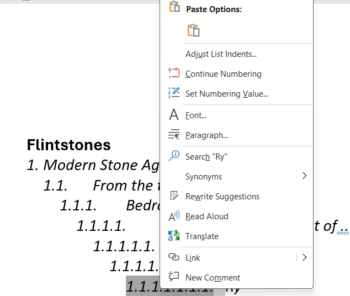
Word multi-level lists, new list, reset numbering and more
Word lists have more power and, let’s face it, confusion hiding under the menus. How to start a new list, continue a previous list, reset the numbering and trying to figure out how a list numbering has been messed up. Many questions arising from our article on Word Autonumbering. Many of them asked about continuing […]
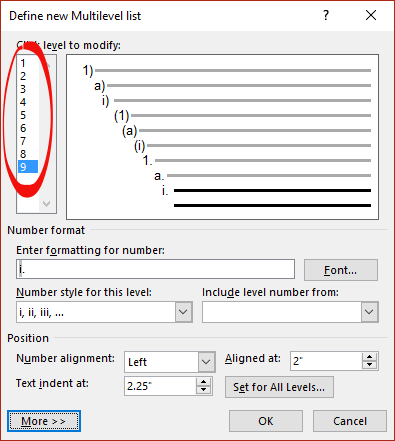
Word Autonumbering … How deep can you go?
There’s a maximum of nine levels available in Word multi-level numbering. That’s enough for the seven dwarves plus two more. There’s a way to get more than nine levels. A Multilevel list setup shows 9 levels. Need more? Perhaps create a separate multilevel list with custom numbering starting at 10? It might be better to […]
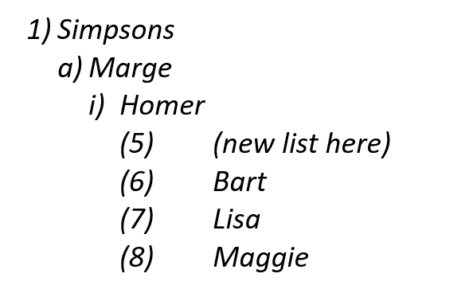
Troubleshooting a Word list problem
Word multi-level lists can get messed up with ‘wrong’ numbering appearing for no obvious reason. Here’s why it can happen, troubleshooting options and how to fix it. It’s too easy to mess up a seemingly normal multi-level list in Word. Options like ‘Start new list’ and ‘Continue from previous list’ are useful (essential at times) […]

Word multi-level Numbering
Word has an amazing range of options for automatically numbering your document headings or paragraphs. Even more amazing is my visit to an office. I found staff going through a long document, laboriously numbering headings and sub-headings by hand! They been doing this for years and weren’t happy when shown this button on the ribbon, it […]
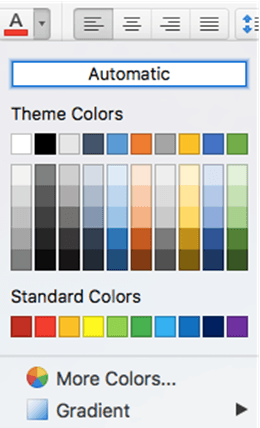
Color selection in Office for Mac, complete
Office for Mac has quite different and extensible color selection options for text, shapes, pages etc. that are the envy of Office for Windows. We’ll explain them all, eyedropper, swatch, color wheel or sliders, palettes and even pencils. Choose from the same range of colors as Windows, but in many different ways and more. All […]
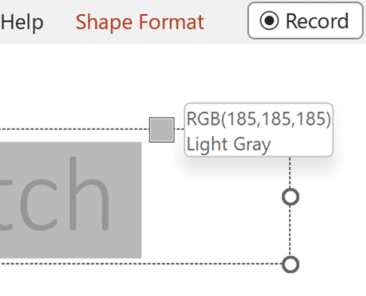
All the Color Picking tools in Microsoft Office
Here’s all the match colors, color picking or color grab tools in Microsoft Office for Windows or Windows itself. While Office for Mac users have it a lot easier with one central ‘eyedropper’ to choose a color from the screen. Naming the color picking tool isn’t consistent in Microsoft Office, it’s called an Eyedropper in […]

Halloween emoji, fast find and copy
Need a Halloween emoji or symbol? Here’s a quick and searchable list of more than 30 spooky, scary emoji for documents, sheets, slides, emails or messages that you can use or copy. In Microsoft 365, Office 2021 and Office 2019 there are also Halloween icons and symbols for Word, Powerpoint and more or see all […]
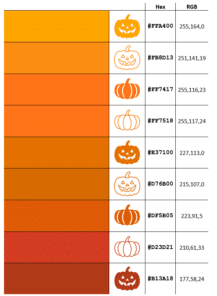
14 perfect pumpkin colors and more in Microsoft Office
Our exclusive Pumpkin Color Charts have the perfect ‘pumpkin’ colors you can use in Halloween documents, slides and graphics with their Microsoft Office compatible color codes including the five Pantone colors called ‘Pumpkin’. There are many Halloween ‘pumpkin’ colors to choose from depending on the variety and ripeness of virtual vegetable you want. See more […]

Make your own Halloween costume pack image
Create your own fun, satirical ‘Halloween costume’ pack in the style of a popular meme using just Microsoft Word or PowerPoint. Use this article as a year-round example of how to overlay one image over another plus adding text to a picture. Take a blank Halloween costume image, add an image and some text. Something […]

PowerQuery mystery solved – how to Remove Duplicates, keeping most recent record
Excel 365’s PowerQuery has many wonderful features but occasionally there are common needs that it can’t easily handle. One of those surprising complexities is removing older duplicates but retaining most recent row for each. We’ll explain the simplest solution then why it works. Here’s some sample data on the left and the most recent purchase […]
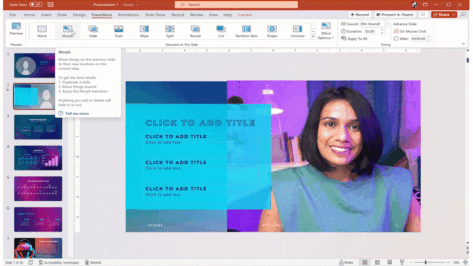
PowerPoint Cameo puts your video selfie into a slide
Microsoft PowerPoint’s Cameo lets you put a live camera feed into your slides. The camera feed can be moved, resized, cropped, and styled just like any other image. Designer in PowerPoint can also be used to add flair to slides that use cameo. Cameo is already in Windows and Mac and now also in Powerpoint […]
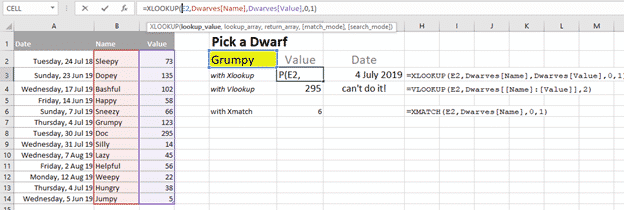
Xlookup is truly a great Excel function
One of the most commonly used and confusing Excel functions is much better in Excel 365 and Excel 2021. Vlookup() has a new, better and easier replacement Xlookup(). It’s a truly good and useful addition to Excel, some might call it a godsend. Xlookup is available in Excel 365 for Windows/Mac/Apple/Android plus Excel 2021 for […]

Anesthetists discover how NOT to use Excel
A British medical office has made a right mess of selecting trainee anesthetists by the misuse of Excel. Let’s look at what happened and some ways you can avoid similar mistakes. As told in The Register, the UK Anesthetic National Recruitment Office (ANRO) had the job of selecting candidates from across seven regions to get […]