Office 2021 is the personal and small business ‘perpetual licence’, non-subscription version of Microsoft Office. For Windows and Mac.
Office LTSC (Long Term Servicing Channel) is the volume licence ‘perpetual licence’, non-subscription version of Microsoft Office for organizations, companies and governments. Also for Windows and Mac.
The features in Office 2021 and Office LTSC are very similar, if not the same.

Use the Office phone activation option a better way
Microsoft has a better, smarter option for the telephone activation of Office 2021, Office 2019 or earlier versions of Office with a method nowhere near as painful or clumsy. All you need is a smartphone, iPhone or Android. What is Microsoft software activation? Software Activation happens after installing perpetual license Office such as Office 2021, […]

Moai 🗿 or stone statue emoji, 3D model and more in Word, Excel, PowerPoint and Outlook
Add the Easter Island stone statue (Moai/Moyai) 🗿 symbol, 3D model or photo into Microsoft Word, Excel, PowerPoint or Outlook. Both in Office for Windows and Office for Mac. Moai 🗿 symbol represents the famous stone statues of Easter Island. It can be used to show a deadpan, ‘straight face’ or ‘stone face’ (literally) expression. […]

Easy charts and summaries in Excel
There are many ways to visually explain a list of values with different types of Excel Charts and other trickery. We’ve already looked at the numerical or statistical ways to summarize a list of values. Now let’s visualize the data in various ways available easily in Excel. There are various charting options available which can […]

Eight SUM functions in Excel … and more
Everyone knows the SUM function in Excel but that’s just the start, there are eight SUM() functions (and more) for adding up numbers in different ways. SUM() SUM is one of the first functions taught to newcomers. It’s as old as Excel itself (older because SUM was in the first spreadsheet program, Visicalc) In its […]
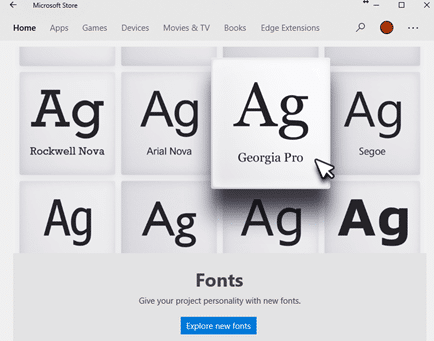
Why there’s three font locations in Windows 11 and 10
With the sale of fonts via the Microsoft Store and cloud fonts there’s now a complication in the familiar way fonts are managed in Windows 11/Windows 10 and how Office for Windows handles new fonts. There are now three different locations that fonts can be saved. For as long as anyone can remember, all Windows […]

Outlook and Office might be blocked by anti-virus software
A Windows 11 update might stop Outlook or other Office apps from working because of a conflict with anti-virus software. The trouble started with KB5027231 a Windows 11 update released 13 June 2023 which, among other things, fixed a file copying bug. 15 days later Microsoft admitted there was a bug in the bug patch. Not […]
How Big Can a Microsoft Word Document Really Be? Limits Explained
How large can a document in Microsoft Word actually get? While most users never hit the upper limits, Word does have technical size restrictions that can affect performance, file stability, images, and long reports. Here’s what you need to know about maximum Word document size, file limits, and how to avoid slowdowns or crashes when […]

Telephone receiver 📞 emoji in Word, Excel, PowerPoint and Outlook
Insert the Telephone receiver symbol 📞 into Microsoft Word, Excel, PowerPoint or Outlook. Both in Office for Windows and Office for Mac. Telephone receiver or handset 📞 symbol can be used on a letterhead or sign where a phone number is shown. There’s an emoji in the Unicode standard plus two Microsoft Office Icons. How […]

Find out more about fonts
A clever interactive from The New York Times explains the basics of fonts and how to choose the right font for your documents, slides and sheets. What’s your type? Try these tests to pick the perfect font for you starts with an option to read the whole article in different fonts. One of the fonts […]

Designer Erase is a picture edit opportunity for all Office users
Microsoft Designer now has an image editing tool that’s been missing from Microsoft Office. Erase in Designer lets you edit images in an important way that’s not possible in Word, Excel, PowerPoint or Outlook for Windows or Mac. Picture editing in Office has a lot of features but they mostly effect the whole image, there’s […]

Pushing Hands🫷 🫸in emoji in Word, PowerPoint and Office
Type the ‘pushing hands’ emoji, left 🫷 or right 🫸in Microsoft Word, PowerPoint and other Office apps. Officially the emoji are called Rightwards Pushing Hand 🫸 and Leftwards Pushing Hand 🫷 but can also be used as a ‘High Five’. These emoji can be used separately or together to great effect, here’s the hands as they […]

Can you use Microsoft Office with Tiny Windows?
Tiny Windows are stripped down versions of Windows 11 and Windows 10, ideal for older computers or virtual machines. We tested Microsoft Office on both ‘tiny11’ and ‘tiny10’ to see if the Office apps can run in memory far below the official limits. Tiny Windows are stripped down versions of Windows 11 (tiny11) and Windows […]

Lovely Wallpapers from Microsoft – old and new
Tucked away in a little known part of Microsoft’s web sites is a lovely collection of wallpapers (or PowerPoint backgrounds) with new and old, nostalgic designs. Including a 4k rendering of the famous Windows XP wallpaper . Go to https://wallpapers.microsoft.design/ to see all the wallpapers. At first some in full-page versions but scrolling past that […]

Search improvements in Word, Excel and PowerPoint
Microsoft is again changing the way Search works in Microsoft 365 and also (surprise!) Office 2021 to expand the results beyond the document or Office features. Now you can search for definitions, media and even web results from the top bar of Word, Excel and PowerPoint. The most recent announcement is about Office 365/2021 for […]
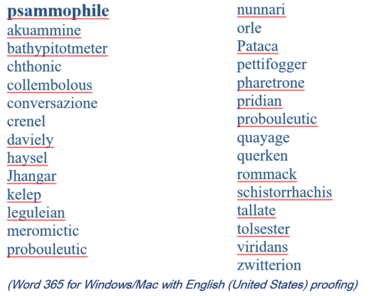
2023 Spelling Bee champs vs Microsoft Word
Our annual look at the words that challenged the Scripps Spelling Bee champs to see how many are recognized by the spell check in Microsoft Word. 2023 wasn’t a good year for Word with a disappointing score that would shame some 14 year olds. Here’s a selection of the last round words from the 2023 […]

Add Power symbols to Word, PowerPoint and Office
Insert the official Power on, off, sleep or standby symbols in Word, Excel, PowerPoint and other Microsoft Office apps. Either via a font or graphics. These power symbols are not directly supported in either Windows or Mac. That’s surprising because the symbols are commonly used on appliances and in software. They are international standards and […]









