Office 2021 is the personal and small business ‘perpetual licence’, non-subscription version of Microsoft Office. For Windows and Mac.
Office LTSC (Long Term Servicing Channel) is the volume licence ‘perpetual licence’, non-subscription version of Microsoft Office for organizations, companies and governments. Also for Windows and Mac.
The features in Office 2021 and Office LTSC are very similar, if not the same.

NSFW or ‘naughty’ words aren’t in Microsoft Word – why?
There’s a strange, almost prudish, feature in the Microsoft Word spell checker aka Microsoft Editor that’s used in many of the company’s products. We’ll explain Microsoft seeming avoidance of ‘Naughty Bits’ and why it’s happening. Warning! This article is unusually explicit (NSFW) for Office Watch. If sexually explicit but standard words (not slang) might offend, […]

Up Down Arrow with Base ↨ symbol in Word, Excel, PowerPoint and Outlook
Type Up Down Arrow with Base or underline ↨ into Microsoft Word, Excel, PowerPoint or Outlook. Both in Office for Windows and Office for Mac. How Up Down Arrow with Base ↨ looks in different fonts. Here’s some examples of how Up Down Arrow with Base / Underline ↨ looks in common Office fonts. Up […]

How to share a single Excel worksheet
Is it possible to share or send a single Excel tab or worksheet from an entire spreadsheet? Sharing a single worksheet or tab isn’t possible. Excel’s sharing features work on the workbook or entire document level. But it is possible to send out or share a single worksheet/tab with a little workaround. Definitions These terms […]
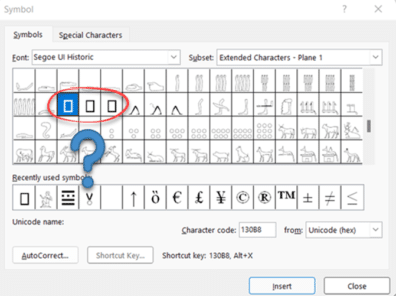
Why are three symbols censored by Microsoft Windows and Office?
There are three symbols that Microsoft won’t put in their fonts for Windows and Office. They are obscure and you’re unlikely to need them. It’s an interesting bit of trivia and example of the differing corporate cultures and judgements. (This article includes an image that might offend some people. NSFW, as they say). There’s a […]

Office security fix bypassed in an incredibly simple way
An important Microsoft Office related security bug fix has been bypassed by hackers in an embarrassingly simple way. Back in September 2021, Microsoft released a fix for a security bug which involved accessing a web page within a Word document (docx or rtf). That web page then downloaded and ran a CAB file (a compressed […]
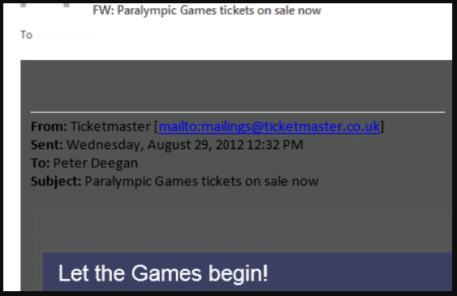
Replying to emails with colored backgrounds
Outlook replies can be a problem of invisible or hard to read text when the incoming email has a color background. We’ll explain the problem and how to fix your reply email. Messages with colored backgrounds might look OK to the sender but are a pain when you try to reply or forward. Most of […]

Outlook Email: why Format Background is called Page Color
If you want to change the background color on an email, Outlook’s option to do that has changed name and location. At least Windows users can change background color, Outlook for Mac users lost this option at few years ago! A color background can be nice in an email but care is necessary when replying […]

Typing both Tilde ~ ∼ symbols in Word, Excel, PowerPoint and Outlook
How to insert either of the Tilde ~ ∼ symbols into Microsoft Word, Excel, PowerPoint or Outlook. Both in Office for Windows and Office for Mac. Tilde ∼ symbol is easy on some keyboards but for other keyboards, there’s no specific key for Tilde. The two Tilde symbols There are TWO tilde symbols in the […]
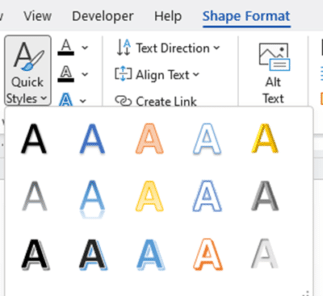
Where did WordArt go after Word 2007?
Microsoft loves tinkering with WordArt and in Word 2010 the entire feature was expanded to Text Effects and split into two features on different tabs. Here’s how to find all the old WordArt features plus a lot more. Back in Office 2007 there was one WordArt feature on the Insert tab. It was quite limited […]
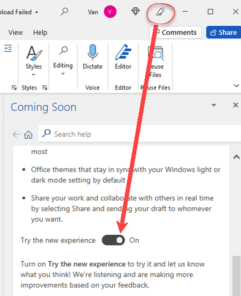
Turn on or off the new look Office 365 for Windows
The new look Office 365 (and Office 2021) is coming. For the moment you might have the option to try it or not. Here’s how. Look for the megaphone If a megaphone appears on an Office app title bar, you can try the new look Office for Windows. Click on the icon to open the […]

2001: A Space Odyssey and font kerning
We’ve looked at design and typography in 2001: A Space Odyssey and how to use the ‘2001’ look in Microsoft Office. Two readers asked about some curious kerning in our version of the title font.Maybe you’re not interested in the fine detail of the text in a fifty year old film? Fair enough. We’re going […]

Word tables for formatting magic
Use Word tables to do formatting tricks, make complex formats easily and solve Word formatting problems. There’s more to Word tables than just showing grids of information like this: Tables have all sorts of little tricks in them and let you do clever things in Word. Here’s a look at some of those tricks … […]
Grabbing audio only from online sources like YouTube
There are many ways to add common sound effects and background music to your PowerPoint videos. But what if you wanted audio from an online source like YouTube? You can copy from online to an audio file, save it to your computer then link into a slide deck. There are many tools to ‘rip’ a video with audio from YouTube that’s against the YouTube terms […]

Up Down Arrow ↕ symbol in Word, Excel, PowerPoint and Outlook
Type the Up Down Arrow ↕ into Microsoft Word, Excel, PowerPoint or Outlook. Both in Office for Windows and Office for Mac. Up Down Arrow ↕ symbol is a vertical line with arrowheads on both ends, pointing up and down. How Up Down Arrow ↕ looks in different fonts. Here’s some examples of how Up Down Arrow ↕ looks in common Office fonts. Up Down Arrow ↕ codes These are the […]
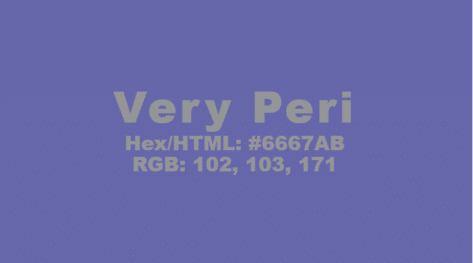
Pantone 2022 color in your Word, Excel and PowerPoint
Pantone has announced their “Color of the Year” for 2022 and, as usual, we’ll explain how to use those exact colors in Word, Excel, PowerPoint and Outlook. For 2022, the new color will also be appearing in Microsoft products with a nice PowerPoint template with extra color palettes. The color of 2022 is … Very […]
Watch the Excel World Cup Final
The Financial Modelling World Cup or Excel esports Final was held a few days ago and you can watch the whole event. There were eight finalists from the USA, Canada, UK, India and Australia. If you can’t get enough of Excel champs at work, check out the earlier rounds. Last 128 & Last 64 (Session […]









