Office 2021 is the personal and small business ‘perpetual licence’, non-subscription version of Microsoft Office. For Windows and Mac.
Office LTSC (Long Term Servicing Channel) is the volume licence ‘perpetual licence’, non-subscription version of Microsoft Office for organizations, companies and governments. Also for Windows and Mac.
The features in Office 2021 and Office LTSC are very similar, if not the same.

Microsoft 365 price increase for monthly payments
In January 2022 there are important changes to the volume licence Business and Enterprise plans for Microsoft 365, Office and Windows. Monthly plans will cost 20% more, making annual plans more enticing. Microsoft says “introduces a monthly term option that will enable partners to provide customers with flexibility at a premium price,” However, the option to cut short a longer license […]

Black Chess Queen ♛ symbol in Word, PowerPoint and Office
Insert the Black Chess Queen ♛ into Microsoft Word, Excel, PowerPoint or Outlook. Both in Office for Windows and Office for Mac. Black Chess King ♛ symbol is useful for users that want to represent the chess piece as a symbol, rather than an image. Or just a generic crown icon. How Black Chess Queen ♛ looks in different fonts. Examples of how Black Chess Queen ♛ looks in common […]
Microsoft Office users can go legal for less
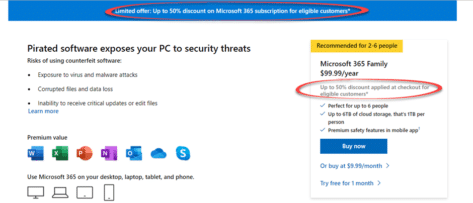
Microsoft is offering a discount price on Microsoft 365 to people with pirated or illegal Microsoft Office. As usual with Microsoft, there are ‘gotchas’ and unknowns with their special offer. People using illegal or pirated Microsoft Office might be seeing a message like this in their Office apps. The message is: Get up to 50% […]

Action Pen is editing by drawing in Microsoft Word
The Ink Editor button in Word 365 has gone, replaced with the ‘Action Pen’ on the Draw tab in Word 365. Some of the ink gestures have quietly changed since the original release of the Action Pen. The ‘Action Pen’ is now on right-side of the Draw tab | Drawing Tools. The Word 365 for […]
Add fancy title bar pattern to your Office Background
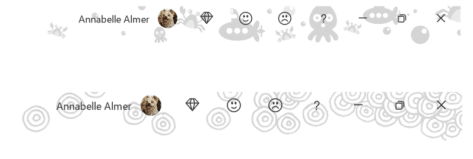
Office Background are the patterns at top right of the title bar in Word, Excel, PowerPoint and other Microsoft Office apps. Here’s the ‘Underwater’ and ‘Doodle circles’ backgrounds, just two of the 14 you can choose from. Office Backgrounds are fairly pointless decoration. They were added to Office 2013 to almost universal apathy outside the Microsoft Hype Bubble™. There is one minor benefit of the pattern […]

Great Word style renaming and alias tricks
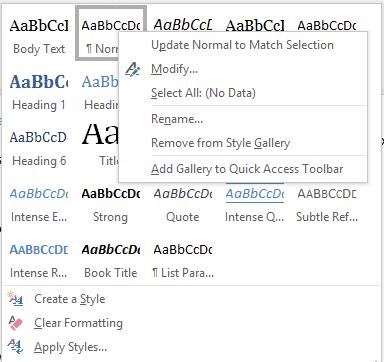
Rename Word styles or give them alternative names/aliases. Sometimes you’ve got no choice but to make an alias because the original style name is fixed. Any style can have an alternative name which appears in the Style Gallery. That’s a useful trick because there’s limited space for the style name on the Gallery and the […]
All 14 separate Style lists and settings in Word
Microsoft Word, since 2007, has developed a confusing mish-mash of lists, galleries and dialog boxes to view, select and manage styles. We’ve received a few questions about finding style options so this Office-Watch.com article will try to make sense of all fourteen places. It’s a guided tour to the various Style setup, configuration and management […]
Who and how to get the new look Office for Windows
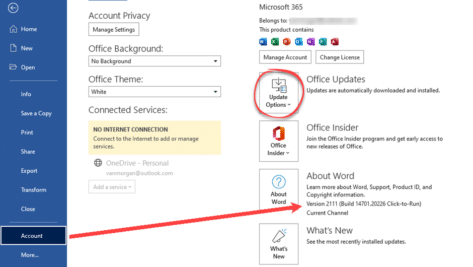
The gradual rollout of the new look Office for Windows (Microsoft 365 and Office 2021) continues. More users, but not all, can now try the revamped Office interface. We’ve had a lot of feedback from Office Watchers about the new look. Some approve, others definitely don’t. Some users are eager to try the new look […]

Nasty Excel XLL files are spreading like crazy
A lesser known Excel file, the .XLL, is being used to spread password stealing malware across the Internet by email and online contact forms. As reported by Bleeping Computer, emails and online forms are getting spammed with links to fake and malicious web sites which entice people to download the malware. The malware is contained […]

Quick Access Toolbar nasty surprises in the new look Office
The Office 365 / 2021 for Windows “new look” is mostly about the Quick Access Toolbar with some nasty surprises and confusion, especially for novices. Let’s dig into the detail of the QAT changes, “fix” it to suit you and how the changes aren’t finished yet and not fully thought through. By default, there’s NO […]

Approximately Equal To ≅ symbol in Word, Excel, PowerPoint and Outlook
Type the Approximately Equal To ≅ into Microsoft Word, Excel, PowerPoint or Outlook. Both in Office for Windows and Office for Mac. Approximately Equal To ≅ symbol with a curvy line above the usual = symbol is commonly used within Mathematics to refer to approximate equality between two values, congruence or isomorphism. Not to […]
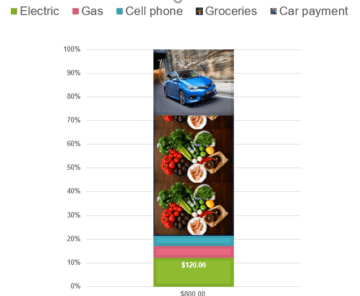
Excel Charts are better looking with pictures
Excel Charts can be even better looking by completely replacing those plain color blocks with pictures. We’ve already shown how to overlay an Excel Chart with an image now we’ll replace the block with a picture. Although commonly differentiated by differing colors like this, how about we look at different images instead? First, click on the plot area within the column, here we’ve selected the brown ‘Car Payment’. This will display […]

Thunderbirds are go, get the look in Word and Office
Thunderbirds are go! They live on in Microsoft Office, ready to serve as a retro look in your Word documents or PowerPoint slides. The passing of Gerry Anderson was sad news. Mr Anderson enthralled millions of kids (and more than a few adults) with his groundbreaking shows like Captain Scarlet and the Mysterons, UFO and, […]
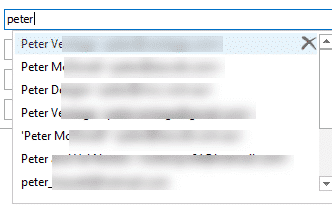
AutoComplete in Outlook – all you need to know
Outlook’s AutoComplete seems simple and useful. It’s certainly useful but it’s hardly simple and occasionally it’s been downright dangerous or embarrassing. AutoComplete makes it too easy to send an email to the wrong address. We’ll look at AutoComplete, how it works, the pitfalls and the few settings available. First we’ll cover the basics (that you […]
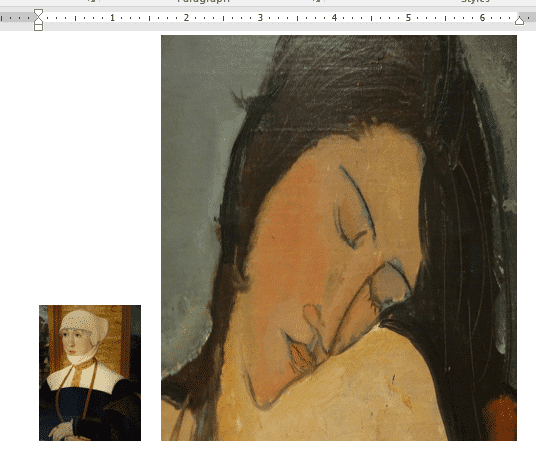
How to make a smaller email or document
Here’s some suggestions for making a Word, Excel or Powerpoint document smaller. Also useful for Outlook emails. We’ve had readers occasionally asking how they can ‘shrink’ a document until it’s under some arbitrary size limit. Why even worry about the file size of documents? Much of the time, the file size isn’t a concern. Modern […]

Outlook calendar tricks & traps adding from links and .ics
There are web links or .ics files that let you add an appointment direct to your Outlook calendar without retyping. Airlines and some theater and concert events offer them at the end of online booking. They are simple to use but there’s also tricks to make them even better. We’ll look at some of the […]









