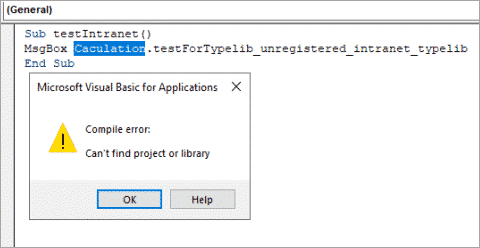
Here’s a function to determine whether a database exists on a network drive. Q: Glenn Faber writes that he needs a function that determines whether a database exists, on a network drive. If it exists (i.e., the network drive is available), a number of instructions will be run; otherwise, they
How to add new color constants. Q: James T. writes: “I need to use certain colors for the back color of controls (I am changing the color from code on a report’s Detail section Print event procedure). The VB color constants enum only has a few colors (vbRed, vbBlue, etc.).
How to create a query that returns the number of visitors (not the number of visits). Q:Adam Nims wants to create a query that returns the number of patients who have visited (not the number of visits). Each patient should be counted only once, regardless of the number of visits.
How to print reports from a printer that’s not the default. Q:Bronwyn Pugh wrote to ask how to print certain reports to a color laser printer, when the default printer is (and should be) another printer. A: I have two laser printers (color and b&w), so I have the same
How to create an Excel timesheet, and export data from an Access timesheet. Q: Maurice writes that he needs to export Access timesheet data to an Excel worksheet for distribution, since some users don’t have Access, so he can’t just create an Access report. Is there a way to do
How to do calculations on a form and store the results. Q: Rob Stoker writes: I have a table called “tblPartHistory” where I store the quantity of parts used in the field “quantity”. When I enter the quantity used into the form I want it to subtract the amount used
How to edit Value Lists in Access 2007. Access Archon #169 In Access versions through 2003, if you selected Value List as the row source type for a listbox or combo box, you had to type in the list values as a semicolon-separated list, which is a tedious chore for
How to show multiple lines of information about listbox items. Access Archon #164 Introduction Listboxes are a convenient way to select one or more items for action, such as creating Word letters or printing a filtered Access report. But sometimes you need to see more than a single line
Some helpful insights about the future of DAO, and what it means for you. For several years now, there have been rumors that DAO would be dropped, so that in future only ADO could be used to work with Access data. While doing research for my new book, I even
How to use Access custom database properties to store information in a database, out of sight, but available to your code as needed. Access Archon #152 Introduction Sometimes you may need to store bits of information in a database, out of sight, but available to your code as needed.
How to change the sorting order of a report. Q: Steve Rudder writes: “I have an Access report that the user would like to be able to change the sorting order. For example, some of the columns they’d like to sort on in the report are Start Date, End Date
A reader has provided this helpful code that allow user’s to add multiple attachments. In response to my article on faxing with DDE in AW 5.12-5.14, Tim contributed some code for adding multiple attachments: ‘Add attachments Set rstAttachments = _ db.OpenRecordset(“Select * from tblBulkEMailMessageAttachments”) If rstAttachments.RecordCount > 0 Then With
These are some different settings user’s can use to yield the week number in the format they want. Q: Terry Smith writes that the expressionFormat(Now(),”ww”) Which used to yield the correct week number, no longer does so (in early 2005). A: This is not a bug, but a result of
How to turn off the make-table query warning message. Q: Steve Mason wants to know how to turn off the warning message saying “X table will be deleted” before the query runs. A: Open the Options dialog (Tools|Options) and click the Edit/Find tab. In the Confirm section there are
Here’s a handy trick to move or resize a hidden control. Q: Sue S. writes: “Sometimes I need to resize or move a control that is hidden under another control, and it is a real pain to have to use the combo box to set focus on it. Is there
How to change multiple object icons to just one Access icon that represents the database. Q: Sally Q. writes: “I am using Access 2002/Windows 2000, and instead of a single Access icon on the taskbar, I see several different icons, apparently representing every open object in the database. This is
How to make a datasheet column invisible. Q: Mary H. has a datasheet column that is needed for doing calculations, but she doesn’t want it to show. She set its Visible property to No, but it still appears in datasheet view. How can the column be made invisible? A: The
How to skip mailing labels in Access Reports. Q: Dan Holme wants to be able to print just a few labels on a sheet of labels, to avoid wasting a partially used page.A: There is a KB article on this topic — Q299024. I haven’t tried, it, though.
How to format a cell or row in a list or combo box using conditional formatting. Q:Dale Stark writes that he has Access 2000, and would like to make a row or cell in a list or combo box a different color or font based on some condition. He had
How to find the Set Control Defaults in Access 2007. The handy Set Control Defaults command on the Format menu in Access 2003 (and earlier) can be hard to find in Access 2007. It is in the Controls group of the Design Ribbon, with a crossed tools and disc image:
In response to my tip on Updating Word fields in Documents Created from Access Merge in AW 9.11, Peter writes: Note there is a significant issue in the section mentioned above. The code shown does _not_ update fields in headers or footers. Word doesn’t make it easy to work with
Q: Fred Kerr writes that code for importing data from text files that worked fine in Access 2003 doesn’t work in Access 2007. Why? A: If you are using a saved Import spec, it won’t work in Access 2007. There was a significant change in Importing/Exporting in Access 2007; import/export
The phantom breakpoint: what causes it and how to solve the problem. Q: Don R. writes: When I click a command button to print a Word letter (this button runs VBA code to create the letter from a Word template), the code stops on a certain line, which is highlighted
An easy-to-use form that applies either one or two filters to data on a form. Introduction In Access Archon #129(Fancy Filters), I described a form that allowed you to filter data using seven filters and two sorts. Some readers found the complexity of this form overwhelming, so in response to