Some scary headlines warn that ‘millions’ will be blocked from Word, Excel, PowerPoint and Outlook later this month. Sounds scary but most people will NOT be affected and no-one will suddenly lose their Microsoft Office . What’s happening on 17 August 2021? Office web based apps will no longer be
Microsoft has announced more changes to OneNote for Windows. Despite what you might have heard, it’s really a clarification of past promises rather than anything new. OneNote for Windows has been messed about for years with two separate programs operating side-by-side and Microsoft unable to decide which one to prefer.
Finding your way around an Excel workbook is about to get a lot easier with the arrival of Navigation Pane in Excel 365 for Windows. Navigation Pane shows each tab, table and other elements in a nested listing for each worksheet. The Navigation Pane is primarily intended as an accessibility
Microsoft is pushing the Internet Explorer browser over a cliff but there’s a good but hidden reason why IE is worth keeping or get Edge’s IE Mode working. Both Edge and Google Chrome have an annoying feature that adds HTML formatting to the web page downloaded. That’s a problem if
An enigmatic Microsoft tweet about Word Dark Mode set off plenty of talk about changes to the look of Office 365 ,,, but does a single Twitter message mean anything? The response tweets did reveal some interesting tips about Dark Mode. Here’s the tweet that started it all … Nothing
Microsoft has added support for Apple’s iPhone and iPad image formats .HEIC .HEIC and .HIF but there’s a small extra price to pay. After an unsubtle reminder from us, Microsoft has clarified the two extensions needed and the extra to be paid. iPhones and iPads now use a new image
Theta upper case Θ, Theta small upper case θ and Theta lower case ϑ symbols in Microsoft Word, Excel, PowerPoint, or Outlook. Both in Office for Windows and Office for Mac. Theta (uppercase Θ or θ / lowercase ϑ) is the eighth letter of the Greek alphabet. The lowercase symbol represents many things, such as an unknown variable in trigonometry, or
Outlook 365 desktop (Windows/Mac) is getting more Dictation controls for email creation and sending. It’s already possible to dictate (speech to text) an email, after all, the Outlook email editor is Word in disguise and Word 365 has dictation features. Now Outlook Dictation can add receivers (TO, CC or BCC),
Chromebook users are getting unexplained messages when they use some Office apps, leading to rumors about Microsoft Office support of Chromebooks. Microsoft isn’t helping by their silence but the signs are not good for paying Office customers with Chromebooks. It all started when Chromebook users reported getting pop-up messages and
Type the Koppa upper case Ϟ and Koppa lower case ϟ symbols in Microsoft Word, Excel, PowerPoint, or Outlook. Both in Office for Windows and Office for Mac. Koppa (uppercase Ϟ / lowercase ϟ) is a letter used in the earlier forms of the Greek alphabet, it was originally used to
How to insert the Alt key ⎇ symbol into Microsoft Word, Excel, PowerPoint or Outlook. Both in Office for Windows and Office for Mac. Alt key ⎇ symbol is a modifier key, used in a similar fashion to the Shift key. On a Mac, the same key is called Option.
Insert the Thinking Face 🤔 emoji into Microsoft Word, Excel, PowerPoint or Outlook. Both in Office for Windows and Office for Mac. Thinking Face 🤔 emoji has several other names; Thinker, Throwing Shade, Chin Thumb, puzzled and skeptic. How Thinking Face 🤔 looks in different fonts. Here’s some examples of how Thinking Face 🤔 looks in common Office fonts. Thinking Face 🤔 codes These
Sound Bible has some useful, free music and sound effects that can jazz up a PowerPoint presentation. There’s a collection of free audio clips (various rights limitations) from here. In WAV or MP3 format, both compatible with PowerPoint. Many of the text labels are deliberatly bland to avoid copyright disputes.
There’s a new way to program or automate actions in Microsoft Office called Office Scripts. We’ll explain what it is, how it’s different from Javascript or VBA and who can get it. Office Scripts is available for some commercial users in Excel but it’ll spread to other Office apps and
Type the Om or Devanagari Om ॐ symbol in Microsoft Word, Excel, PowerPoint, or Outlook. Both in Office for Windows and Office for Mac. The Om symbol is a divine sign that denotes the essence of absolute truth, Atman or consciousness. In Hinduism, Buddhism, and Jainism. The syllable is chanted either separately or before a spiritual recitation.
The wildcard is an advanced finding feature that has some powerful options beyond the standard * and ? options for Word. What Word calls ‘wildcard’ is really Regular Expressions, or at least a version of RegEx. Beginning or end of a word The beginning of a word can be represented
Using Strikethrough in Word seems straight forward but, like many things in Office, there’s extra tricks hiding away for double, long and short strikethrough. Why use Strikethough? Strikethrough has various uses. Perhaps most commonly to show a discounted price Was $100 now $99.99! Or to show that a change was made from the original: Turn left right at the corner.
TrimMean() function is a slightly different and useful measure than the regular Excel Average(). It’s still an average/mean but without the high and low, extreme or outlier values in the list. Average() (and its partners AverageA() and AverageIFS() use all the values in the array or list provided. TrimMean() excludes
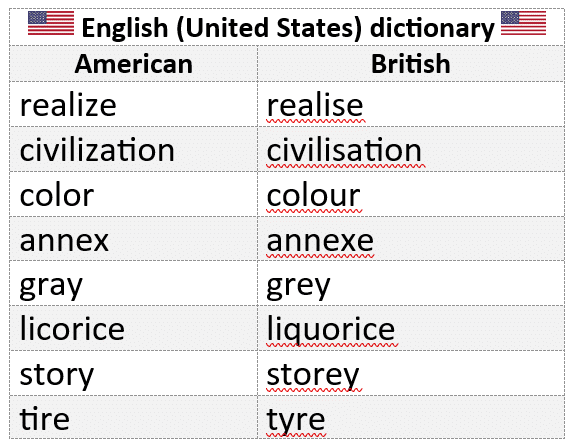
How does Microsoft Word’s spell check go with the 2021 Words of the Champions list from the US annual spelling bee? Each year the Scripps National Spelling Bee releases a Words of the Champions study list to educators, featuring up to 800 new words. We grabbed a selection of the
Office 365 for Windows is getting a ‘visual refresh’ a changed look to the ribbon and overall appearance of Word, Excel, PowerPoint and Outlook (the other Office apps will change later). This new look is currently in beta testing and may change a little before public release. It’s only fair
Type the Weary / Distraught face 😩 into Microsoft Word, Excel, PowerPoint or Outlook. Both in Office for Windows and Office for Mac. Weary / Distraught face 😩 emoji is also called Wailing, Frustrated or Sadness. How Weary / Distraught face 😩 looks in different fonts. Here’s some examples of
Microsoft Word seems to have two pairs of shortcuts that do the same thing – increase or decrease the font size. This is how they are different. The shortcuts are: Ctrl + Shift + < or Ctrl + Shift + > – which are also buttons on the Home tab.
The Office Watch “Shortcut of the Week” tips for Outlook, Excel and PowerPoint from 2005 in the one convenient place. Tip 1 – Outlook navigation The Outlook navigation shortcuts could be more intuitive but here they are: Switch to Mail CTRL+1 Switch to Calendar CTRL+2 Switch to Contacts CTRL+3 Switch
Office 2007 and later to Office 365 not only has keyboard shortcuts but in many ways they are better than previous versions of Microsoft Office. For the most part the shortcuts used in Office XP and Office 2003 still work in Office 2007 through 365 also – despite the very