Microsoft 365 – the subscription / annual fee plan for Microsoft Office on Windows, Mac, iPhone, iPad and Android.
Includes Word 365, Excel 365, PowerPoint 365, Outlook 365 and many other ‘365’ programs, apps and services.

AI images coming to PowerPoint plus more CoPilot news
CoPilot, Microsoft’s AI project, inches towards reality with news of a very limited preview plus hints that Dall-E like image creation will be possible from inside PowerPoint. OneNote, Outlook and Whiteboard will also get an AI makeover. Microsoft continues to make announcements about their AI product, CoPilot, as if it’s already available to the public. […]

Fast rotate and resizing in PowerPoint
With a few PowerPoint keystrokes you can move, rotate or resize an object in any direction in tiny amounts to get it where and how you want it. Positioning objects in PowerPoint applies to PowerPoint for Microsoft 365, PowerPoint 2021/2019 (Windows and Mac), PowerPoint 2016 and PowerPoint Online. Change size, and rotation with the arrow […]
Quicker and finer positioning or ‘nudge’ in PowerPoint
Placing graphics on a PowerPoint slide is simple but getting them positioned “just right” needs a ‘nudge’. Smart Guides and Gridlines Mostly positioning images and other objects is easily done with the Smart Guides (look for the faint red or gray lines as you move about an object) or use View | Gridlines to overlay […]

Windows 8.1 expired for Microsoft 365 users
In early January 2023, Microsoft 365 for Windows stopped supporting Windows 8 or 8.1. Here’s the details of what you’ll have to do and a possible workaround. Microsoft 365 for Windows is supported on Windows 11, Windows 10 and, until 2023, Windows 8.1/8. It’s been a little surprising that the older Windows is still supported […]

Make sense of an Outlook email header
A nice little tool that will make sense of any email header you receive in Outlook. An email header tells you a lot about the sender and the route the message took to reach you. Emails don’t go directly from your computer to the receiver, they pass through at least two other servers and probably […]
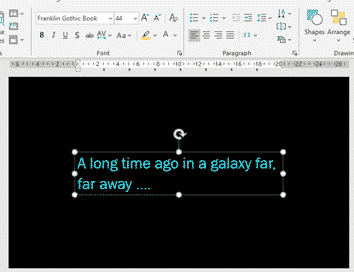
Star Wars movie opening and end credits in PowerPoint
Open and close your presentation with a look from a galaxy far, far away or at least a Star Wars movie near you. Here’s the fonts, colors, background and other details to emulate the opening and closing credits. See Star Wars in Office Star Wars in the Office dictionary Opening Credits A long time ago in […]
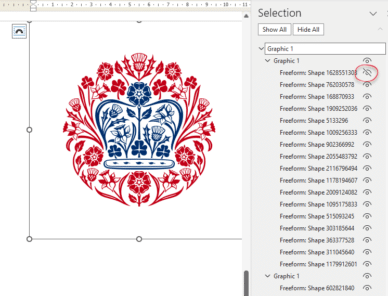
All 20 Coronation emblems and how to use them in Microsoft Office
All 20 (yes, twenty!) emblems for the Coronation of King Charles III, the exact colours required and how to use them in Microsoft Office like Word documents and PowerPoint slides. Also how to get an SVG/icon version of the emblem, ideal for modern Office apps and show just the parts you want (e.g. no text, […]
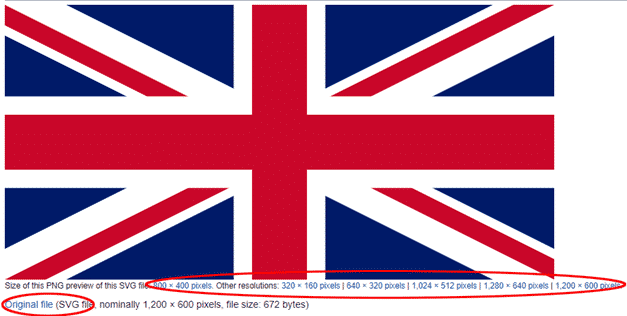
Insert the British ‘Union Jack’ flag into Word, Excel or PowerPoint
Add the British National flag “Union Jack” into Office documents, Word, Excel or PowerPoint, then use some Office picture tools to enhance the image. The same help applies for any other national flag, just look for a different source. Get the British Flag Image There are many, many copies of the British flag available. We’ve […]
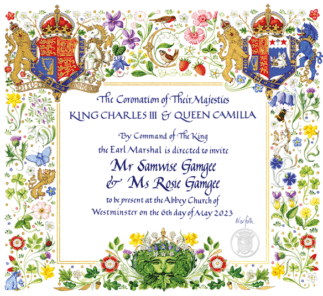
Make your own invitation to the Coronation!
Has your invitation to the Coronation of King Charles and Queen Camilla got lost in the mail? Never fear, you can make your own ‘replacement’ <g>. Or more likely use the ornate graphics for some other purpose, not always so serious. Here’s an ‘invitation’ made in PowerPoint with a name added (including compulsory Monty Python […]

Designer now for everyone – no waiting
Microsoft Designer is now available to everyone with no wait list. You can make graphics and images using Microsoft’s AI system at no cost … for now. The future pricing of Designer has also been revealed. Until now, anyone could use Designer but there was a wait list for access. Now there’s a “Expanded Public […]
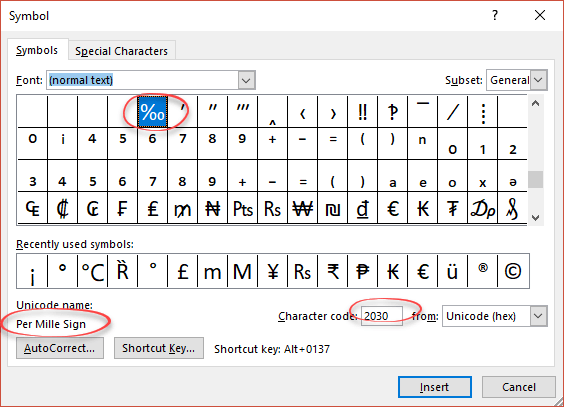
Per Thousand / Per Mille sign ‰ in Word, Excel and PowerPoint
How to type the Per Thousand ‰ (or it’s official name ‘Per Mille‘) sign into Microsoft Word, Excel or PowerPoint. Per Thousand / Per Mille ‰ means ‘parts per thousand’ and can be used for values below 1%. It’s not regularly used in English. How Per Thousand ‰ looks in different fonts Per Thousand / […]
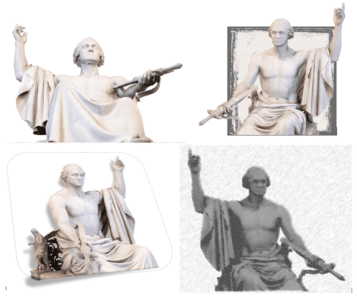
Discover the secret powers of a 3D model
3D models have a secret. They let you choose the exact look you want, turn it into a 2D ‘normal’ image that you can do a lot more with. Here’s a 3D model from the Smithsonian collection, a full length but frankly plain view of a famous statue. With a little Microsoft Office trickery, you […]

Six Word tricks to reduce space between lines
Reducing the line spacing or vertical gap between lines in Word paragraphs can be done in six different ways depending on your needs. Adjusting line spacing to put lines very close isn’t usually necessary for regular text. It becomes useful when trying some design tricks for headings, for example the title in our Millennium poster. […]

Typography 101 – font terms explained
Font vs typeface, ascender, desender, X-height, finial … there’s a nice one-page guide to all the Typography terminology. Become a typography nerd in under 10 minutes by Andrew Coyle Has a good visual summary of all the major words used talking about type – the broad categories of fonts (Serif, San-serif etc), how letters combine […]

Goldman Sachs font for a new look in Excel, Word and Office
The (in)famous Goldman Sachs bank has released their own font which anyone can use in their Word, Excel or Powerpoint documents. It’s called Goldman Sans and is available for anyone to download and use. The font is especially useful in Excel workbooks. The company describes the sans-serif typeface as “approachable without being whimsical”. Goldman Sans, […]

Make Word line spacing LESS than single
There’s a simple Microsoft Word trick that lets you shrink the vertical space between lines. Specifically reducing to below single line spacing. To set less than 1 line space go to Paragraph | Line Spacing and choose ‘Multiple‘ – yes ‘Multiple’. Sounds screwy but it works. Set the Multiple line spacing value to less than one eg […]









