
Where is Excel’s Show Changes?
Back in August we told you about the interesting ‘Show Changes’ feature in Excel which tracks not only edits made to a workbook but who made them. Since then eager Excel users have wondered when it’ll appear in Excel 365 for Windows or Mac … and so are we. According to Microsoft’s own documentation, Show […]

Two checkmark or tick ✓ choices in Word, Excel, PowerPoint and Outlook
Check mark or tick has two options, normal ✓ or heavy ✔ to insert into Microsoft Word, Excel, PowerPoint or Outlook. Both in Office for Windows and Office for Mac. Checkmark ✓ symbol is used for bullet or check lists and other indicators. There’s also Heavy Check Mark ✔ which looks different, heavier, than the […]

Four X cross ✗ choices in Word, Excel, PowerPoint and Outlook
Type one of the four diagonal cross Mark ✗, multiplication or ballot symbols into Microsoft Word, Excel, PowerPoint or Outlook. Both in Office for Windows and Office for Mac. The X or Cross Mark ✗ symbol is used for bullet or check lists and other indicators. It’s the opposite of the tick or Checkmark. There […]
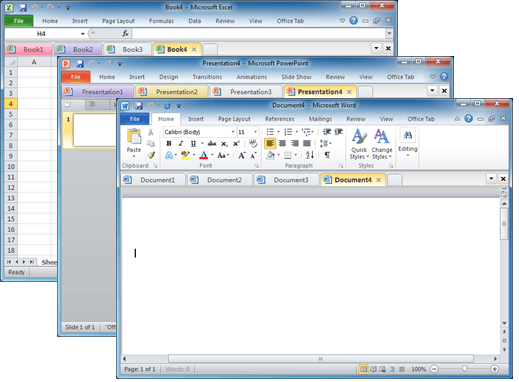
Documents in tabs option for Microsoft Office
There’s a useful and long-standing Office add-on for people who have many documents open at once and prefer them to appear in tabs (like web pages) instead of separate windows. Office Tab switches Microsoft Office for Windows from the usual ‘one document per windows’ view to ‘many documents in a single window’. This can be […]

Save Office images or slides to SVG format
Microsoft Office 365 and Office 2021 let you save images to SVG format from either images/graphics, charts or whole slides from PowerPoint. Originally ‘Save As SVG’ was only in PowerPoint 365 Windows but it’s quietly spread to Word 365, Excel 365 and Outlook 365 as well as the Office 2021 apps. SVG is a scalable […]
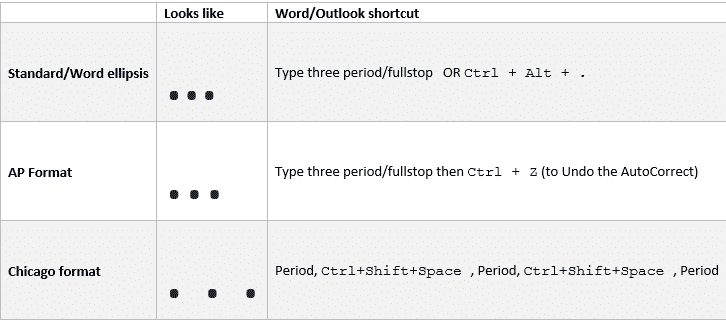
Ellipsis … symbol in Word, Excel, PowerPoint and Outlook
Type the three different types of Ellipsis … marks in Microsoft Word, Excel, PowerPoint or Outlook. Both in Office for Windows and Office for Mac. Ellipsis … symbol is used for a gap or break in some text, usually to drop out some irrelevant text or speech. The same applies in maths e.g. 1,1,2,3 …. […]

Comma Ellipsis ,,, in Word and Office
Like it or loath it but the comma ellipsis has arrived ,,, as an alternative to the more common ellipsis with dots. Here’s how to use it in Word and Office. The comma ellipsis is a modern, more casual version. It’s used as a more dramatic, even annoyed trailing off of a thought, compared to […]
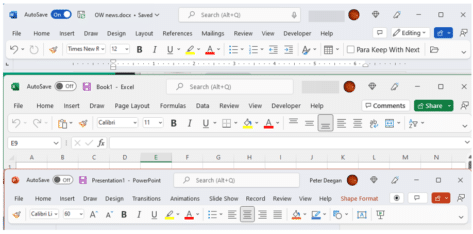
See the ‘simplified’ Office toolbar for Microsoft 365
The latest Microsoft Office 365 for Windows has a new and, to date, undocumented, toolbar or “personalized Office experience”. This ‘toolbar just for you’ is both more and less than it appears. The toolbar is an effort to declutter the top or title bar of the Office apps. Microsoft has crowded out the title bar […]

Simple text with day, month and year to Excel date conversion
The simple and easiest way to convert text dates to Excel dates is using Text to Columns on the Data tab. It’s a simple ‘one off’ method that works well and takes you through the steps. If you need something more automated, for new text dates entered from time-to-time use one of the formulas at Converting […]
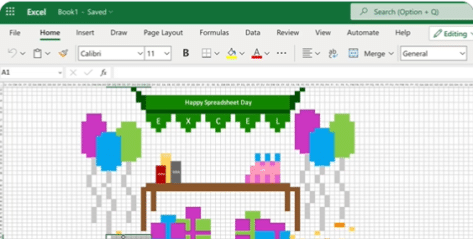
Happy Spreadsheet Day 2022 with Excel
Today, 17 October, is Spreadsheet Day and Microsoft has joined the event with a fun example of what Excel is capable of. #spreadsheetday #spreadsheets #excel Microsoft Excel at Office-Watch.com The hidden trap in Excel’s DateDif()Better Excel formula converts days into Years, Months, DaysFour ways to make text fit in an Excel cellCheck Performance – inside […]
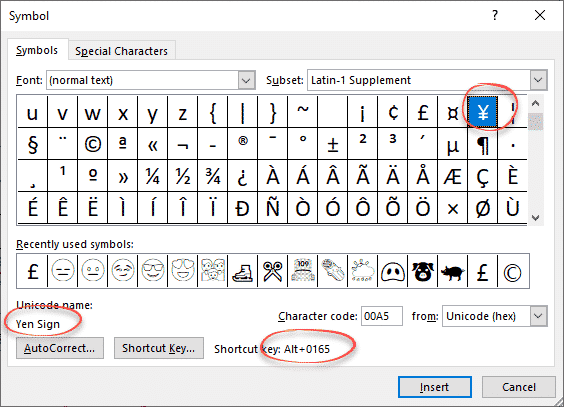
Yen ¥ symbol in Word, Excel, PowerPoint and Outlook
Type the Yen ¥ currency symbol into Microsoft Word, Excel, PowerPoint or Outlook. Both in Office for Windows and Office for Mac. Yen is used for Japanese currency and the Chinese Renminbi / Yuan. Microsoft Excel also offers the Yen symbol for Mongolia even though the tögrög currency uses another symbol. ¥ symbol is easy […]

Array Formula with IF filter in Excel
Excel Array formulas are useful for getting the result from a filtered list quickly with a single, simple formula. Continuing our series on Excel array formulas. Here’s a list of stocks with industries aka Table3. How many stocks are in the ‘Shop’ industry? The array formula in G5 has the answer from the formula: =COUNTIF(Table3[Industry],G4) […]
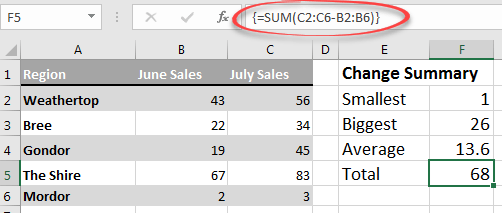
Excel Array formulas for everyone
Array formulas are an important part of Excel and they are a lot more important now that dynamic array formulas are around. Don’t ignore arrays because they’re an unavoidable part of Excel for everyone. This is the start of a series to help you understand arrays in Excel. At the very least, you’ll know what […]

Better Excel formula converts days into Years, Months, Days
Here’s a better Excel formula for converting a number of days into text for year, months and days. This formula leaves out zero values and proper singular/plural (e.g. not “1 Year 0 Months 27 Days” but “1 Year 27 Days”). And we’ll show an even better way to write the formula in Excel 365, 2021/LTSC […]
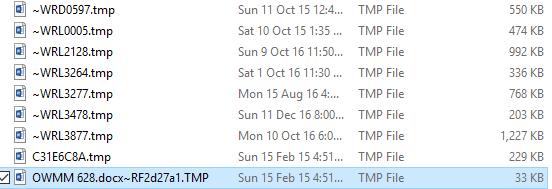
What are .tmp files in MS Office document folders?
If you look in folders that contain Office documents (Word, Excel, PowerPoint) you might see the occasional .tmp file. What are they? Could they be useful? How to look inside. Can they be safely deleted? The quick answers are: probably Word or Office document remnants, could be handy to recover a lost document but otherwise […]

Four ways to make text fit in an Excel cell
Here’s your four choices for making text fit within an Excel cell. About wrapping text, adding line breaks and merging cells in Excel. There are plenty of options to fit text in Excel but not all of them are obvious. At first, when you type text in a cell it just keeps going across the […]









