All about Microsoft Office for Apple Mac. Word, Excel, PowerPoint, Outlook on macOS, Microsoft 365 for Mac, Office 2021 for Mac and earlier versions.

Seven free Halloween fonts for Word, PowerPoint and Office
There are plenty of creepy Halloween themed fonts available for free to work on Windows or Mac with Word, PowerPoint or other Office apps. Here’s seven that caught our eye plus one that you probably already have. All of these work in both Windows and Mac, mostly TrueType fonts. They are licensed for personal use, […]

Add Skeleton and Skull to Word, PowerPoint and Office
Office has various options for graphics or images of skeletons or skulls – perfect for Halloween or other gory, scary uses in Word docs, PowerPoint slides or Outlook emails. We can’t offer a 12-foot skeleton, complete with creepy glowing eyes. For this 3.56 meter monster you have to hunt through Home Depot stores in the […]
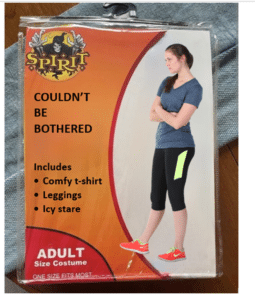
Make your own Halloween costume pack image
Create your own fun, satirical ‘Halloween costume’ pack in the style of a popular meme using just Microsoft Word or PowerPoint. Use this article as a year-round example of how to overlay one image over another plus adding text to a picture. Take a blank Halloween costume image, add an image and some text. Something […]
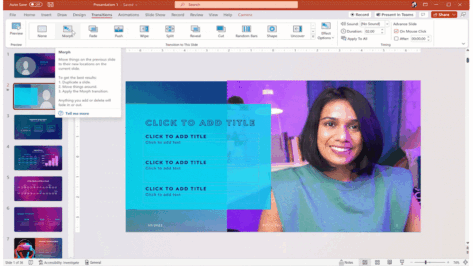
PowerPoint Cameo puts your video selfie into a slide
Microsoft PowerPoint’s Cameo lets you put a live camera feed into your slides. The camera feed can be moved, resized, cropped, and styled just like any other image. Designer in PowerPoint can also be used to add flair to slides that use cameo. Cameo is already in Windows and Mac and now also in Powerpoint […]
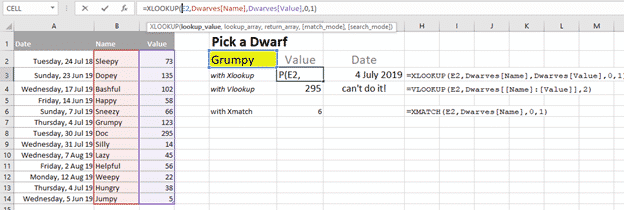
Xlookup is truly a great Excel function
One of the most commonly used and confusing Excel functions is much better in Excel 365 and Excel 2021. Vlookup() has a new, better and easier replacement Xlookup(). It’s a truly good and useful addition to Excel, some might call it a godsend. Xlookup is available in Excel 365 for Windows/Mac/Apple/Android plus Excel 2021 for […]

Anesthetists discover how NOT to use Excel
A British medical office has made a right mess of selecting trainee anesthetists by the misuse of Excel. Let’s look at what happened and some ways you can avoid similar mistakes. As told in The Register, the UK Anesthetic National Recruitment Office (ANRO) had the job of selecting candidates from across seven regions to get […]
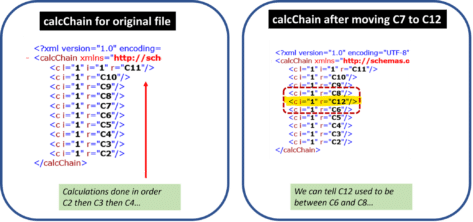
How Excel’s hidden CalcChain can catch data cheats
There’s a hidden part of Excel which can be used to catch ‘data cheats’ or people who tweak workbooks to get the results they want. There’s a news story about research into honesty, the academic is being accused, ironically, of dishonesty in their findings. The Professor is suspected of tampering with source data to change […]

Bharat or Bhārat (India) in Microsoft Word
The alternative name for India is Bhārat and that term is now being used, somewhat controversially, by the government. How does Microsoft Word handle “Bharat” and what are your choices for either using the word or not. Even if you’re not interested in the name change, it’s a practical lesson in what’s possible in the […]

What is Dall-E and what it’ll do for Microsoft 365 customers
Microsoft is adding Dall-E to new services for Microsoft 365 (Designer), Bing and Office (starting with Word). Let’s look at what Dall-E is, what it can do for you and the fun to be had. In short, Dall-E turns text into an image with often good and sometimes funny results. Dall-E converts a text request […]
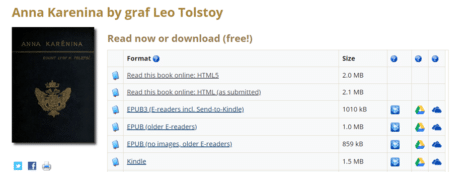
Listen to free audiobooks from Microsoft and Project Gutenberg
Microsoft and Project Gutenberg have joined to create thousands of audiobooks for free, using modern ‘text to speech’ technology that’s amazingly good. And we have some tips on how to create audiobooks with more variety in voice, accent and pace. Since 1971, Project Gutenberg has compiled a wide range of copyright free ebooks in many […]

Microsoft’s font substitution for Aptos really sucks
Microsoft’s alternatives for the new Aptos fonts range are very poor. In some cases, the substitutions make no sense at all. We’ve looked at what happens if a document with Aptos fonts is opened Office 2016 and earlier versions of Word, Excel, PowerPoint and Outlook. Aptos fonts are the new default for Microsoft 365 and […]
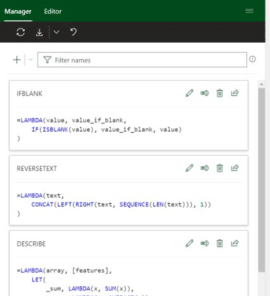
Microsoft fixes a big hassle with Excel’s great Lambda()
Microsoft has fixed the big hassle that comes with the otherwise excellent Lambda() feature in Excel 365 with the new Advanced Formula Environment. Office Watch has sung praises over the power that Lambda brought to Excel. It’s the ability to write custom functions within Excel but without VBA macros. Proper IDE for Excel formulas But […]

Copying images from Designer to Office documents
Unfortunately, copying an image made in Designer isn’t as simple as it should be. Here’s how to grab images made with Designer to use in your own Office documents. Don’t wait, start using Microsoft Designer now It’s easy to paste an image into Designer. Just copy the image from your app (like Word or PowerPoint), […]
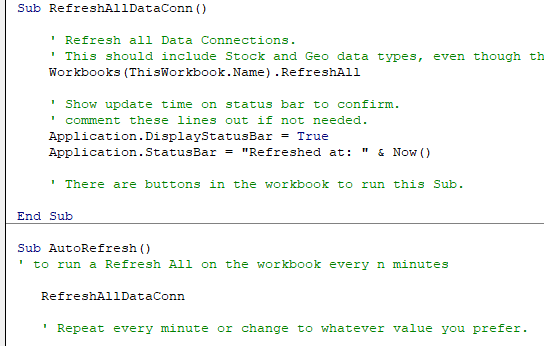
Two Excel workarounds for automatic refresh and recalculation
There are two ways to make Excel automatically refresh data connections and recalculate a worksheet. These tricks are important with the Stock and Currency data type in Excel 365 but also other situations. Normally Excel will update itself when you change a cell value. These days there are situations where cells change value but Excel does […]

Gun 🔫 emoji in Word, Excel, PowerPoint and Outlook
Insert the Water Pistol or Gun emoji 🔫 into Microsoft Word, Excel, PowerPoint or Outlook. Both in Office for Windows and Office for Mac. AND how to make the ‘gun’ point to the right. Water Pistol 🔫 symbol is the only ‘gun’ style symbol in the emoji collection. It’s officially called ‘Water Pistol’ but searching […]

Ten ways to Reverse, Mirror or Flip Text in Microsoft Word
There are at least ten ways to ‘reverse’ ‘mirror’ or ‘flip’ text or images in a Word document. Horizontal, vertical, reversed, combined or any angle you like. When people say those terms they can mean different things so we’ll look at many options and how to do them. Also along a curve, but that’s a […]









