All about Microsoft Office Word, Excel, PowerPoint and Outlook, Microsoft 365, Office 2021 and earlier versions.

Now there’s Stock videos for your PowerPoint slides
Short Stock videos are coming to PowerPoint 365 slides and backgrounds. Instead of searching the web or making your own little videos, they are now available from PowerPoint itself. All the videos are short (around 10 seconds) and automatically loop by default. Here’s four of them as a sampler .. They seem intended as backgrounds […]

We’ll miss Claude Almer
Claude Almer 1950-2020 We’re devastated to report the passing of Claude Almer who died in Sydney, Australia, on November 19, 2020 after a long illness Claude was technical and personal support for Office Watch since well before the newsletter started in 1996. Whenever in-depth analysis of some virus code was needed, Claude would dive in […]

Bring a great library into your home
The famous Bodleian Library in Oxford is a lovely place to work and now you can pipe that ambience into your ‘Work from Home’ area. More than a few Office Watch articles are written in libraries including the old British Library Reading Room (alas been closed for some years), the Edinburgh Central Library and the […]
Office 2010 updates are still available, here’s how
0Patch is stepping in where Microsoft has left by offering continued security updates for Office 2010 after official support was dropped a few months ago. Newly discovered high risk security bugs in Office 2010 will get micropatches from 0Patch. These unofficial updates change the existing program files to prevent the new security lapses troubling your […]

Putting a Command on the Quick Access Toolbar
The Quick Access Toolbar (QAT) is located on the left side of the Word, Excel, PowerPoint or Outlook title bar. You can add commands, options and even symbols for easy and quick obvious access By default, the QAT only has Save, Undo, Redo and Touch/Mouse commands but you can cut down on unnecessary keystrokes by placing […]
Reader’s suggestion for typing a tick in Office
A quick way to type a ü tick or check mark character in Word. Another great Autocorrect suggestion from Morris B. ” … the one that I have found the most useful is to replace ‘./’ with a tick (wingdings 252 – or wingdings 254) “ Using the fullstop/period is a clever Autocorrect prefix since […]
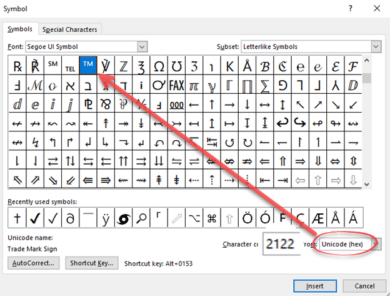
Quickly add any special characters in Office
One of the eternal questions to Office Watch is about adding characters to an Office document. Symbols and characters not on the keyboard. The most common requests are for adding currency symbols like Pound £ Euro € or Yen/Renminbi ¥ but can also include the @ symbol which can, even these days, be missing from […]
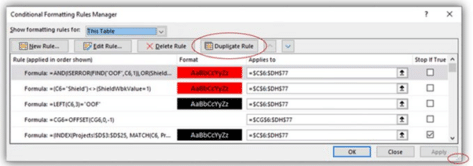
Excel is getting better Conditional Formatting with much needed improvements
Excel’s Conditional Formatting is getting two small but much needed changes that will make it a lot easier to use. According to Microsoft, the latest Insiders releases of Excel 365 for Windows has two changes to the Conditional Formatting Manager dialog. Resizable The dialog is now resizable from the handle at bottom right. That means […]

All you need to know about Microsoft Office and Big Sur MacOS
Apple is releasing a new version of MacOS, for all Mac computers, called ‘Big Sur’ or version 11. What does that mean for Microsoft Office compatibility and stability? Big Sur is the latest MacOS operating system (version 11) for Mac computers. It’s rolled out from 12 November but you can decide to switchover when you’re […]
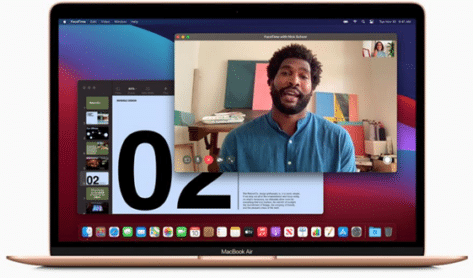
Is Microsoft Office ready for Apple Silicon Macs?
Apple’s new Macbook’s use a totally new type of chip, the M1 or Apple Silicon. What does that mean for Microsoft Office and other programs? We’ll explain what Apple Silicon Macs are and why they are better. Microsoft Office compatibility with the new machines (it’s messy at the moment) and whether to buy an Apple […]
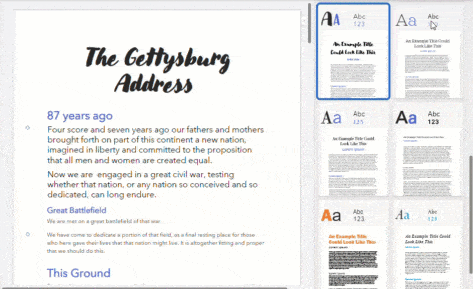
Inside the new Designer for Microsoft Word
Designer, a quick formatting feature in PowerPoint is now available in Microsoft Word. Here’s how to find and use the new feature. Word’s Designer works a little differently to the PowerPoint Designer but the basics are the same. A side-pane offers some templates that will reformat the entire document. Some Microsoft clever coding (they call […]
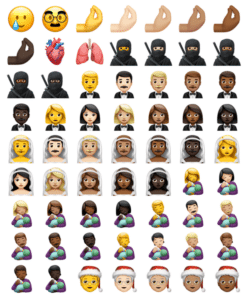
New Apple emoji available now but be careful
The new Apple iOS 14.2 adds 117 new emoji to use but be careful now you use them because not even all iPhone and iPad can handle them, let alone non-Apple devices. We explain how they work, how the emoji appear on receiving devices and include a full list of the newcomers. The new emoji […]
How to get ‘Plus’ email addresses, the new feature in Microsoft 365 and Outlook.com
Plus + , disposable or instant alias email addresses are now available for Microsoft 365 hosted mailboxes and Outlook.com accounts. Here’s how to get this useful email trick for your mailbox. Outlook.com All Outlook.com accounts have plus addresses automatically. It was introduced to Hotmail (‘as was’) back in 2013. It’s such an ‘old’ feature, many […]
Get the most from Plus addresses in Outlook
Outlook for Windows/Mac has features that work well with email plus or disposable addresses. Plus addresses let you make sub-addresses that come to the same mailbox see What are email Plus addresses and how to use them for details. Outlook Rules with plus addresses Most Outlook Rules are based on the senders address but there […]

Make your own ‘Awards’ with Word and PowerPoint
Those ‘award’ logos with the laurel or fern on each side can be made in Word or PowerPoint. The ‘awards’ can be serious or joking. Here’s the thing we mean, you’ll often see them on theatre or movie posters. Format The standard wording for these logos is: Award organization (Academy Award, Pulitzer, Tony, BAFA) The […]

Copyright © tricks for Word, Excel, PowerPoint and Outlook
Tricks for typing the Copyright © into Microsoft Word, Excel, PowerPoint or Outlook. Both in Office for Windows and Office for Mac. Copyright © symbol isn’t on any keyboard but is so commonly used that there are special shortcuts available to type © Copyright © in Word and Outlook The Copyright © has an inbuilt […]