All about Microsoft Office Word, Excel, PowerPoint and Outlook, Microsoft 365, Office 2021 and earlier versions.
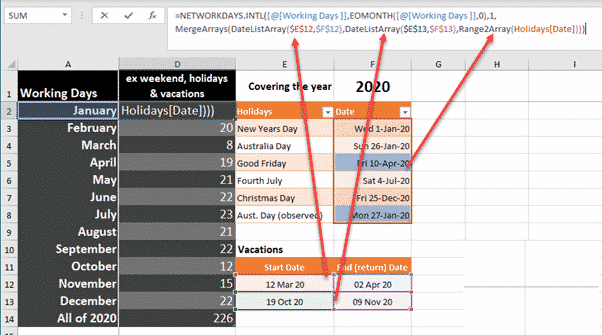
Complete Excel NetworkDays() solution with holidays & vacations
Excel’s NetworkDays() and NetworkDays.Intl() need more help to cope with realistic situations with public holidays and more than one vacation. Annabelle Almer started looking at NetworkDays() & NetworkDays.Intl() and we ended up deep down a geeky rabbit hole trying to get the functions working in realistic situations. The functions work, as advertised, but trying to […]

Excel making list of days between two dates
Making a list of all the days between two Excel dates is possible in various ways, manually, an Excel 365 formula or some VBA code. We need a way to make a list of all the dates between a start and end date. Use this to make a list of all vacation days for a […]

Konami Code in PowerPoint and other Office documents
The Konami Code symbols can be used together or separately in PowerPoint slides, Word documents or elsewhere. They serve to demonstrate some tricks and failings in Office and it’s SVG support. The Konami Code graphics caught our eye because they are a useful set of icons or graphics either complete or separately. There’s nothing like […]
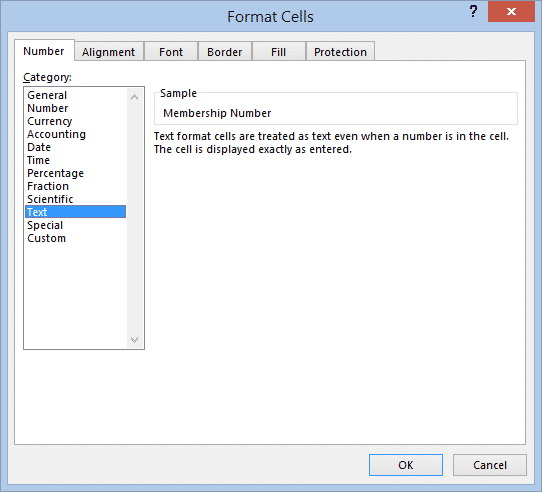
Enter Numbers Starting with Zero in Excel
If you’ve ever tried to enter a number starting with zero into an Excel spreadsheet, you will have had the frustrating experience of finding that as soon as you exit the cell, the zero disappears from the front of the number. Here’s how to stop Excel from ‘helping’ you when it’s not wanted. Because zero […]
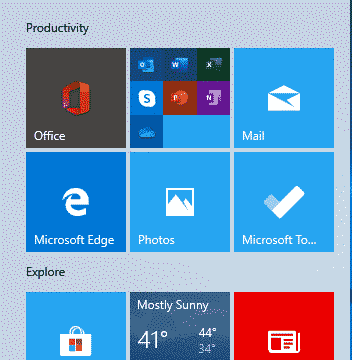
Fixing Office confusion and other hassles on Windows Start menu
The Start Menu on a new Windows 10 has Microsoft Office icons which are badly labelled, misleading and setup to promote Microsoft’s corporate agenda. We’ll explain what Microsoft has done and how regular Office users can make the Start Menu better. Make a Start Menu that suits you, not Microsoft. A new or reset Windows […]
Office all-in-one app for Apple iPhone and iPad
Last week we said it would not be long before Microsoft released their Office app for Apple devices and, sure enough, within a few days Office ‘all in one’ for iPhone and iPad is out. The app is a combination of Word, Excel and PowerPoint plus other tools into a single app. Individual Office apps […]

Oblique RAT documents try to infect computers
A new type of infected Word document is doing the rounds with the name ObliqueRAT with a few new tricks. ObliqueRAT is similar to an earlier nasty CrimsonRAT but has a range of infection capabilities and is encrypted. Password Protected The infected Word documents usually arrive via email and are password protected. Presumably the password […]

Office ‘All in One’ Mobile app – the video!
Microsoft has released a video to promote the Office Mobile ‘all in one’ app for Apple and Android. It’s big on fancy graphics but almost no useful information. There are lots of fancy colors, bouncing bubbles and even Office logos turning into balloons then exploding … all for no good reason. There’s more info in […]

Vale two pioneers of word-processing, Lawrence Tesler and Gary Starkweather
Farewell to Lawrence Tesler and Gary Starkweather. One gave us the clipboard with cut, copy and paste as well as the ridding computers of modes. Mr Starkweather invented the laser printer, a major innovation for the time. Back in the 70’s, word-processing programs had two modes – editing and viewing. Edit mode had rough text […]

Multiple Holiday lists in Networkdays()
Here’s a limited solution to the problem of excluding multiple holidays or vacation lists to use in NetworkDays() or NetworkDays_Intl() and a request to Microsoft for an improvement in the function. NetworkDays() or NetworkDays_Intl() is OK if you only have to deal with one list of public holidays or one vacation. But in the Real […]

Excel’s NetworkDays() and Holidays in the real world
We looked at the handy NetworkDays.Intl() function in Excel and mentioned that the Holidays parameter is a lot more complicated that it appears. Let’s look at how Holidays works and how it gets messy when faced with real world applications. Quick Recap of NetworkDays.Intl() Just to recap, NetworkDays.Intl() lets Excel count the number of working […]

Using NetworkDays.intl to count working days step-by-step
Here’s a step-by-step example of Networkdays.Intl() in an Excel worksheet. We suggest using that improved function over the older NetworkDays() with less options. As usual, you can select the formulas tab and Excel will guide you through the process. From Formulas | Date & Time choose NETWORKDAYS.INTL . It will open a dialog box to […]
Count your working days in Excel with NETWORKDAYS()
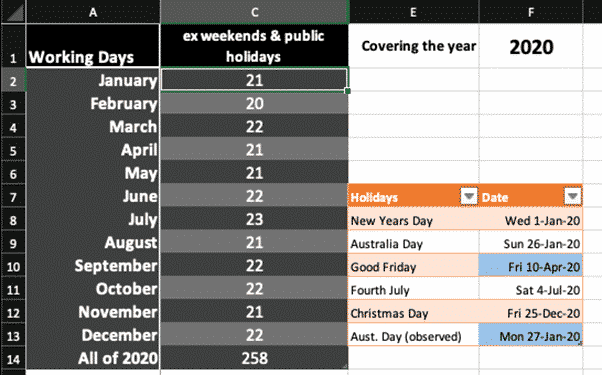
The NETWORKDAYS function in Microsoft Excel will calculate the number of working days between two dates. It will automatically exclude weekends (e.g. Saturday and Sunday) plus you can exclude public holidays and personal vacations. Most people read the function as ‘Network Days’ but it’s really ‘Net Work Days’. Figure out employee benefits from total working […]
Excel convert Range to Array in VBA
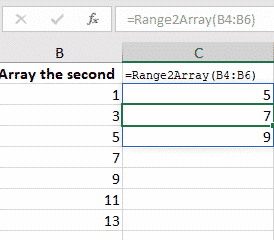
Arrays have more powerful options than simple Excel ranges but, happily, it’s very easy to convert a range of cells into an array. Or sometimes you have a mix of arrays and ranges that need to be managed as a collection of arrays. That’s what we’ve needed to make the NetworkDays() and NetworkDays_Intl() functions work […]
PowerPoint makes animated GIFs of your slides
PowerPoint 365 is now able to create animated GIF’s from presentations. It’s a little limited but the basics are there, and we’ll explain how to get even more from ‘Export to Animated GIF’. Animated GIF’s have long been wanted in PowerPoint. They make simple animations or mini-videos which are widely compatible with web pages and […]

Microsoft backtracks on forcing Bing into Office 365
The plan to force Office 365 ProPlus users to Bing Search has come to a halt with Microsoft announcing a backtrack on their original ham-fisted plan. As we told you last month, they wanted to add a Microsoft Search extension for Google Chrome which also changed the default search engine to Bing. This new Office […]