All about Microsoft Office Word, Excel, PowerPoint and Outlook, Microsoft 365, Office 2021 and earlier versions.
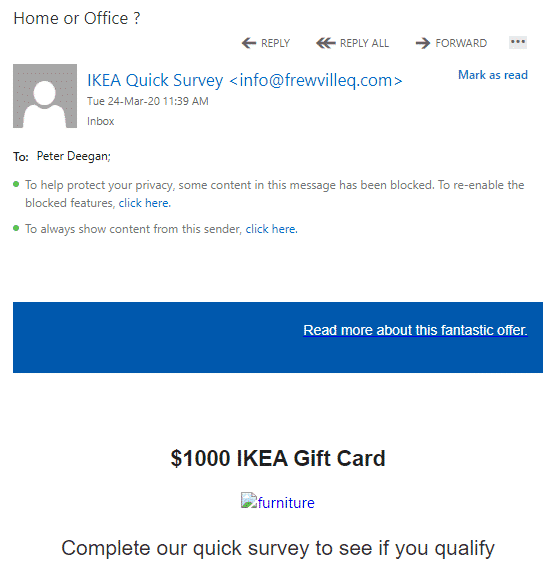
Five simple clues that an email is dangerous
Four simple clues that an email should be deleted. Among the bogus coronavirus emails was something new to us and apparently the anti-spam filters that should have detected it. We’ll use the dangerous email as an example of what to look for in a scam or virus-infected email. The email is supposed to be an […]

Coming attractions in Teams not ready now
You may have read about ‘new’ Teams features like ‘Raise Hand’ and noise suppression but not that they won’t go public until sometime ‘later this year’. Microsoft is doing its usual trick of promoting future features in their products as if they are available now. Only a close reading reveals the wait time before customers […]
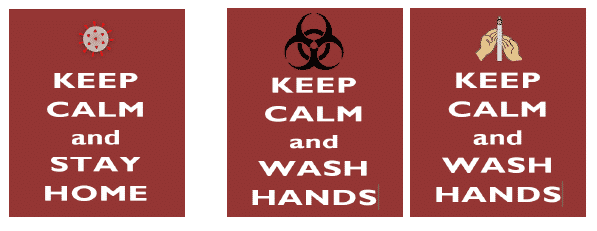
Keep Calm and Wash Hands extras
We’ve added more documents and slides to our template collection, Keep Calm with Microsoft Office with extras like ‘Keep Calm and Wash Hands’. The new designs include useful graphics for coronavirus, biohazard symbol and a hand washing graphic. These and many more Word docs & PowerPoint slides in Keep Calm with Microsoft Office All these are included […]
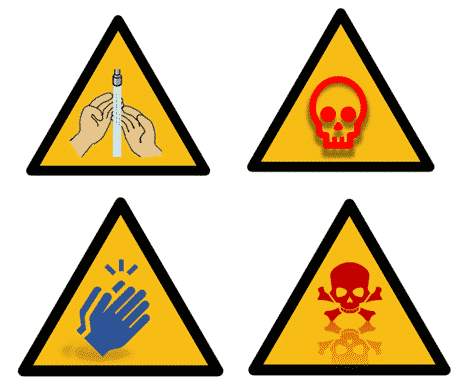
Download a Warning Triangle in Word and PowerPoint
Here’s a download of the standard but blank Warning Triangle graphic and image ready for Word and PowerPoint. We’ll look at the official warning sign specification as a starting point, then we’ll look at variations based on that. In other words, symbols that look a bit like a warning sign, but different. The official ISO […]

Microsoft keeps older Windows 10 alive, what about Office?
Windows 10 1709 (Fall Creators) for Enterprise ENT and Education EDU is having an extended lifecycle until 13 October 2020. No word yet on Microsoft Office policy. That’s to give those organizations some welcome stability at this time. The last thing customers need at the moment is a forced revamp of Windows. Home, Pro, Pro […]

Setup Contacts on Zoom
Linking to other people on Zoom is necessary before you call them. We’ll explain both sending contact requests and receiving them. A person has to be added to your Zoom contacts list before you can call them. Similarly, they have to add you to their contacts before they can call you. Zoom contacts are separate […]

Get ready to Zoom ….
Zoom online meeting software has become very popular with many people joining it for the first time. Here’s how to fully get ready for a Zoom meeting, there’s more to it than the official advice. Two Office Watch readers found themselves asked to join a Zoom meeting at short notice. Neither had heard of Zoom […]

What’s going on with Microsoft Teams?
Microsoft’s Team collaboration service has hit some snags this week in stark contrast to the company’s shameless promotion of Teams over other useful services. We’ll explain what happened and what you can do if the Teams troubles happen again. On both Monday and Tuesday this week, many people had trouble logging into their Teams accounts. […]

Microsoft cloud servers slow down
Microsoft has quietly announced some minor but important slow down in some of their cloud services including the way real-time edits of Office documents are handled. It’s a wise move given the increased demand for cloud services. Microsoft had an outage on their much-hyped Teams services earlier this week. Like other cloud companies, Microsoft has […]

Using Skype with Microsoft Office
Skype can be integrated into collaborating on Word, Excel or PowerPoint documents. It’s not officially part of Microsoft Office collaboration but is easily done. It lets you work on a document while talking to other collaborators at the same time. Like this … This works with any modern version of Office or really any program […]

Do you have your tech ‘eggs’ in different ‘baskets’?
Already we’ve seen signs of stress on Internet access, cloud and streaming services. Do you have alternatives ready to use? Two popular collaboration services, Slack and Microsoft Teams have already suffered slow downs or outages. Part of our Remote Life and Work coverage. Tips and help from experts in working and living online at Office […]

Get faster Internet and Wifi from ISP supplied modems
Here’s one simple tip for getting better Wifi speeds from an existing cable or ADSL modem. It’s a tip that had not occurred to us before but definitely works because Peter has just done it! We’re obliged to Jack Randall for pointing it out. ISP supplied modem can be cheap and nasty The slow-down point […]
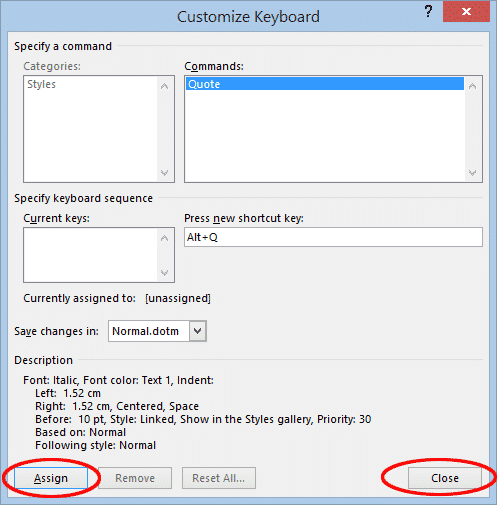
Keyboard Shortcuts for Styles in Word
You can set up your own shortcuts to quickly apply any style in Word. You’re not limited to the in-built shortcuts for Normal and a few Headings. You may be familiar with using keyboard shortcuts to such has Ctrl+B or Ctrl+I to quickly change text to bold or italic but those don’t apply styles, just individual character formatting. We’ve explained […]

Easier ways to setup and test Skype
We can say plenty about Skype, but it’s setup and testing is easier than most. Here’s how to get ready for Skype calling on Windows, Mac and others. While Skype’s text messaging service is awful (clumsy and insecure with Microsoft reading every message!), it’s video and voice calling are good. There’s also a live translation […]

No nonsense guide to fixing Windows audio problems – speakers
When the speakers or headphones don’t work on a Windows computer don’t make a noise, fixing the problem can be frustrating. Here’s our no nonsense guide to the problem and finding a fix. The problem with Windows audio Windows audio support is a mess. Anyone who has tried to get a speaker or headphones working […]

Coronavirus scams and nasty Word documents
No surprise that criminals are using Coronavirus/COVID-19 as a way to trick people into opening nasty Word document that could infect your computer. All the usual suspects are trying to take advantage of Coronavirus to sell stuff. Plenty of fake ‘cures’ being touted, usually existing ‘miracles’ rebadged to take advantage of the unwary. Just one […]