All about Microsoft Office Word, Excel, PowerPoint and Outlook, Microsoft 365, Office 2021 and earlier versions.
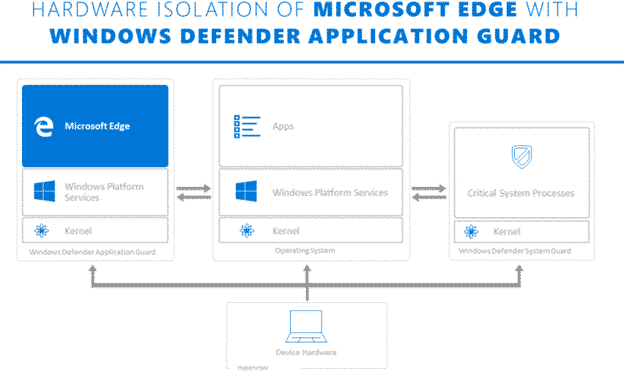
What is Application Guard and what it means for Office 365
Microsoft is touting Application Guard as a defence against Office 365 macro viruses. What is it and will it truly prevent viruses in Word, Excel or PowerPoint documents? Application Guard is already in the Edge browser and Microsoft has announced that it will be extended into Office 365 sometime in early 2020. They’ve not said […]

Wide ranging Access query bug is a series of Microsoft blunders
Oh what a tangled web Microsoft weaves …. a patch for Office has caused another bug in all versions of Access (365, 2019 back to 2010). The bug is the latest in a series of blunders for Office updates. It’ll take until next month for all customers to get a ‘patch of a patch of […]
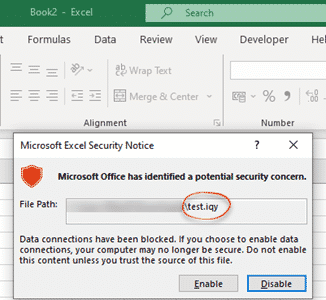
Protect against the latest ransomware attack via Excel
Here’s how to block .IQY web queries in Excel that are being used to infect machines with Buran ransomware. Yet again, a mostly forgotten part of Office is being used by hackers to get inside computers and networks. Suspicious Link (great name) found this nasty in an email. It pretends to be a forwarded message […]

New features promised for OneNote
The future of OneNote involves more connections to other services like Teams, Tasks and Todo. New features made possible by a big effort to bring OneNote code back to a single base. OneNote default installed OneNote 2016 for Windows will rejoin the Office 365 suite from early 2020. It will become part of the default […]
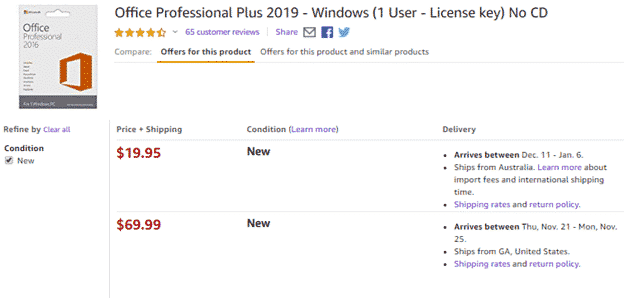
Amazon’s fake problems are bigger than just Microsoft Office
A wonderfully independent article in the Washington Post reveals a big problem with the sale of fake and pirated products on Amazon. Our articles on fake Microsoft Office products is just a tiny part of a bigger problem. The Washington Post is owned by Jeff Bezos, the head of Amazon so it’s great to see […]

Latest changes to Windows 10 available now
The latest update to Windows 10 is out now and so is our companion book Windows 10 November 2019 for Microsoft Office users. Somewhat chastened by past troubles, the November 2019 update is being deployed in a much more cautious way. Microsoft is giving customers a choice about when to update Windows 10 to the […]
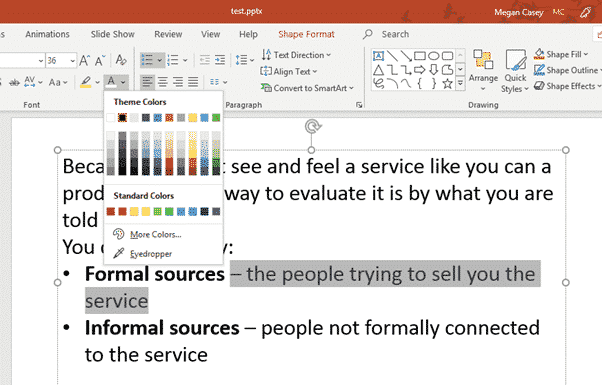
Hiding Text in PowerPoint
PowerPoint has options for hiding slides and also hide & reveal text or content within slides. We have looked previously at hiding things in Word and Excel, and PowerPoint also allows you to hide things, although the approach is a little different. The most common reason to want to hide text on a PowerPoint slide […]
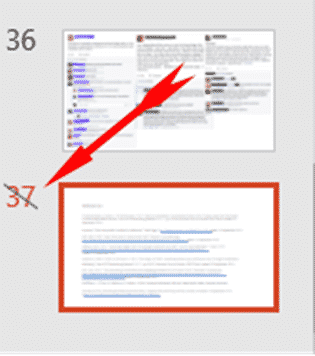
Hide a PowerPoint Slide
If you have a slide that you want to keep in your PowerPoint deck but don’t want to show them in a presentation, you can hide those slides. Go to the strip of slide thumbnails down the side of your project and select the slide you want to hide. You can select multiple slides using […]

Good news for OneNote with Windows as Microsoft does a ‘180’.
OneNote for Windows has a better future after some reverse-course announcements from Microsoft. OneNote desktop program gets extended life and a promotion. The desktop and app versions merging into a single codebase. We’ll also explain the strange case of two OneNote for Windows. The announcements amount to a 180° reversal of past poor, short-sighted management […]
OneNote 2016 for Windows gets dark mode
The first sign that OneNote 2016 is back from a slow death is the announcement of the first new feature in well over a year. OneNote 2016 is getting a Dark Mode just like the Mac and Apple apps. OneNote dark mode will be an option in OneNote 2016 for Windows but only for Office […]

Why are Microsoft Keyboards so damn annoying?
Buying and using a computer keyboard from Microsoft is very annoying, based on what we’ve heard from Office Watch readers. Choosing a Microsoft keyboard is harder than necessary and finding help, even harder. Microsoft’s keyboard range is especially bad for not properly explaining all the features of the products, apparently as a deliberate corporate strategy. […]
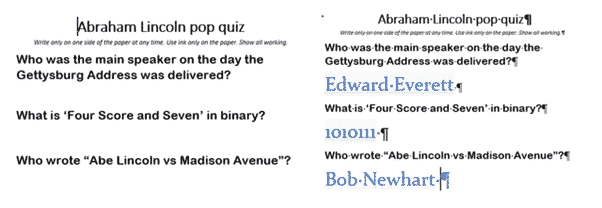
Hidden text positioning and formatting tricks in Word
Word is very clever dealing with Hidden text, perhaps a bit too clever at times. Here’s some tricks for positioning and formatting with Hidden text. Students quiz (left) and Teachers version (right) from the same document. The answer text is hidden in the student version but there’s still space for their answers. Leaving space where […]

Welsh schoolkids and teachers get Office 365 free – what about your kids?
In Wales, all teachers and their students can get Office 365 free, instead of about ₤60, thanks to an initiative of the Welsh government. It’s worth checking what access to the full Office suite your school, college or university kids might have. The Welsh government has arranged this as part of the HWB scheme that […]
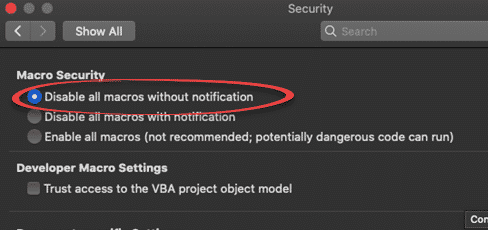
Office for Mac long-standing security bug revealed
A security vulnerability has been discovered in Excel for Mac. It’s been there for many years and affects Office 365, Office 2019, Office 2016 and Office 2011 for Mac. We have details and suggest a protection you can do yourself. It’s another problem with legacy support for an older Microsoft Office feature. In this case […]

Outlook for Mac Profiles, finding and using them
Outlook for Mac also has Profiles to manage multiple setups on the one machine. Though they are managed very differently to Outlook for Windows, the basics are the same on both. To add a bit of confusion, profiles where called ‘identities’ up to Outlook 2011. Outlook 2016 and later for Mac use the ‘Profile’ name. […]

Microsoft Bluetooth keyboard – with Office and Emoji keys
The Microsoft Bluetooth Keyboard is one of two new models with dedicated Office key and Emoji key. What’s this new keyboard like … aside from those innovations? We bought a Microsoft Bluetooth Keyboard with our own money and gave it a long hard look. Source: Microsoft Note: this is the Microsoft Bluetooth Keyboard released in […]