All about Microsoft Office Word, Excel, PowerPoint and Outlook, Microsoft 365, Office 2021 and earlier versions.
Rename the Outlook Archive folder
For many mailboxes it’s not possible to rename the Outlook Archive folder. But non-Microsoft mailboxes can rename Archive to anything maybe ‘Miscellaneous’, ‘Store’ or just ‘Old Stuff’. In modern Outlook with Microsoft hosted mailboxes (Outlook.com, Office 365 hosted or recent Exchange Server) the Archive folder is an in-built folder like Inbox, Sent Items etc. All […]
Manually moving Outlook messages to Archive
Move a message to the Archive folder with any of the usual ways to move an item between Outlook folders plus three dedicated special options only for the Archive folder. See Starting with Archive in Microsoft Outlook Archive in Outlook 365 and Outlook 2016/2019 for Windows Archive button Most obvious is the button at Home | […]

About Outlook Archive, Online Archive and AutoArchive
Outlook has three features called ‘Archive’ with the newer versions (Archive and Online Archive) much better than older ‘AutoArchive’. We’ll explain the difference, how to use Archive and why to avoid AutoArchive. Each form of Archive sets aside older messages or emails you’ve finished with. It does that in two crucially different ways. Archive is […]

Line Ends on Dashed Picture Borders in Word and PowerPoint
One of the more obscure settings when putting a frame around a picture in Word or PowerPoint is the Cap Type or line ends. This setting only applies when you are using one of the dashed borders with the choices Square, Flat and Round. To put a dashed border on your picture, click on the […]

Picture Frame Corner Types in Word and PowerPoint
Join Type is what Microsoft calls the corners of the picture frames – the place where the horizontal and vertical lines join. There are three options: Round. Bevel and Mitre. We’ll show you where those choices are and what they look like. We’ve previously looked at ways to put frames around pictures in Word and […]

Outlook for iPad gets split screen support
Outlook for iPad gets split-screen support which goes a small way towards making the much-hyped app an effective tool for email, calendar and contact management. Sadly, no similar options for other Office Mobile apps. Source: Microsoft plus a little border cropping … According to Microsoft … “ Multi-task like a pro with Outlook, now optimized […]

USB charger vs Apollo 11 – it’s no contest
Peter Deegan used to tell people that a simple digital watch could beat the crap out of the Apollo 11 lunar landing computer. And that was before modern smartwatches. He was wrong … It turns out that a humble USB-C charger has more ‘grunt’ than the rope memory computer on ‘Eagle’. Forest Heller has done a very detailed […]

Special Offers for Office 365 customers
Microsoft has released some limited time, introductory offers for Office 365 subscriber. They’ll mostly interest parents or people wanting some digital learning. These aren’t permanent Office 365 benefits like OneDrive storage or Skype minutes. Microsoft calls these ‘Partner Offers’, in other words promotional, trial lures to joining (yet) another service. The offers are for Office […]

Coronavirus, Buttigieg and other topical words in Word & Office
One of the quiet improvements in Office is the regular updates to the Office dictionary used mostly in Word and Outlook but also other Office programs. They even handle new terms like Coronavirus or names such as Buttigieg. In olden days the main dictionary was only updated with major revisions of Office. Now the dictionary […]
Multi-Line Picture Borders in Word or PowerPoint
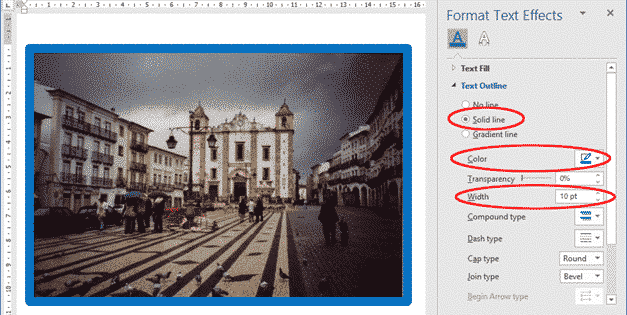
Word and PowerPoint have some great ways to add a border or frame around an image, graphic or logo. We covered these broadly in a Framing Pictures in Office and now we will look in detail at the Compound Type, or multi-line borders. Compound Type is Microsoft’s name for the options of two-line borders with […]
Xlookup now available for all Excel 365 platforms
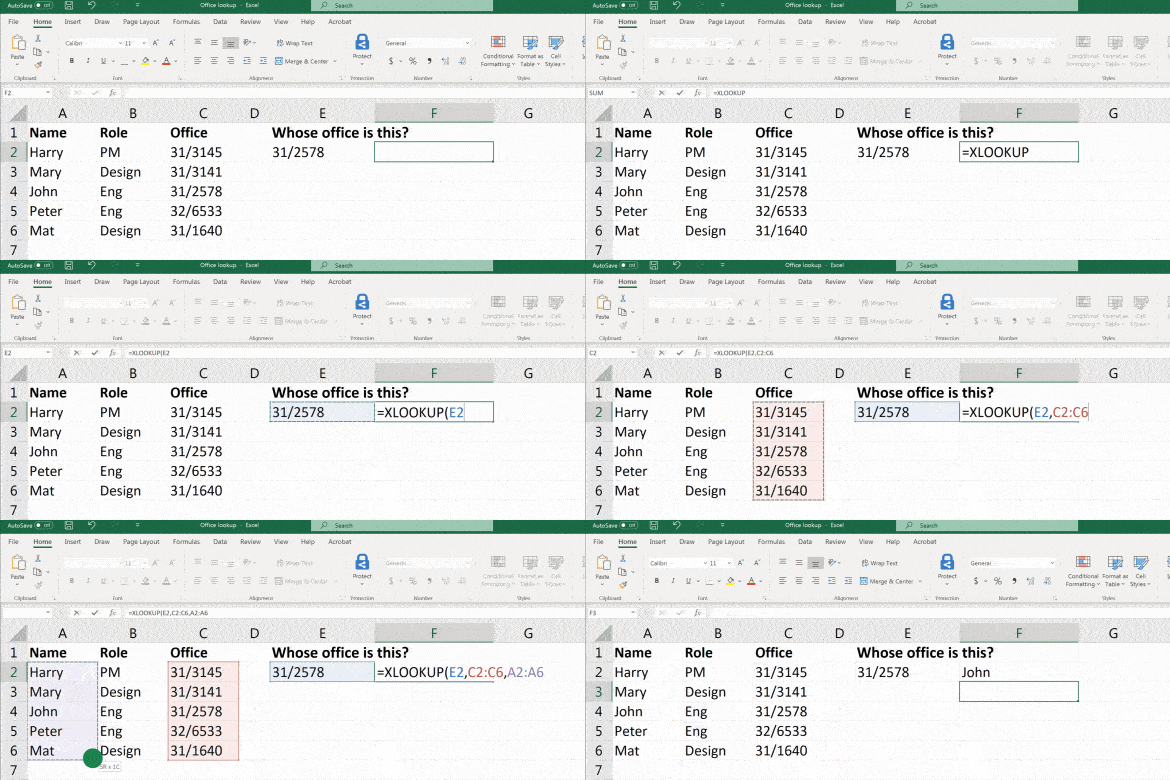
Xlookup is now available across all the Excel programs and apps, making it a viable alternative to Vlookup/Hlookup for Office 365 users. The Xlookup function is the much-improved way to lookup values from a list or table. It works really well but it’s taken some time to appear across all incarnations of Excel 365 and […]

Which version of Office for iPhone, iPad do you have?
Here’s how to find the version number of your Word, Excel, PowerPoint or Outlook apps for iPhone or iPad. Sometimes it’s important to know which exact app version you’re running. Normally, the apps are updated automatically but occasionally it’s important info. Maybe you need to check the version to ensure that a new feature is […]

Office for iPhone get new look and less menu options
The iPhone apps for Word, Excel and PowerPoint have been redesigned with a new look that reduces the initial menu options from five to three. At least that’s what Microsoft is saying, though there’s no change in the apps so far. According to Microsoft the apps are “Redesigned From Scratch: We have redesigned the app […]

Office Picture formatting tricks – Fit, Fill and Positioning
Hiding in plain sight are some useful tricks for picture formatting within a shape. It’s possible to fit or fill the image within the shape and, importantly, move the picture around with shape outline. Office Watch has already talked about various ways to change the look of an image within a shape. There are more […]

Three ways to crop a picture with an Office shape
Here are three options for putting a photo inside any Microsoft Office Shape or Icon (Word, Powerpoint etc.). Photographers call it cropping a photo to a shape or graphic. There are three different ways to get the same or similar result. Two are quick and easy. The third option is a little cumbersome but lets […]

PivotTables ebook extra now available
Our ebook PivotTables and PivotCharts from scratch now has a bonus extra for all readers, new and existing. Our Subscriptions Manager is an Excel workbook to organize online subscriptions like Netflix, HBO, Office 365 and (too) many more. We’ve just added an enhanced version of the Subscriptions Manager to our ebook PivotTables and PivotCharts from […]