All about Microsoft Office Word, Excel, PowerPoint and Outlook, Microsoft 365, Office 2021 and earlier versions.
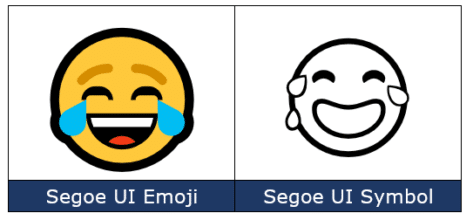
Face with Tears of joy 😂 emoji in Word, Office
Type the Face with Tears of joy 😂 emoji into Microsoft Word, Excel, PowerPoint or Outlook. Both in Office for Windows and Office for Mac. Face with Tears of joy 😂 emoji is one of the most popular, if not THE most commonly used emoji. Also known as Laughing Crying, Laughing Tears, LOL (Laugh Out Loud) or […]

Make your own blue checkmark Twitter ‘verified’ in Office
You can add a Twitter blue or gray checkmark to your Microsoft Office documents including Word docs, PowerPoint slides. We’ll show you how to add the ‘verified’ graphic at any size you need with the exact blue, gray or some other color. Oh, and save yourself $8 a month <kidding>. We’ve all seen the Twitter […]

Inside Microsoft Create, the new Office templates site and more
Microsoft Create is a new part of Microsoft 365 that will replace the existing Office templates site and more. Office Watch explains how to use the Create site now, the many categories available and what’s to come. Cut through all the usual Microsoft Hype™ like “ultimate creator launchpad” and the dreadful phrase “uplevel your creative […]

Where does Microsoft’s money come from … and go to (hint, a lot of profit)
A fascinating graphic shows were Microsoft (MSFT) makes money, how much profit it makes and tax paid. App Economy Insights https://twitter.com/EconomyApp made some charts comparing the Income and Spending of Apple, Google, Amazon and Microsoft. As you can see, the biggest money maker for Microsoft isn’t the traditional cash-cows Windows and Office. It’s Microsoft’s cloud […]
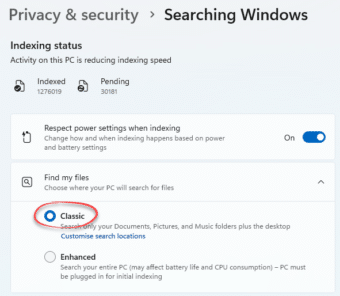
Force Windows indexing to run faster
You can make Windows Search index your documents and Outlook data faster and ‘catch up’ indexing your documents, pictures and emails. Here’s how for Windows 11, Windows 10, Windows 8.1 and Windows 7. Windows Search makes an index of all your files, documents and Outlook data. It’s essential for quick searches, especially within Outlook. Until […]
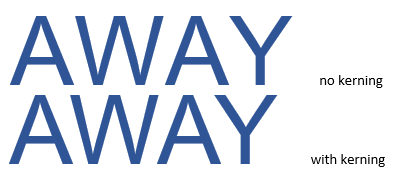
Kerning text simply explained for Word and Powerpoint
Kerning is a font setting that’s important in Word and PowerPoint. We’ll explain kerning and why you mostly don’t have to worry about it except for large size text like titles and headings. Kerning adjusts the horizontal space between letters so they look right to the human eye. It’s necessary because letters take up different […]
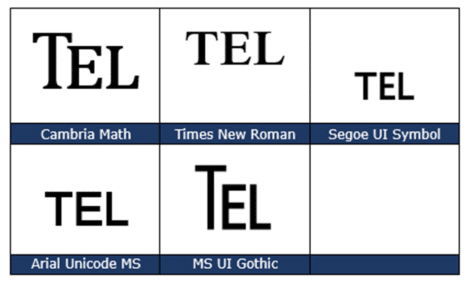
TEL – Telephone ℡ symbol in Word, Excel, PowerPoint and Outlook
Insert the TEL – Telephone symbol ℡ into Microsoft Word, Excel, PowerPoint or Outlook. Both in Office for Windows and Office for Mac. TEL – Telephone ℡ symbol is a single character with the letters TEL, normally used to prefix a telephone number in a letter heading or footer. How TEL – Telephone ℡ looks […]
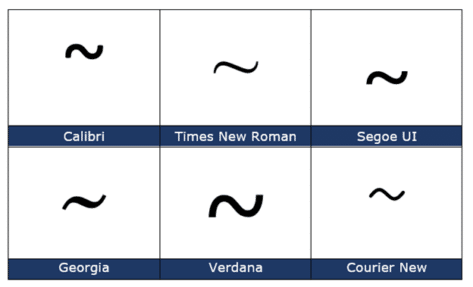
Tilde ~ symbol in Word, Excel, PowerPoint and Outlook
Type the Tilde ~ into Microsoft Word, Excel, PowerPoint or Outlook. Both in Office for Windows and Office for Mac. Plus an emoji alternative to Tilde. Tilde is used to mean ‘approximate’ as in “ ~30 minutes late”. In maths it means ‘similar order of magnitude’ e.g. “ a ~ b “. Tilde ~ symbol […]

Good advice for buying an iPad
The Verge has some good advice on buying an iPad and choosing between the many models available. Now’s the time to buy last year’s iPad by Dan Seifert cuts through the messy collection of Apple iPad models with this core advice … … thing that remains the same is it is an iPad. There might be […]

How to view and delete your Outlook.com attachments
There’s a way to view the attachments to items in a Outlook.com mailbox either in the web browser or, the better option is Outlook desktop software (Windows or Mac). Finding attachments is useful for recovering a lost file or past version of a document. Also vital to reducing the mailbox size when it’s reaching the […]
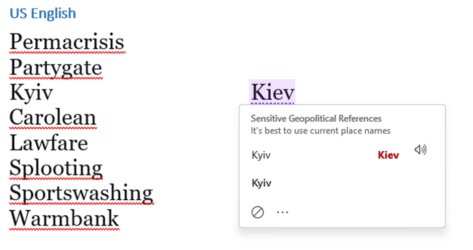
Are the 2022 Words of the Year recognized in Microsoft Word?
The 2022 Word of the Year is “Permacrisis” according to one dictionary, is that and other new words recognized in the Microsoft Word dictionary? Surprisingly, one of the 2022 words is and there’s another strangeness in the Word Grammar and Style checks. According to the Collins Dictionary, the 2022 Word of the Year is “Permacrisis” […]

Change single space after sentence to double space in Word
Word can check if you use a single or double space after a sentence (fullstop/period) but how can it be changed single space to double throughout a document? The Sentence Spacing settings (single, double or don’t care) is in Word’s Grammar settings see Sentence Spacing in Word. These days, sentences more commonly separate with a […]

Outlook the way you like with Custom Views
It’s easy to make your own views for email, calendar and contacts and switch between them with Outlook Custom Views. Outlook does not have to look the way it does ‘out of the box’. Perhaps you’d prefer a different color scheme for read and unread messages? Maybe with more lines of message preview? Or a […]

Pray / Thank You 🙏 emoji in Word, Excel, PowerPoint and Outlook
There’s a Pray / Thank You 🙏 emoji you can drop into Microsoft Word, Excel, PowerPoint or Outlook. Both in Office for Windows and Office for Mac. Pray / Thank You 🙏 symbol in Western cultures can be used to show prayer or devotion more generally as well as thanks or appreciation. The official Unicode […]
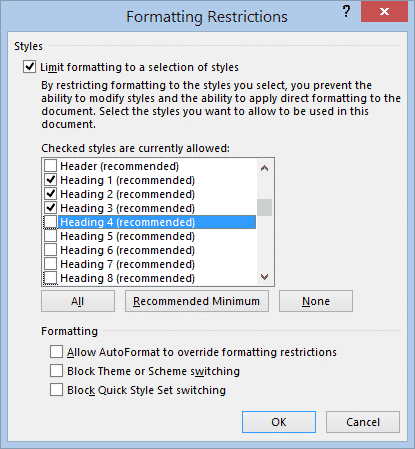
Limit editing and collaboration within a Word document
There are options in Microsoft Word to limit access a document in different ways. It’s more fine-grained control of what people can do in the document rather than the entire Word document permissions options we’ve mentioned before. Restrict Editing options let you collaborate on a document more broadly without the risk that important parts will […]
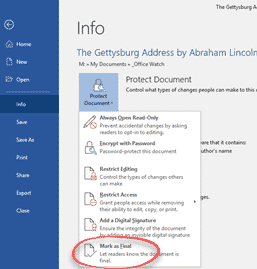
Three ways to stop people changing your Word document
Word, Excel and PowerPoint have options to stop people from changing a document, making them ‘read only’ in tech speak. These options protect your documents from unauthorized editing or even reading them at all. There are different levels of protection, they are all under File | Info | Protect Document. While they are mostly talked […]