Make your WhatsApp portable between numbers and devices
WhatsApp can still work on the same account if you change the mobile number or SIM card. You can even move your WhatsApp account to a different smartphone. You might think that a WhatsApp account is tied to your phone number, but that’s not true at all. WhatsApp (like other messaging services) sends an SMS […]

Put WhatsApp on your PC, Mac or tablet
Typing on a little Smartphone screen is a pain and happily there are PC desktop, Mac and tablet extensions for both WhatsApp and Signal. There are ‘big screen’ options to read and send WhatsApp and Signal messages from a larger screen. A Windows PC, Mac computer or a tablet device (iPad, Android etc). Source: WhatsApp […]
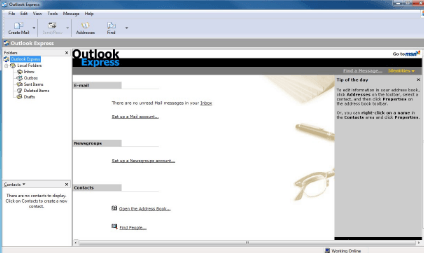
Outlook Express – it’s dead like the proverbial parrot
Lost in the ‘news’ about Paint is the confirmation that Outlook Express is dead. Like the Norwegian Blue Parrot it’s going to join the choir invisible. Microsoft will be dropping Outlook Express from the supplied programs in the upcoming Windows 10 Fall Creators update. Outlook Express is finally getting removed. It’s long since been replaced […]

Make Microsoft Office speak or read aloud
Microsoft Office can read aloud, talk or speak the text of documents to you. It’s possible in Word, Excel, PowerPoint, Outlook and OneNote. Computer speaking text is mainly suggested for various disabled users under the ‘Accessibility’ name. But ‘Speak’ is also useful if you’re just tired of reading the screen or are proof-reading from another […]

Get your free Office ebooks from Microsoft
Microsoft’s annual giveaway of ebooks is on again. Thousands of free downloads, including Office related ebooks. The full list is on the Microsoft blog. We’ve copied the Microsoft Office related titles into a easily searchable list below. Most are in PDF format with a few in MOBI (Kindle), EPUB or XPS format. Modesty (almost) […]

Buggy Outlook patches yet again trouble Office users
Yet again, Microsoft has released buggy patches for Office and Outlook. We have details of the faulty patches and the bugs they’ve added to Outlook. This time it’s Outlook users who have the hassle and time-wasting dealing with Microsoft’s bungling. All these security updates cause bugs in Outlook, various versions. Of course, Microsoft won’t admit […]

Office ‘Alt Text’ accessibility problems
Microsoft proudly added accessibility features to Office 2016 for Windows, in particular ‘Alt Text’. Pity it’s not been refined and fixed once the hype died down. Earlier this year, Microsoft added an ‘Alt Text’ feature to Office which tries to automatically suggest alternative text for visually impaired readers. Right click on an image and choose […]

New Privacy leakage in Office 2016 for Windows
Images inserted into your Word documents are being automatically uploaded to Microsoft for the accessibility ‘Alt Text’ feature. Even if the image and document are saved on your computer, not cloud storage. It’s a hidden ‘feature’ in Office 2016 for Windows desktop (Office 365 subscribers). Earlier this year, Microsoft added an ‘Alt Text’ feature to […]

Share Outlook email drafts between computers
Here’s how you start writing an Outlook email drafts on one computer and later continue writing it on another machine. If you’re using Office 365 hosting or Exchange Server with Outlook for Windows/Mac only a little tweak is necessary. For others, there are workarounds. We do this often. Most commonly starting an email on one […]

Find the Outlook Web App / webmail link for an Office 365 or Exchange Server mailbox
Browser based email is a great standby in case your main email program, like Outlook, goes wrong or the mailbox connection doesn’t work. Here’s how to find the webmail setting for Office 365 or Exchange Server mailboxes. Webmail for Office 365 or Exchange Server mailboxes is called ‘Outlook Web App’ or ‘Outlook Web Access’. Known […]
Why ‘Office in the Windows Store’ isn’t really Microsoft Office
It’s expected that today (15 June 2017), Microsoft will release ‘Office in the Windows Store’ as a new way to buy Office. Understand the differences between it and ‘Office 2016 for Windows’ or the Windows 10 / Modern apps for Word, Excel, PowerPoint and OneNote. The new release is not just a different way to […]

Office won’t start ‘This app can’t run on your PC’ – Fix
This is a really screwy error message. You try to start an Office desktop program and are stopped with the message ‘This app can’t run on your PC’. Here’s the fix. To make it even stranger, some Office programs will work while others say they can’t run? We’ve seen the very latest version of Outlook […]

Word documents help Russian election hack
According to a classified NSA report, a Russian hack used Word documents as part of their attempts to interfere in the 2016 US Presidential election. The report also shows that some often-repeated security advice is worthless in the 21st Century. The report details how Russian based hackers targeted employees of firms who maintained electoral rolls […]

What? Office Fast Ring catches up with Slow Ring
The latest ‘Fast Ring’ Insiders update to Office for Windows restores the correct versioning between the Fast and Slow Ring ‘Insiders’ releases. Normally, the latest changes and new features appear in the Fast Ring release. After the bugs have been discovered by the fearless Fast Ring testers, an update goes out to the ‘Slow Ring’. […]
Fix: Outlook .msg files switch to Acrobat .PDF
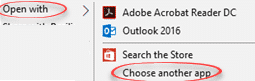
We have Office-Watch.com readers and others trying to fix a problem with their Outlook .msg files which have mysteriously become linked to an Acrobat PDF Reader program. The .msg files start sporting the familiar (but quite inappropriate) red and black PDF icon. If you double-click to open the .msg file, Acrobat Reader doesn’t know what […]

OneNote for Windows 10 misleading Outlook feature
Microsoft’s promotion of a new OneNote for Windows 10 feature is, to put it politely, misleading. The updated app doesn’t do what the hype promises. You can’t insert a meeting from ‘Outlook’ and not ‘Outlook 2016’ as Microsoft alleges. Hype vs Reality is something all Microsoft customers are familiar with, but this goes beyond some […]