
8 simple ‘Prohibited’ symbols for smoking, phones, kids and more in Word
Some ‘not allowed’ or ‘prohibited’ symbols, they can be used in Word, PowerPoint, Excel or Outlook. No Smoking, No Phone, No Children, No Drinking, No Pedestrians, No Bicycles, Not Drinkable Water or Mute. The Unicode symbol list includes red circle with diagonal to stop, smoking, children under 18, Mobile Phones, Littering, Pedestrians, bicycles plus no […]
Bulk conversion of old Office documents to new formats
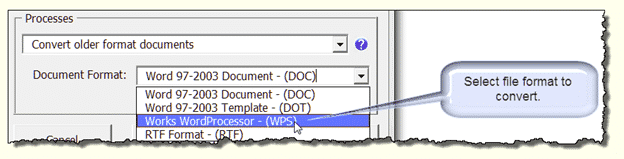
How to bulk convert old documents (.doc .xls .ppt) into the newer Office formats (.docx .xlsx .pptx etc.). Microsoft has never produced a simple bulk conversion tool for the masses, much to the annoyance of users and network administrators. Redmond probably made that choice for their own self-interest but some of the reasons also serve […]

Quickly type Greek letters like beta, delta & gamma in Word
A little-known Word shortcut lets you type Δ Θ Δ Ω Π plus other Greek and math symbols quickly and easily. Ctrl + Shift + Q changes to the Symbol font for the next letter only. Only in Word for Windows, I’m afraid. Not Word for Mac. It’s a very old Word shortcut, it’s in […]
Micron µ or mu μ in Word and Office
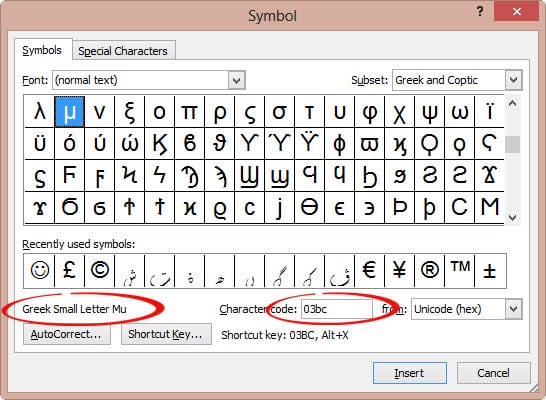
Type the micron µ, micrometer or mu μ symbol in Word, Excel, PowerPoint and Outlook. Stuart H has an AutoCorrect suggestion: ” I need to use the symbol μ for micron (1/000 mm) and use mu for this. “ The Micrometre / Micrometer is one-millionth of a meter. The μ character is the Greek letter […]
Ohm symbol Ω in Word, Excel, PowerPoint and Outlook
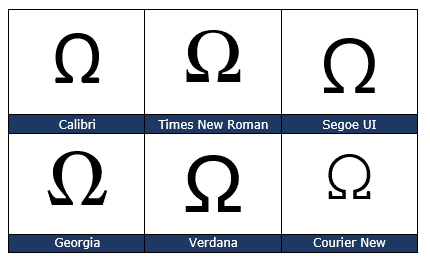
Type the Ohm symbol Ω into Microsoft Word, Excel, PowerPoint or Outlook. Both in Office for Windows and Office for Mac. Also the unofficial Siemens symbol, an inverted Ohm ℧ . Ohm is a measure of electical resistance with the symbol Ω It’s an official SI Unit of measurement just like gram, metre and many […]

So many power selection tricks hidden in Word
Here’s some power selection tricks in Microsoft Word for text, tables, pictures and more. You might think that selecting text and other things in Word is simple. Like many things in Office, there’s a lot more available than the simple methods that we all learn. There are quick ways to choose a word, paragraph, objects, […]

Omega upper Ω or lower ω symbols in Word and Office
Type the Greek letter Omega in upper case Ω or lower case ω in Microsoft Word, Excel, PowerPoint, or Outlook. Both in Office for Windows and Office for Mac. Omega (uppercase Ω / lowercase ω) is the twenty fourth and final letter of the Greek alphabet. It is used to often denote the last or ultimate […]

Flowing column text in Word with break-out or sidebar
Sometimes there’s more than one way to do something in Microsoft Word like having four blocks of text on a page with images or text breakout with flowing columns of text with a side-bar or break-out. “How can I do a magazine-like layout with four blocks of text, one in each corner with a box […]

Limitations of Word Sort feature for name sorting
Microsoft Word’s Sort feature is OK but has its limitations. We humans insist on variations of the simple ‘first and last’ name that confuse a computer. Here’s some name sorting traps and workarounds. For short lists, it’s probably enough to do a Word surname sort then manually adjust the list for any anomalies. Longer lists […]

Sort a list of names by surname or more in Word
Microsoft Word sorting is more powerful than it appears, with a few extra clicks you can sort last names or anything else in a list. Sort is one of those Word features that’s been around for a long time. These days it’s tucked away on Home tab in the Paragraph group. Select a list or […]

Converting SVG into JPG, PNG or other raster image format
Converting SVG icons into JPG is essential for older Word and Office versions that don’t have native icon/SVG support. Here’s some options for conversion or sourcing alternatives. SVG’s are great with many advantages for Office 365 and Office 2021/2019 users. Not everyone has the latest Microsoft Office or shares documents with others who have earlier […]

Make your own ‘handwritten’ letters with Word
Microsoft Word has almost all you need to make ‘hand written’ notes and letters for a fraction of the cost of a special service. Dig into some of the lesser known Word font and line spacing settings to get that ‘written by hand’ effect. The New York Times has a report on Bond – a […]
Type Phi uppercase Φ or lower φ in Word and Office
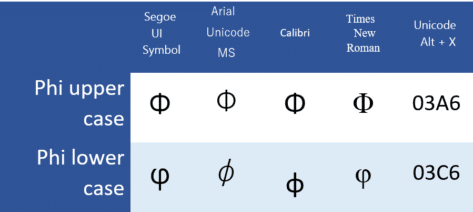
Insert the Phi uppercase Φ, and Phi lowercase φ / φ symbols in Microsoft Word, Excel, PowerPoint, or Outlook. Both in Office for Windows and Office for Mac. Phi (uppercase Φ / lowercase φ / φ) is the 21st letter of the Greek alphabet. The uppercase symbol has various uses, such as the cumulative distribution function of standard normal deviation in statistics. The lowercase symbol has […]
Word documents might write themselves and more
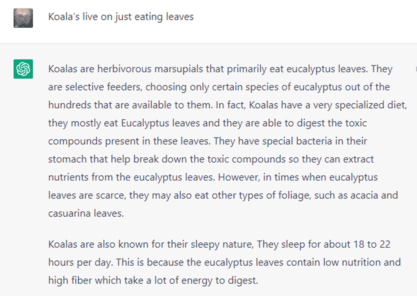
Microsoft is working on extending OpenAI features like ChatGPT to help people write Word documents based on a short suggestion. And there’s a lot more possible given Microsoft’s investment in OpenAI, even a koala poem ‘written’ by Dorothy Parker. Office Watch has been looking at ChatGPT’s ability to write Office VBA programming code (with mixed […]

Up arrow ↑ symbol in Word, Excel, PowerPoint and Outlook
How to insert the Upwards arrow ↑ into Microsoft Word, Excel, PowerPoint or Outlook. Both in Office for Windows and Office for Mac. The upwards arrow ↑ symbol is used for various purposes. It can notate a mathematical symbol for ‘undefined’, for very large integers or in medical notation it can mean increased. Of course, there are plenty of uses in graphics and design elements especially […]

Banana 🍌 emoji in Word, Excel, PowerPoint and Outlook
Insert the Banana 🍌 emoji into Microsoft Word, Excel, PowerPoint or Outlook. Both in Office for Windows and Office for Mac. There’s also a Banana icon in modern Office apps. How Banana 🍌 looks in different fonts. Only two Segoe fonts support the Banana emoji; Segoe UI emoji (color or black) and Segoe UI Symbol. […]









