
OK Hand sign 👌 emoji in Word, Excel, PowerPoint, and Outlook
Type the OK Hand sign 👌 into Microsoft Word, Excel, PowerPoint, or Outlook. Both in Office for Windows and Office for Mac. OK Hand sign 👌 emoji is mostly used to symbolize approval, agreement, all that is well but there are other meanings. Scuba Divers use 👌 hand sign to confirm they are ‘OK’ and […]

Beware! Clippy is hiding in Windows and Office
The dread Clippy, the paperclip with eyes, is still hiding in Windows and Office. The Windows 11 emoji panel and Segoe UI Emoji font have Clippy instead of a plain old paperclip that other apps use. Use the Emoji Panel in Windows 11 (Win + . ) and search for ‘paper’ you’ll see various options […]

LucidChart in Microsoft Office
LucidChart is a very nice diagramming and flowchart tool which is integrated with Microsoft Office for Windows or Mac. Office has diagram tools via Insert | Shapes but they aren’t very elegant. They serve for simple uses but not a lot more. LucidChart is better than the inbuilt Office diagram tools and not as expensive […]
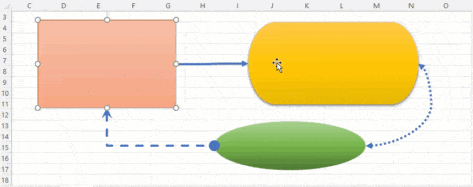
Why can’t Word connect shapes?
The Shapes feature in Microsoft Office looks the same in all the major Office apps but it’s not. The important connectors feature, essential for flowcharts, is obvious Word or Outlook but works automatically in Excel, Publisher and PowerPoint. Update: We’ve updated this article after some clever readers reminded us of the Windows only Word trickery […]
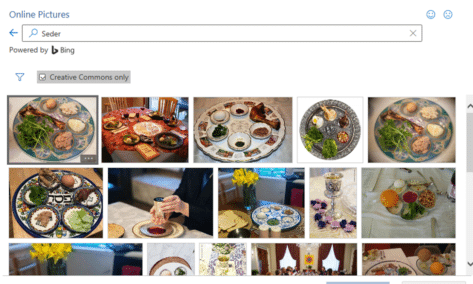
Passover images and more in Microsoft Office
Add some Passover images and icons to your documents, slides or emails from right inside Word, PowerPoint, Outlook and Excel. If you know where to look there are images from the Jewish tradition related to Seder, Matzah and Menorah among many, Icons The SVG Icons collection (Insert | Illustrations | Icons) has only one option, […]
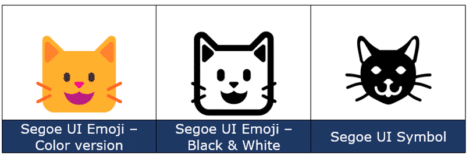
Cat Face 🐱 emoji in Word, Excel, PowerPoint and Outlook
How to insert the Cat Face 🐱 into Microsoft Word, Excel, PowerPoint or Outlook. Both in Office for Windows and Office for Mac. Cat Face 🐱 emoji is a variant of the grinning face emoji, usually depicted as yellow on all platforms. How Cat Face 🐱 looks in different fonts. Here’s some examples of how […]

Fast screen shot or clipping in Office
There’s a simple way to copy a screen image into Word, PowerPoint, Excel, Outlook or OneNote. Word, PowerPoint and other Office apps for Windows (Office 2010 and later) has a Screenshot option to paste an image from any open program window into a document or email. Go to the Insert tab of the programs, there’s a Screenshot […]
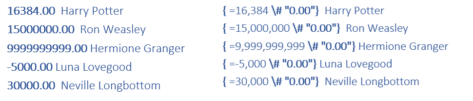
Word number \# field code formatting explained
All about the \# formatting switch in Word field codes lets you change the look of numbers in many different ways. Many examples plus a guide to the formatting codes. Use these options with Word fields that return a number like SEQ, REF, PAGE, SECTION, SECTIONPAGES, AUTONUM, EDITTIME, FILESIZE and MERGEFIELD . The \# codes […]

Dog Face 🐶 emoji in Word, Excel, PowerPoint and Outlook
How to insert the Dog Face 🐶 emoji into Microsoft Word, Excel, PowerPoint or Outlook. Both in Office for Windows and Office for Mac. Aside from the obvious the Dog Face 🐶 emoji can used as a variant of the Grinning smiley face emoji. How Dog Face 🐶 looks in different fonts. Here’s some examples […]
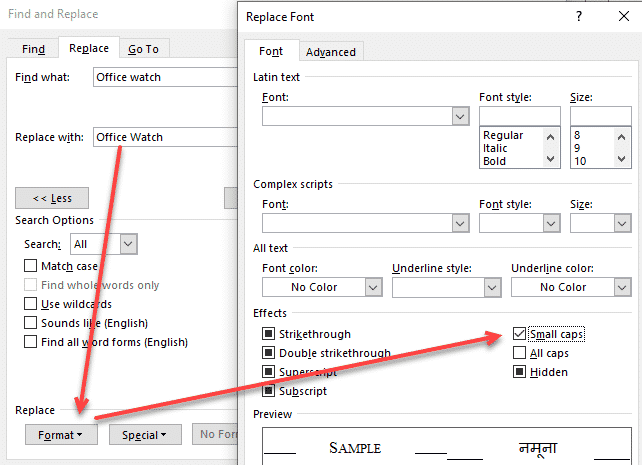
Change case using Word’s Replace feature
Changing the case upper/lower for text through all of a Word document is easy because the default Find / Replace settings don’t need changing. We’ve already talked about the manual Change Case options in Word, now we’ll move onto bulk changes. Sometimes the spelling of a product or brand has peculiar case choices like iPad, […]

Five Change Case choices in Microsoft Word
Change Case options in Word, like many Word features goes beyond the obvious choices from the basic shortcut. There’s up to five choices on the ribbon with a keyboard shortcut to reach it. Alter the upper/lower case of words, phrases or more. ‘change case’ can become ‘Change Case’ or ‘CHANGE CASE’ or even “cHANGE cASE” […]
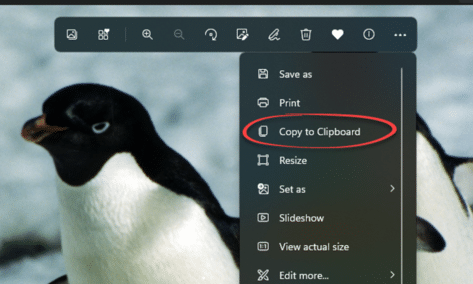
Change Picture from clipboard in Word and Office
Replacing images in Word, PowerPoint, Excel and Outlook is a lot easier using the ‘Change Picture’ option, especially now you can change to insert an image on your clipboard. We’ll show you a step by step on how to do it. There might not be one simple keyboard shortcut, but it is a lot better […]
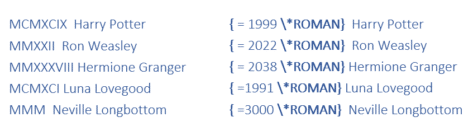
All the \* named format switches for Word field codes
Ever been confused by the \* formatting options in Word field codes? You’re not alone, believe me. Here’s a complete guide with the \* codes and examples of how they appear. In this article we’ll look at the named formatting codes which start with \* like \* Arabic and \* Ordinal and even \* Hex […]
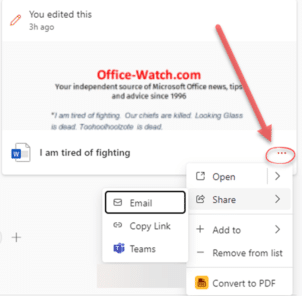
Useful tricks hide in the new look Office.com
The main Office.com page has an updated look for Business and Enterprise customers. There’s a Create pane, My Content section and Quick Access buttons plus some more useful features hiding away under obscure buttons that are easy to overlook. This is the overall Home https://office.com look if you’re logged into a non-consumer Microsoft account. Choose […]

Using Text Boundaries view in Word – how and why
How to view Text Boundaries in Microsoft Word, why they can be useful and how the feature has changed over time. Text Boundaries put a dotted line box around each text element on a Word page. Turn on Text Boundaries to solve formatting problems. For example, in the above example, it’s easy to see why […]

Show Crop Marks each page in Word
How to show the four corner Crop or Trim marks on a Microsoft Word page. The ‘L’ shapes are a guide to the useable part of the page, inside the margins, and appear in all four corners. The four marks are called Crop Marks also known as Trim Marks. Word Crop Marks in Page View, […]









