
Make styles for individual table cells in Word
It’s possible to apply individual cell formatting in Word consistently using a little VBA code. In effect it makes styles for cells in a way that Word itself won’t do. Reuse this code to apply the same formatting to many cells. Cell Format Special We’ve made two VBA functions for two different cell formatting settings; […]

Office apps for Windows 10 Mobile end support now and in 2021
The Office apps on Windows 10 Mobile devices have now ended main support and will end security updates, hotfixes and support in 2021. It’s an unsurprising announcement and another death notice for the failed Windows 10 Mobile platform and phones. Source: Microsoft, from happier days when Win10 phones were ready to take over the world […]
Office apps and the Fluid framework
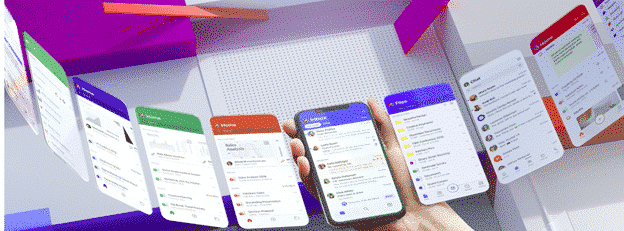
In a recent blog post Microsoft explained some of their thinking behind the redesigned Office mobile apps like the new ‘all in one’ Office app. The company has done a lot of research into the way people use their mobile devices, including the many people who only use a smartphone with no laptop or desktop […]

Pantone 2020 color of the year in Word, Excel and PowerPoint
Pantone has announced its Color of the Year for 2020 here’s how to get it in Microsoft Office – Word, Excel, PowerPoint, Outlook etc. The color of 2020 is … Classic Blue Source: Pantone As usual what’s more amazing than the color is the description from the ‘Pantone Institute’. Classic Blue is: reassuring thought-provoking dependable […]
Tabbed panes come to Microsoft Word
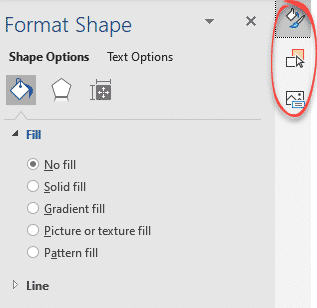
At last! The clutter of right-hand panes in Microsoft Word is ending and we’re getting tabbed panes. Very welcome news for laptop users with less screen real estate. According to Microsoft: “ Now you can switch between multiple panes using a tab UI on the right hand side of the app. The UI will only […]
Change Margins in Word
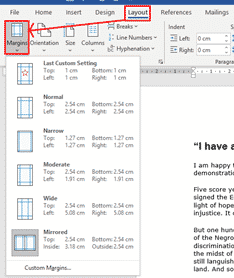
Sometimes we want to change the margins around a Word document, either to change the way the page looks, or to get the text to fit onto the page. To do this, go to Layout > Margins or use the Ruler to drag the margins. There are several default options that you can choose from. […]

I Love signs in Word or PowerPoint
I ♥ or I Love signs or logos can be made in Word or PowerPoint to liven up a document or presentation. We’ll show how to make something similar to the famous and much copied logo. The official ‘I ♥ NY’ logo complete with registered trademark. The original ‘I Love NY’ logo was made to […]
What is Application Guard and what it means for Office 365
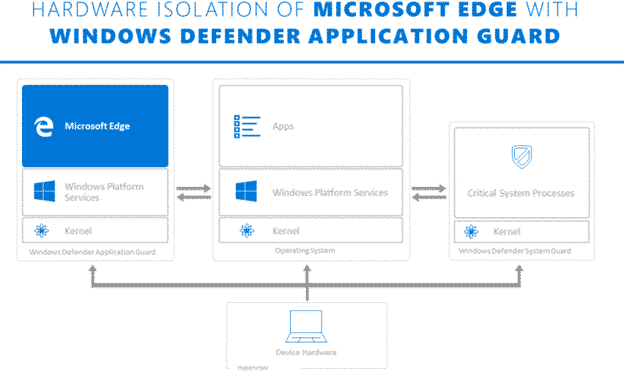
Microsoft is touting Application Guard as a defence against Office 365 macro viruses. What is it and will it truly prevent viruses in Word, Excel or PowerPoint documents? Application Guard is already in the Edge browser and Microsoft has announced that it will be extended into Office 365 sometime in early 2020. They’ve not said […]
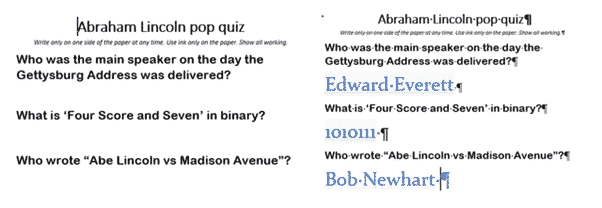
Hidden text positioning and formatting tricks in Word
Word is very clever dealing with Hidden text, perhaps a bit too clever at times. Here’s some tricks for positioning and formatting with Hidden text. Students quiz (left) and Teachers version (right) from the same document. The answer text is hidden in the student version but there’s still space for their answers. Leaving space where […]

Microsoft Bluetooth keyboard – with Office and Emoji keys
The Microsoft Bluetooth Keyboard is one of two new models with dedicated Office key and Emoji key. What’s this new keyboard like … aside from those innovations? We bought a Microsoft Bluetooth Keyboard with our own money and gave it a long hard look. Source: Microsoft Note: this is the Microsoft Bluetooth Keyboard released in […]

The dirty little secrets of Word’s new Rewrite feature
There are three little ‘gotchas’ with the Rewrite feature in Word 365 for Windows. One is unprecedented in the history of Microsoft Office. The ‘public’ feature isn’t available to everyone. Rewrite is the new cloud service that suggests alternatives to phrases in a document. The way it’s been released to the public is unusual […]

All about Microsoft’s new Emoji Key
Two new Microsoft keyboards have an Emoji key. Office-Watch.com has now tried one of these keyboards to see how the new key really works and hardware details. There are various layouts available including US layout. We bought a UK layout keyboard with the Alt Gr key. Firstly, it’s not an ‘Emoji key’. Everyone has been […]
Office Key, all about Microsoft’s new keys
Two new Microsoft keyboards have a dedicated Office key. Office-Watch.com has tested one of these keyboards to see how the new Office key really works. We have a full list of Office key shortcuts plus how it works inside Word, Excel and PowerPoint and geeky hardware info. Hard information about the new key has been […]
Rewrite, a new language helper for Microsoft Word
Microsoft Word can now suggest alternative wordings for phrases and sentences in a feature called Rewrite. It’s ‘synonyms for phrases’ not just single words. Rewrite is promoted as ‘Say it another way’. If you want a different wording for an overworked phrase, Rewrite could help. Speaking of overworked phrases, here’s Rewrite’s suggestions for Microsoft <g>. […]

Whiteboard app now accepts Word pages or PowerPoint slides
The Microsoft Whiteboard app can now import pages from Word documents or selected slides from a PowerPoint deck. The new feature is better than it’s promoted because you can select pages/slides not just entire documents or decks. Start from the Insert menu where there are now options for Word document and PowerPoint document. The PDF […]

Surface Buds work with Microsoft Office
Microsoft’s new Surface Buds are earbuds with links to Microsoft Office for voice control and transcription. The new product is a rival to the Apple Airpods and many other similar cordless earphones. What’s different is the touch surface with allow more integration with Windows and especially Office. Source: Microsoft It’s unclear what, if anything, is […]









