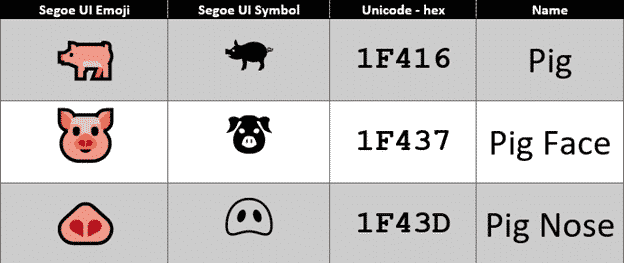
Have a happy Year of the Pig emoji in Word and Office
It’s the Chinese Year of the Pig and there are some symbols in Word, Excel and PowerPoint to mark the occasion in Office for Windows or Mac. The Unicode standard has three Pig related emoji, Pig, Pig Face and Pig Nose. Once you know the names or hex value, they can be found with the […]

Google Translate with Office documents
If the Translation options in Microsoft Office don’t do it for you, try the Google Translate full document translation option instead. For a long time, Google has a word and text translation between languages. The app is a godsend to travelers around the world, and the locals dealing with them! Entire Office documents can also […]

Bitlocker in the Word dictionary
Bitlocker is an important part of Microsoft Windows so why isn’t it in the Microsoft Word dictionary? Bitlocker is the drive encryption feature in modern Windows. It secures your drive if stolen or lost because the entire drive is unreadable without the password. Our books for Windows 10 and Windows 8.1 have chapters devoted to […]
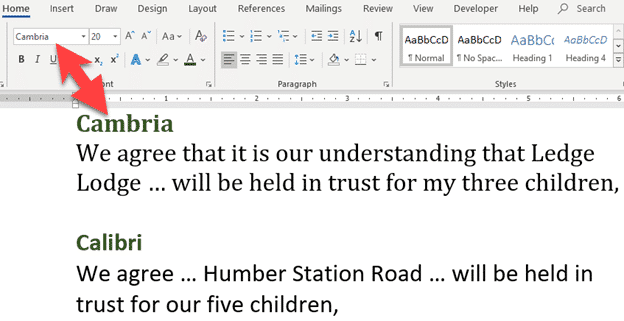
Font Fraudsters caught again
A Canadian man has been caught trying to hide assets from bankruptcy because the wrong fonts were used in documents. Gerald McGoey, the former CEO of Look Communications filed for bankruptcy over a year ago. He presented trust documents that appeared to shield two properties from his creditors. But there was a problem with both […]

Word Booklet printing woes after January 2019 updates
Many Word users are reporting Booklet printing options after the January 2019 updates to Office. No word from Microsoft but we have some suggested workarounds. All sorts of problems are being reported, mostly missing or blank pages in a booklet. The best workaround is using Adobe Reader which also has a Booklet printing feature with […]

Office memory leak finally patched by Microsoft
An astonishingly simple security breach in Microsoft Office has finally been patched two months after Microsoft confirmed the problem. The unanswered question, why did it take so long to discover it? Mimecast.com discovered the ActiveX memory leak back in November 2018 and told Microsoft. Two months later Microsoft fixed the problem in their January 2019 […]

Make your own ‘Snow Flakes’ posters in Word or PowerPoint
The British Army has new recruitment posters for Millennials or ‘Snow Flakes’. Make your own versions in Microsoft Office with either Word or PowerPoint. The campaign targets “snowflakes”, “millennials” and “selfie addicts” with a call-back to the famous Lord Kitchener “Your Country needs YOU” poster. Here’s our re-creation in Microsoft Word as it might appear […]

New Office app coming to Windows 10
Microsoft is replacing the current ‘My Office’ gateway app with a new ‘Office’ app for Windows 10. The Office app is a gateway to your Word, Excel, PowerPoint documents plus Outlook, OneDrive and SharePoint. Source: Microsoft The official Microsoft blurb: ” Quickly switch between apps. See all your Office apps in one place and switch […]
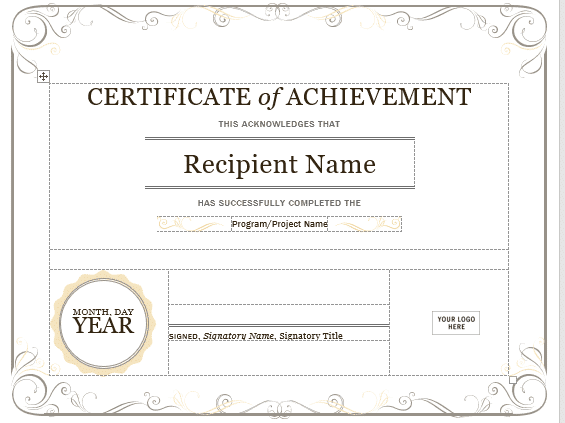
How to become a doctor with Microsoft Word
An Arizona man practiced as a dental anaesthesiologist using a Microsoft Word template as part of his application. It wasn’t hard for Office-Watch.com to find the template he used and you can too! ABC15 (Arizona’s News Leader) has the story of Dr. Pankaj Goyal who applied for a General Anaesthesia Permit. That’s the highest level […]

Lipspeakers and Lipreaders in the Word dictionary
Today’s story from the UK Parliament raised the interesting fact that there’s a difference between Lipreaders and Lipspeakers. Being Office nerds we wondered if Microsoft Word’s dictionary knew about the two words. Let’s start with the basics … The difference between a lipreader and a lipspeaker A lipreader is deaf or hard of hearing who […]

Pantone Color of 2019 – available now in Microsoft Office
Pantone has announced its Color of the Year for 2019 but before you run off to grab color swatches, here’s how to get it in Microsoft Office – Word, Excel, PowerPoint etc. The color of 2019 is <drum roll> ….. Living Coral … As usual what’s more amazing than the color is the description from […]
Why can’t you buy individual Office programs?
Office Watch reader, Meredith M. asks a question we’ve heard many times before. Why can’t you buy individual Office programs instead of paying for an Office bundle with programs you don’t need? “My issue: I need ONLY Word, Excel and Access–but I NEED them. I know that I cannot buy them separately but does anyone […]

New Icons for Microsoft Office 365
It’s been five years since the Word, Excel, PowerPoint and other Office icons were given a new look. Now they’ve been announced and, frankly, we could not care less. New look icons don’t make any difference to anyone’s daily use of Office. It’s like supermarket groceries that boast ‘New Packaging’ as if any customers care? […]

Online Video hack now ‘in the wild’ and Microsoft won’t do anything
A previously theoretical way to misuse Office documents to infect your computer is now ‘in the wild’ and Microsoft isn’t interested in stopping it. Last week we told you about a new way for Office documents to get malware onto your computer. Cymulate discovered that the Online Video feature could be manipulated to download malware […]
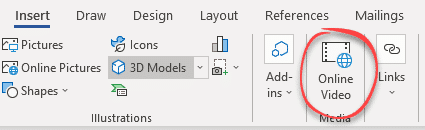
Online Video now a risk for Office users
Cymulate is reporting how embedded video in Word or other Office documents are another way for criminals and hackers to infect your computer. It’s yet another example of how Word, Excel or PowerPoint documents can be used to get malware onto computers to steal data, becomes bots or other nasties. This trick uses the relatively […]
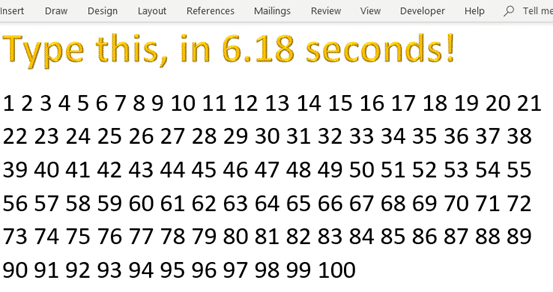
1 to 100 in 6.18 seconds, speed running with Microsoft Word
Speed Running, a gamers pastime has come to Microsoft Word. Finding ways to type the numbers 1 to 100 in the fastest time. If you’re unfamiliar with speed running, as we were, it’s playing and recording a pass through a game aiming to complete as fast as possible. Someone came up with the idea of […]









