Microsoft Word vs Scrabble Champions
The 2018 Scrabble World Championship is over. How does the Microsoft Word spell check fare against the Scrabble champs? Microsoft Word has slightly different dictionaries for many English language variations (US, UK, Australian etc). Word’s English dictionaries different from the official Scrabble dictionary. Among the words in the final rounds were: Groutier Zonular Phenolic Maledict […]

Why Microsoft’s Word Count went to court
A judgement from the US Court of Appeals turned on the Word Count feature in Microsoft Word and how it differs from the rules for court submissions. Most courts have rules about the length of submission which, in this case, were accidently exceeded. The plaintiff is representing himself (‘pro se’) so the judge was more […]

Word Online gets Dictation – type with your voice
Microsoft has added the Dictation feature to the browser based versions of Word and OneNote. You can speak and words will appear in Word/OneNote using the cloud ‘speech to text’ feature. Source: Microsoft Dictation is already available in Word 365 for Windows. Office for Mac users have a ‘voice to text’ feature available in the […]
Office for iPhone/iPad gets Icons or SVG graphics
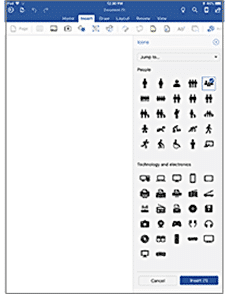
Office for iOS (iPhone / iPad ) is getting the Icons or SVG support already available in Word 365 for Windows. Icons now available to Office iOS Insiders on the Insert tab. There are 500 to choose from … Source: Microsoft Available in the Word, Excel and PowerPoint apps for Android. Icons are really SVG […]
Word’s Ink Editor gets more gestures
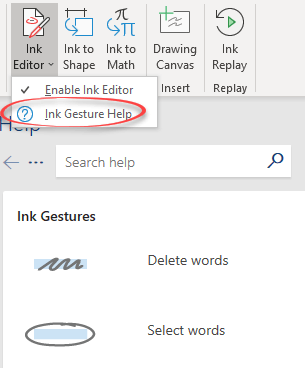
Coming to Word 365 for Windows are more Ink Editor gestures plus a pop-out pane to explain the gestures available. Ink Editor is on the Draw menu. It’s a way to use a digital pen to edit existing text. For example, draw a squiggly line through some words to delete them. It’s a nifty idea […]
How Word can help your college entrance essay
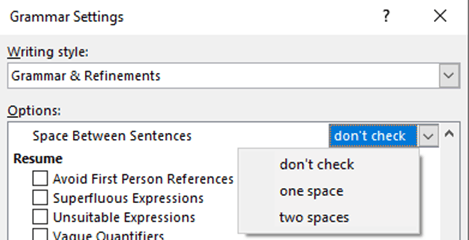
A New York Times article about parents writing their kids college entrance essay reminded us of a forgotten feature in Microsoft Word. A feature of modern ‘helicopter parenting‘ is helping, if not entirely writing, essays for their children. The article How I Know You Wrote Your Kid’s College Essay by JM Farkas, a college essay […]
The Microsoft Office font that helps you remember
An Australian university has developed a font that will help you remember what you read. It sounds like an April Fool’s joke, but the font is real and works in Office for Mac or Windows. Sans Forgetica was made at RMIT University in Melbourne, Australia. Unlike most fonts, Sans Forgetica is designed to be a […]

Office apps for Windows 10 get sidelined
Word, Excel, PowerPoint and other Office apps for Windows 10 have been sidelined by Microsoft with no new features planned. Bad news for anyone still using a Windows Phone. The Windows 10/Mobile apps will continue to work but no more features are planned. This ‘no more features’ decision appears to apply to Word, Excel, PowerPoint, […]

Office 2019 starts public release
Office 2019, the new non-cloud version of Office for Windows and Mac, is now available to volume licence and commercial customers. This is the ‘cloud free’ or, as Microsoft call it the ‘on-premises’ version of Office desktop. It has no cloud related features and is ‘feature fixed’ with no future enhancements. There’ll be security and […]

Brand logo font with color, at least in theory
A fun new font using famous logos for letters also demonstrates where Windows 10 and Windows 11 color font features become useful with Microsoft Word. Brand New Roman is a fun mashup font made up of famous logos. It looks best in color so it’s handy that Windows 11/10 supports color fonts. Try out Brand […]
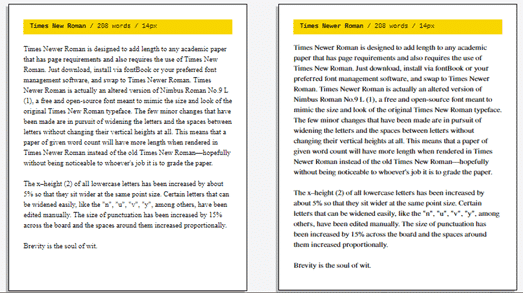
Times Newer Roman puts less text on more pages
Ever wanted to stretch out your essay or report so it fit on more pages? Times Newer Roman is a font that will help you do just that. Any student knows the standard tricks for making an essay seem longer. Adjust the margins, stretch the Font | Advanced | Spacing, slightly larger line spacing, bigger […]

Exploring the Office clipboard
The Windows clipboard is quite limited but there’s a better one hiding inside Microsoft Office for Windows. It can collect more items, paste in any order and be cleared when you like. We’ll also show how to keep the sometimes annoying pane out of the way. You’re about to hear more about the clipboard because […]
Office hacks come faster than ever before
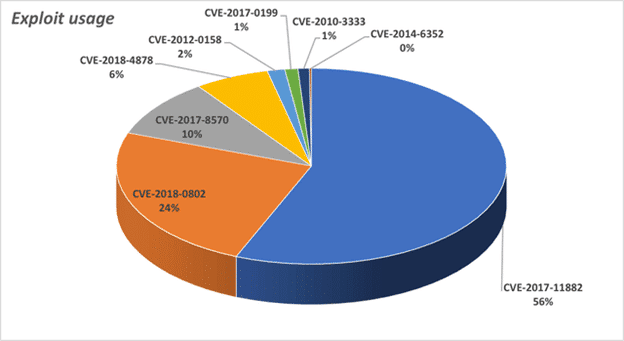
A new report from Sophos shows how hacking via Office documents has changed of lot in 2018 with new attacks coming much faster than in the past. Microsoft’s assurances that a security bug (sorry ‘exploit’) hasn’t been used ‘in the wild’ doesn’t mean a lot. Office document hacks made in bulk The people who find […]

Publish Date and mapped content controls in Word
Each Word document has various hidden data fields and some are called mapped content controls. They let you set some text or date in a document which is automatically repeated any other place in the document that has the same control. Mapped Content Controls are an alternative to other ‘repeating text’ options like Bookmarks. The […]

Significant improvements in Office 365 Home, Personal and University
Microsoft has announced some truly important improvements in what you get with Office 365 Home, Personal and University plans. The Home plan will be available for six family members instead of five. How Microsoft calculates use of Office software is changing and for the better. All these changes apply from 1 October 2018 onwards for […]

New features coming to Outlook, Access, Project and Visio
The latest Office 2016 Insiders release version 1808, Build 10730.20030 shows off some upcoming additions to Outlook, Access, Project and Visio Outlook – block forwarding in meeting invitations When making a meeting invitation in Outlook, go to Response Options and deselect ‘Allow Forwarding’ to stop that invitation being forwarded to others. ‘Allow Forwarding’ defaults on. […]