Why Office security patches should always be installed
An Office security breach, which was patched last year, is still being used to infect unpatched computers. Hacked documents using the vulnerability have been appearing in the last few weeks: SIMON WERNER GMBH – RFQ.doc ‘security instructions’ Visa.doc выписка.doc, 2017april.doc While the files have .doc extensions, they are really .rtf files. They all are variations […]

Keep the deleted Crayola color in your Office documents
One of the colors in the Crayola box is being dropped. Never fear, the color Dandelion can be part of your Office documents as can any other Crayola color. It’s not the same as the smell and feel of a Crayola crayon but it’s better than losing the color entirely. Dandelion is being removed from […]

The mistake in Microsoft’s ‘common grammar mistake’ list
As a publicity stunt, Microsoft published a list of common grammar mistakes made in Word. It’s strange that one of the listed mistakes is NOT detected even by the latest version of Microsoft Word. Office-Watch.com noticed this curiosity because we tested all Microsoft’s claims against their own Word software. We didn’t just copy the press […]
Safely using Docs.com
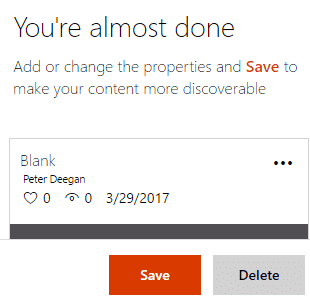
Even today, despite the public outcry, a document saved to docs.com will automatically be available to everyone. The privacy choices aren’t obvious and the ‘public’ default isn’t clear either. Here’s what you see when uploading to docs.com You have to click the ‘three dots’ menu button then scroll down a long list of options to […]
Protect your Docs.com account
If you’ve ever used http://docs.com it’s a good idea to check what’s saved there and what public access is set. Login with your Microsoft account (or other login) and check the list of saved documents (click on your name at top right. Depending on your wishes you can: Leave as ‘Public on the web’ Change […]
Oxford Comma costs $10 million but Word would not have helped.
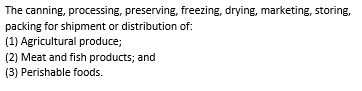
The debate about the Oxford Comma continues with news that a Maine company has lost a court case for the lack of a vital extra comma. Oxford Comma is one of the lesser known grammar checks in Microsoft Word. Sadly, Word would not have warned of the problem and saved the millions. The court case […]
Video training help from Microsoft
Redmond has released more Office training videos to help newbie users. Get started with Office Intro to Office Basics Sign in to Office Get help and support Change your Office for Home password Change your Office 365 for Business password What is Office 365? What is Office 365? Get the most out of Office 365 […]

Get Office Picture Manager free!
Office Picture Manager, the much loved and simple image editor was dropped by Microsoft, but it’s still available. Picture Manager has some features that aren’t in Windows 10 to this day. Here’s how to get it for free. There are two ways to get Office Picture Manager (OPM). Both involve doing a custom installation of […]

Google Docs can default to Microsoft Office formats
The Google Docs apps have a useful option for making new documents, worksheets and presentations that are Microsoft Office compatible. JR Raphael at ComputerWorld pointed out the option in the Google Docs app for Android, we poked around to find the equivlalents in Google Sheets and Google Slides Under Settings there’s the choice to make Word […]

Operation BugDrop hackers use Word documents
CyberX Labs has identified Operation BugDrop, which uses Word document to attack targeted businesses and steal corporate information. They send emails to the business they want to raid that trick people into enabling macros. Opening the hacked document displays the Security Warning and ‘Enable Content’ button are real; created by Word. But the sincere looking […]

Getting an image into Office – not as simple as you’d expect
You’ve chosen an image, now you have to get it into your Office document. You’d hope there was a single way to do that but, as usual, there’s plenty of options. Outlook has its own special needs, different from Word, Excel and PowerPoint. There’s also privacy and image size issues to consider. The simple way […]

Highlights of Feb 2017 updates for Office 2016 and Office 2013
Here’s the complete list of non-security updates for Office 2016 for Windows and Office 2013 plus our notes on some bug fixes that caught our eye. As usual, these updates will be pushed to most Office computers automatically. No action is necessary. Unexpected Issues Microsoft is always using different words to avoid saying ‘bug’. This […]
First Word for Mac hack attack
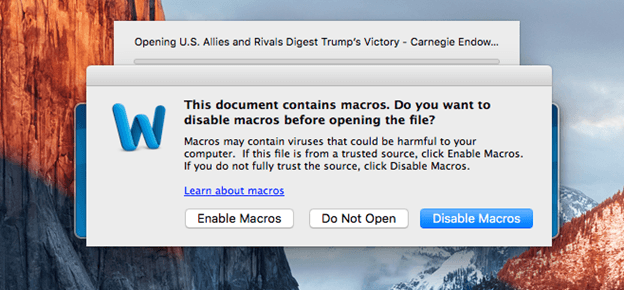
It was only a matter of time, the first attack targeting Word for Mac has been released. It’s a simple, almost primitive hack, but it’s out there so beware. There even a ‘silver lining’ of sorts. The document is named U.S. Allies and Rivals Digest Trump’s Victory – Carnegie Endowment for International Peace.docm but the […]

Public Domain images from ‘The Met’.
The Metropolitan Museum of Art in New York is the latest gallery to put many of their images into the public domain. Now you can, legally, use them to decorate your PowerPoint presentations or Word documents. The Met has released about 375,000 images under Creative Commons Zero CC0 licence. That means there are no rights […]

Office Touch Bar support is happening soon – 3 months late.
Microsoft announced Touch Bar support with much fanfare back in October 2016. Over 3 months later and paying customers are still waiting. There’s been lot of talk about this feature including web sites with ‘tips’ on using Office with the Touch Bar without noting that it’s not got into ‘insider’ beta testing yet. New Macbook […]
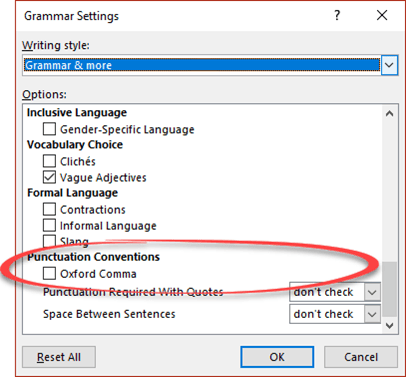
More on the Oxford Comma in Microsoft Word
To many people the Oxford Comma is an obscure grammar issue but, boy!, can it get people excited. We’ve had lots of messages, pro and con, from readers. This all started because Microsoft dropped one of the options available for the Oxford Comma check. In Office 2016 (Windows or Mac) you can’t get a warning […]









