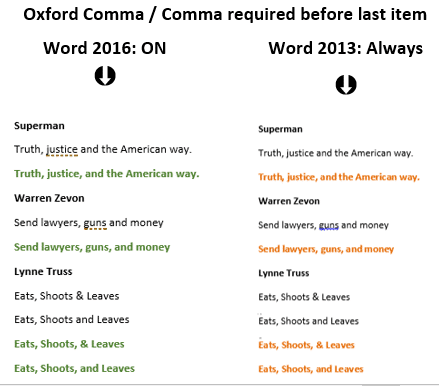
Oxford Comma differences between Word 2016 and earlier versions
A few years ago we had a close look at the Oxford Comma (‘Comma required before last item’, serial comma, Harvard Comma etc) in Word 2013. We’ll now repeat those tests with the new “Microsoft’s own” grammar system to see if there’s any improvement. Office-Watch.com has already noted that the options for the Oxford Comma […]

Grammar checking returns to Office 2016 for Windows
Microsoft has restored an important missing part of Word 2016 for Windows; the Grammar and Style checking! It’s available for all Word 2016 for Windows users including the ‘perpetual licence’ users who normally don’t get ‘new’ features. This important improvement hasn’t had the usual Redmond hype, presumably because it’s more embarrassing for Microsoft to admit […]

Comic Sans – the video
The saga of the Comic Sans font never ends. Like the font itself, stories about the font won’t die. Now we have “Comic Sans: The Man Behind the World’s Most Contentious Font” the video. Contentious is a polite word. Hated, Loathed, Despised, Reviled, Detested might be more accurate. It’s not a new story, we mentioned […]

Office Lens, at last it’s available for iPad
Office Lens, a way to convert pictures of documents or whiteboards into text is finally available for Apple iPads. Back in 2015 Office-Watch.com demonstrated some of the clever crop and rotation tricks in Office Lens, plus the ‘convert to text’ option shameless stolen from OneNote. Source: Microsoft Images can be saved to OneDrive, OneNote or […]

Word document danger installs a keylogger
There’s a new type of infected Office document that can bypass some protections and trick people into installing a keylogger on their computer. A keylogger is software that records each keypress and send it to a hacker. They can use that info to get your login details for many sites or software. What’s new is […]
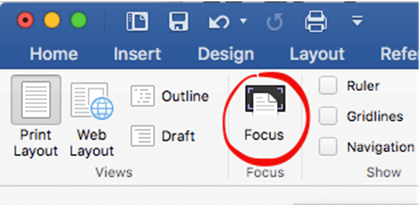
Word for Mac – Focus view for reading
“Why doesn’t Word for Mac have a reading view like Word for Windows?” Clare C. Nottingham, UK? Word 2016 for Mac does have a variation on reading view. It’s similar to Word for Windows, but it’s renamed. Look for Focus on the View tab. Word for Windows has Read mode. Focus mode (as it was […]

New Office 2016/Win features near release
Microsoft has released a new version of Office 2016 for Windows to the ‘Slow’ insiders. This means Office 365 customers have more goodies to look forward to in coming months. You’ll need Office 2016 Version 1612 (Build 7628.2048) or above. The new features, as described by Microsoft are: View and restore changes in shared files: […]
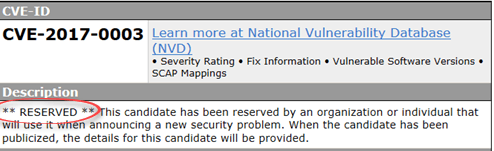
Single Office security bug fix for Jan 2017
There’s very few security patches this month but the major fix is for Word 2016 for Windows. Alas, as usual, Microsoft tries to overwhelm with a lot of standard phrases leaving key questions unanswered. This months security flaw is similar to many others over the years. A hacked document can manipulate computer memory to allow […]

What is a Style in Word, Excel or Outlook?
A style is a collection of formatting choices combined under a single name. Any word or even a single letter has a collection of formatting settings as well. Font: size, color, bold/italic/underline/strikethrough/subscript/superscript, highlighting and more. Position: Left, Center, Right, Justified. List: bullet, numbering. Line Spacing, Borders, Background color and a lot more details. Instead of […]

Pantone’s 2017 ‘Color of the year’ in Office
Another festive season (marketing) tradition is the Pantone ‘Color of the Year’ which gets a lot of media coverage. It gives us an excuse to explain how to convert (as best you can) a Pantone color into something to use in Microsoft Office. Pantone colors don’t have a direct match in Office because Pantone is […]

AutoText and the AutoTextList field
There are long-standing but hidden parts to AutoText that’s worth checking out – the field codes. Two Word field codes apply to AutoText: {AutoText } – inserts or updates the named AutoText field automatically. {AutoTextList } makes a menu of some or all AutoText entries to select from. These field codes use the same AutoText […]

SVG graphics coming to Office … at long last!
Office 2016 for Windows will soon support scalable vector graphics (SVGs). Preview/Insiders can try them now and it’ll be available to all Office 365 subscribers in 2017. That means you’ll be able to make your documents look even better with vector-based SVG files that won’t pixelate when increased in size. SVG support has been a […]

Ink innovations coming to Office
Microsoft is gradually adding to Office some interesting new Ink related features; Replay and Math. Rewind and Replay Until now drawings or ‘ink’ in Office documents has been static and fixed, much like real ink. OneNote Mobile for Windows 10 is the first Office app to make ink additions animated. Office remembers how you’ve drawn […]

Spelling Bee winners 2016 vs Word
It’s that time of year again and Office-Watch.com has a little fun seeing how Microsoft Word’s dictionary compares to the winners of the Scripps (US) National Spelling Bee. Surprisingly, Word did better in 2016 than past years, despite the words being harder. Still, no chance of Word reaching the finals in 2013, 2014, 2015 and […]
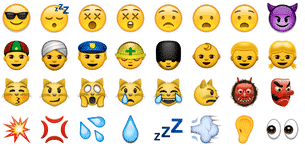
Using emoji in Microsoft Office
Emoji are those funny little icons that appear in text/SMS messages and some emails. Emoji have become quite the thing. More are being added to mobile phones, especially Apple devices. Originally intended to show emotions in text messages, they’ve expanded to other uses and overlap with many common symbols from Wingdings etc. They aren’t just […]

Warning: image editing and redaction in Microsoft Office
Editing an image in Office is not a way to hide the original details or redact a photo. Images in a document can be fully redacted by replacing the image with black box (or other full color block). But what if only want to hide/redact part of the image? That’s possible with the image editing […]









