Office 2021 is the personal and small business ‘perpetual licence’, non-subscription version of Microsoft Office. For Windows and Mac.
Office LTSC (Long Term Servicing Channel) is the volume licence ‘perpetual licence’, non-subscription version of Microsoft Office for organizations, companies and governments. Also for Windows and Mac.
The features in Office 2021 and Office LTSC are very similar, if not the same.
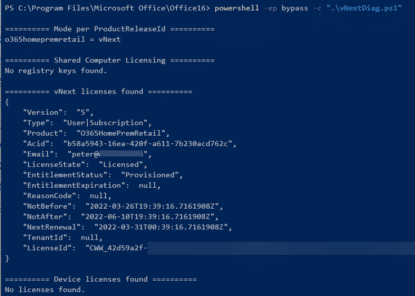
Hidden license info reveals good news for Microsoft 365
Like to know some more about your Microsoft 365 for Windows software license? How long the Office apps will run without an Internet connection? Here’s how to see that hidden license info, how it’s changed and a little good news too. Microsoft 365 software occasionally checks with Microsoft servers to see if the customer still […]

Hidden Microsoft 365 License details revealed
Here’s how to find out what type of Microsoft Office 365 licence you have with details hidden from the usual About dialog box. We recently showed it’s important for for perpetual non-subscription versions of Office like Office 2021 or Office 2019 to know if the purchase is Retail/Volume or OEM. That’s a vital detail for […]

Two unusual Page Break options in Word
In addition to Manual, Paragraph and Style page breaks there are two unusual ways that Microsoft Word can insert a page break where you might not expect one. Keep with next and Keep lines together. Learn about Word Page Breaks: Visible and Invisible Page Breaks in Word and Add a Manual Page Break in Word Word’s Paragraph […]
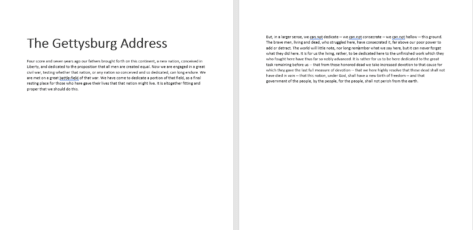
About Word’s Page Breaks – Visible and Invisible
There are many different ways to insert a page break into a Microsoft Word document, some are visible and others invisible even with Show All turned on. Luckily, Word has a straightforward way of doing this with a manual or separate Page Break. It’s also possible to associate a page break with the paragraph, which is a lot easier manage page breaks but they are somewhat invisible and it’s not obvious why the page break […]

Add a manual or forced Page Break in Microsoft Word
There’s a simple way to manually insert or force a page break in Microsoft Word. Also delete a page break later. Word will automatically insert page breaks in your text depending on the size of paper you have selected; they may not be in the place you want them. You can’t delete an automatically inserted page break, […]

Change Word style reliably to match current paragraph
A quick and reliable way to update a style within a Microsoft Word document. It works only when you ask it and you can apply a series of changes before updating the style. Update Style to Match Selection We’ve made a series of changes to a paragraph; font size, color and indent. Then right-click on […]

Which Microsoft Office feature badly needs a fix?
For all the changes Microsoft has made to Search (aka Tell Me), they continue to ignore one basic that would make Word, Excel, PowerPoint and Outlook a lot easier to work with. Here’s some examples of how Microsoft Office search badly needs fixing. Search (formerly called “Tell Me”) usually appears in the title bar as […]
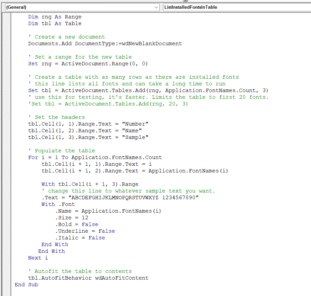
List all available fonts in a Word table
Here’s how to make a list of all the available fonts on a computer by making a table in Word complete with sample text using each font. It makes a Word table of all the fonts, including sample text like this. VBA features on show The code is fairly straight-forward and a simple example of […]

Three ways to insert a Recycle symbol ♻ in Word, Excel, PowerPoint and Outlook
Three ways to insert the Recycle symbol ♻ into Microsoft Word, Excel, PowerPoint or Outlook. Both in Office for Windows and Office for Mac. There are many different and specialist Recycle symbols. We’ll focus on the standard, generic symbol, officially called “Black Universal Recycling Symbol” in three forms: Emoji or Unicode symbol, Office Icon and the […]

Teardrop-Spoked Asterisk ✻ in Word, Excel, PowerPoint and Outlook
Insert the Teardrop-Spoked Asterisk ✻ into Microsoft Word, Excel, PowerPoint or Outlook. Both in Office for Windows and Office for Mac. Heavy Teardrop-Spoked Asterisk ✻ symbol has a circle in the middle with six ‘teardrop’ spokes around it. It has no specific purpose but is a more decorative alternative to the standard asterix * or other bullet […]

Investment Rate of Return is easy in Excel
Excel’s IRR() function is a straightforward way to calculate the rate of return for investments which have regular return/payment dates with amounts which might vary. Such as a simple fixed-interest bond, where cash flows occur at regular intervals such as monthly or yearly. When expressed as a percentage return, it’s a lot simpler to understand. […]

Easily calculate stock and asset returns in Excel
There’s a nice little Excel function that will calculate the rate of return on any asset like a stock or fund including income/dividends with purchases and sales over time. The secret sauce is XIRR() a function which calculates an internal rate of return with uneven interest or dividend payments. In other words, common real-world situations. […]

Scanning from within Microsoft Word or Office
Can you scan a picture or document directly into Word, Excel, PowerPoint or Outlook? Certainly, but these days we’re spoiled for choice and have fantastic features like using a smartphone as a simple scanner. Back in the day, you could click a button in Word 2003 to scan a document or image and drop it […]
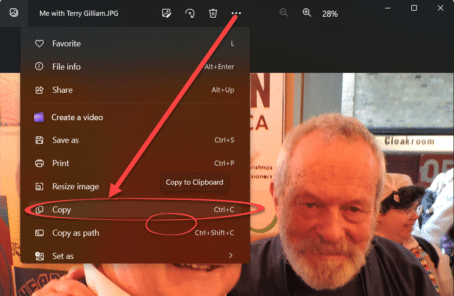
The faster way to insert pictures into Office documents
An easy and fast way to add pictures into Word, Excel, PowerPoint or Outlook. We mentioned a faster way to get a scanned image into Word via the ‘scan to clipboard’ option available in some scanning software. There are similar options available for copying existing image files into Word, Excel or PowerPoint documents as well […]

Why another Outlook for Windows is coming
Windows Mail and Calendar apps will be replaced with the ‘new’ Outlook. That means a second ‘Outlook for Windows’ and plenty of confusion for customers and support people. Microsoft made this mistake before and seem determined to do it again. This ‘new’ Outlook is a Progressive Web App (PWA) formerly known as ‘Project Monarch’. It’s […]

Excel can figure out how long to pay off a loan
Microsoft Excel has a handy function called NPER that can help you work out how long it’ll take to pay off a loan. It’ll show how adding even a little bit per payment can help clear a loan faster and some practical advice on using NPER in the real world. Say you have a personal […]









