Office 2021 is the personal and small business ‘perpetual licence’, non-subscription version of Microsoft Office. For Windows and Mac.
Office LTSC (Long Term Servicing Channel) is the volume licence ‘perpetual licence’, non-subscription version of Microsoft Office for organizations, companies and governments. Also for Windows and Mac.
The features in Office 2021 and Office LTSC are very similar, if not the same.

All about Office 2021 for Windows & Mac
Office 2021 is the current ‘perpetual licence’ or non-subscription version of Microsoft Office for consumers and small businesses, here’s details of what’s new, prices, shorter support time and why Microsoft doesn’t want to sell Office 2021 at all! It’s what Microsoft calls a ‘perpetual licence’ version. A single payment for ongoing use of the software […]

Easy way to get UTC / GMT current time in Excel
Finding out the current UTC / GMT time in Excel is possible with a little VBA magic. We’ve included a full working example. Excel has two functions to give you the current date TODAY() or current date and time NOW() but it’s the local time as set on your computer. Often the worksheet needs either […]
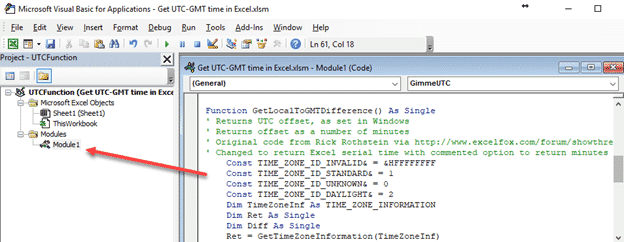
Get the local time zone offset into Excel
Finding out the computers local time zone offset in Excel is possible with a little VBA magic. We’ve included a full working example of how to get the ‘nn hours from GMT’ setting from Windows into Excel. The need for the current UTC/GMT time and offset is becoming more important as Excel improves its external […]

Compass 🧭 symbol in Word, Excel, PowerPoint and Outlook
Insert a Compass 🧭 symbol into Microsoft Word, Excel, PowerPoint or Outlook. Both in Office for Windows and Office for Mac. Compass 🧭 uses Segoe UI Emoji In Windows, the Compass 🧭 symbol is in the font: Segoe UI Emoji. Depending on the app and use, it’ll appear in color or black. The symbol can […]

Quick change the language setting in Word
There’s a way to quickly change the language setting for a multi-lingual Microsoft Word document, by adding a language selector to the Quick Access Toolbar (QAT) like this. Use this as a pull-down list to change the language setting in parts of a document. The problem is the fixed width of the toolbar item, which […]

Cool Excel Year Planner now available for download
A clever and different year planner with a progress thermometer is now available for download as an Excel workbook. The days remaining in the year are visible with weekends shaded and each day of week shown. At the bottom is a clever use of Excel’s Chart features to make a progress ‘thermometer’ for the year. […]

Average / Mean options in Excel
Excel statistical functions have many Average / Mean options including Average with IF for filtering or mean with extreme values excluded. by David Goodmanson In a world which has more and more data, statistics are really important. They help you distill lots of numbers down so that you can see the overall pattern. And yes, […]

Set the default translation language in Word
If you regularly translate text from or to the same language, you can set default languages. Once you have set the languages, Microsoft Word will automatically translate the text as soon as you hit Translate, without you having to set the text each time. To set the default languages, go to Review | Translate | […]
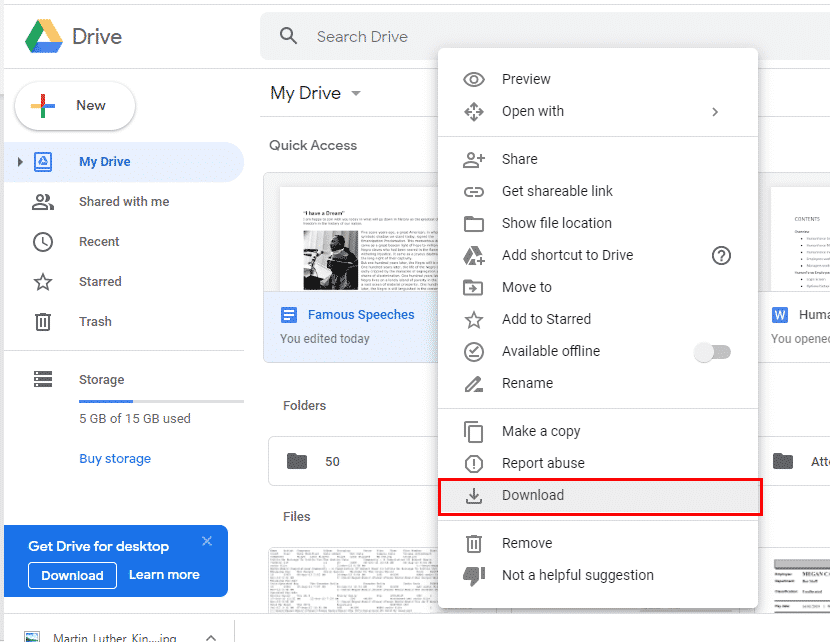
Converting Google Docs to Microsoft Word
Google Docs can be handy for sharing and working on documents with other people, but sometimes you just really need that file in Microsoft Word. No problem – it’s actually really easy to convert them. All you have to do is download the file and save it as a Word doc, Excel sheet or PowerPoint deck. If the Google Docs File is Open […]

London Street Signs, make your own in Word and PowerPoint
Famous London streets signs are selling for big bucks … or you can make your own in Word or PowerPoint for nothing. A sale of genuine London street signs by Westminster City Council included one for Abbey Road that sold for £37,200 (US$51,000). We thought that was a lot and figured out how to make […]

8 simple ‘Prohibited’ symbols for smoking, phones, kids and more in Word
Some ‘not allowed’ or ‘prohibited’ symbols, they can be used in Word, PowerPoint, Excel or Outlook. No Smoking, No Phone, No Children, No Drinking, No Pedestrians, No Bicycles, Not Drinkable Water or Mute. The Unicode symbol list includes red circle with diagonal to stop, smoking, children under 18, Mobile Phones, Littering, Pedestrians, bicycles plus no […]
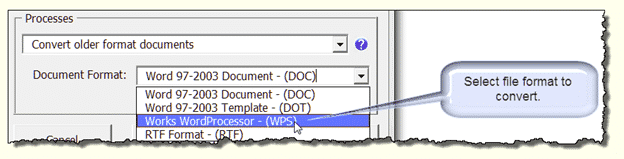
Bulk conversion of old Office documents to new formats
How to bulk convert old documents (.doc .xls .ppt) into the newer Office formats (.docx .xlsx .pptx etc.). Microsoft has never produced a simple bulk conversion tool for the masses, much to the annoyance of users and network administrators. Redmond probably made that choice for their own self-interest but some of the reasons also serve […]

Quickly type Greek letters like beta, delta & gamma in Word
A little-known Word shortcut lets you type Δ Θ Δ Ω Π plus other Greek and math symbols quickly and easily. Ctrl + Shift + Q changes to the Symbol font for the next letter only. Only in Word for Windows, I’m afraid. Not Word for Mac. It’s a very old Word shortcut, it’s in […]
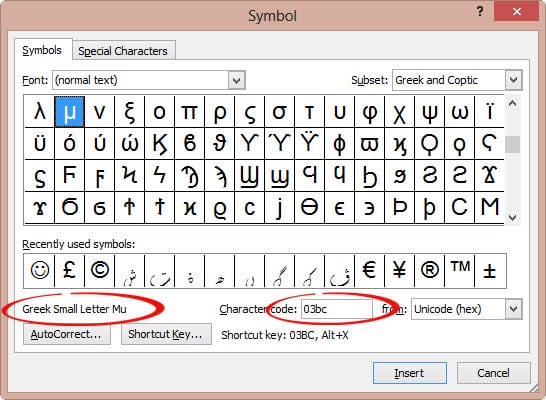
Micron µ or mu μ in Word and Office
Type the micron µ, micrometer or mu μ symbol in Word, Excel, PowerPoint and Outlook. Stuart H has an AutoCorrect suggestion: ” I need to use the symbol μ for micron (1/000 mm) and use mu for this. “ The Micrometre / Micrometer is one-millionth of a meter. The μ character is the Greek letter […]
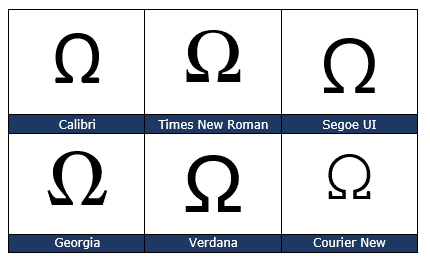
Ohm symbol Ω in Word, Excel, PowerPoint and Outlook
Type the Ohm symbol Ω into Microsoft Word, Excel, PowerPoint or Outlook. Both in Office for Windows and Office for Mac. Also the unofficial Siemens symbol, an inverted Ohm ℧ . Ohm is a measure of electical resistance with the symbol Ω It’s an official SI Unit of measurement just like gram, metre and many […]

So many power selection tricks hidden in Word
Here’s some power selection tricks in Microsoft Word for text, tables, pictures and more. You might think that selecting text and other things in Word is simple. Like many things in Office, there’s a lot more available than the simple methods that we all learn. There are quick ways to choose a word, paragraph, objects, […]