Office 2021 is the personal and small business ‘perpetual licence’, non-subscription version of Microsoft Office. For Windows and Mac.
Office LTSC (Long Term Servicing Channel) is the volume licence ‘perpetual licence’, non-subscription version of Microsoft Office for organizations, companies and governments. Also for Windows and Mac.
The features in Office 2021 and Office LTSC are very similar, if not the same.

Omega upper Ω or lower ω symbols in Word and Office
Type the Greek letter Omega in upper case Ω or lower case ω in Microsoft Word, Excel, PowerPoint, or Outlook. Both in Office for Windows and Office for Mac. Omega (uppercase Ω / lowercase ω) is the twenty fourth and final letter of the Greek alphabet. It is used to often denote the last or ultimate […]

Flowing column text in Word with break-out or sidebar
Sometimes there’s more than one way to do something in Microsoft Word like having four blocks of text on a page with images or text breakout with flowing columns of text with a side-bar or break-out. “How can I do a magazine-like layout with four blocks of text, one in each corner with a box […]

The best ways to get Microsoft Forms results into Excel
Here are the best ways to get results from Microsoft Forms into an Excel workbook. Sadly they aren’t the elegant and efficient ways available in modern Microsoft Excel 365, 2021 or 2019 for Windows. We’ll explain how to get Microsoft Forms results into Excel for better filtering and analysis. Then we’ll explain how Microsoft could […]

Named Ranges and Objects in the Excel Name Box
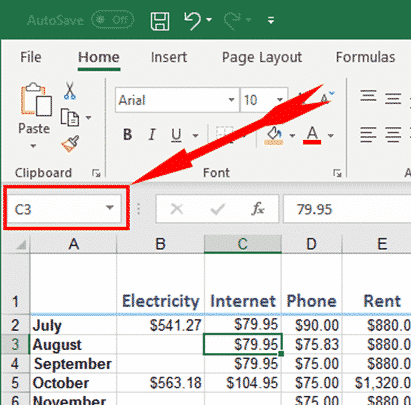
I said there are at least six tricks with the Excel Name Box and that’s before you get into using named rangers and objects. The Name Box lets you select a cells and give them a name or jump to an existing named range. It’s the same as going to Formulas | Define Name | […]
Six clever tricks (at least) in Excel’s Name Box
I found at least six uses for the Excel Name Box beyond just displaying the current cell address. The Name Box is an unassuming little box at the top of your Excel worksheet that you may not have thought about much, but it has a powerful range of uses for selecting and moving around a […]

Limitations of Word Sort feature for name sorting
Microsoft Word’s Sort feature is OK but has its limitations. We humans insist on variations of the simple ‘first and last’ name that confuse a computer. Here’s some name sorting traps and workarounds. For short lists, it’s probably enough to do a Word surname sort then manually adjust the list for any anomalies. Longer lists […]

Sort a list of names by surname or more in Word
Microsoft Word sorting is more powerful than it appears, with a few extra clicks you can sort last names or anything else in a list. Sort is one of those Word features that’s been around for a long time. These days it’s tucked away on Home tab in the Paragraph group. Select a list or […]

All mailbox limits (& how to find yours) in Outlook.com and Microsoft hosting
An Outlook.com or Microsoft hosted mail storage quota can be anything from 2GB to 100GB. Here’s a full list of the mailbox limits, how to check your current usage and total allowed size. We’re talking here about Microsoft mailbox hosting services including Outlook.com. NOT the various and confusing types of Outlook software. Outlook.com free account […]

Full CONVERT() measurement list for Excel
A full and searchable list of the measurements and multiplier prefixes available for Excel’s CONVERT function. This is a table of the abbreviations used in the Excel CONVERT() function. The basic units inbuilt to the function are all listed plus some of the common measures available using the Multiplier prefixes. Below that are a list […]
Outlook for Windows – restoring windows
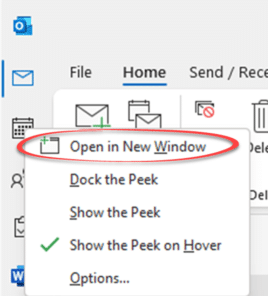
What happens to all the different windows open in Outlook for Windows when the software crashes? How can you restore the open windows when Outlook restarts? In case you didn’t know, it’s possible to have many windows open in Outlook. Many people don’t realize that because Outlook first starts with just one window and clicking […]
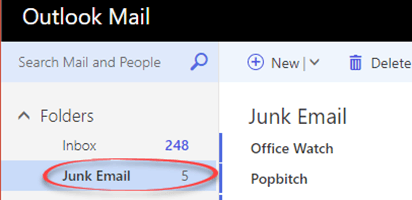
Saving Office Watch from Outlook.com
Microsoft’s mail service Outlook.com might move Office Watch or Office for Mere Morals to Junk Email. Here’s how to stop it doing that for any email, The same advice applies to other newsletters and emails that are wrongly marked as Spam / Junk Email. The famous UK newsletter, Popbitch, is treated the same way. Spam […]

Converting SVG into JPG, PNG or other raster image format
Converting SVG icons into JPG is essential for older Word and Office versions that don’t have native icon/SVG support. Here’s some options for conversion or sourcing alternatives. SVG’s are great with many advantages for Office 365 and Office 2021/2019 users. Not everyone has the latest Microsoft Office or shares documents with others who have earlier […]

Make your own ‘handwritten’ letters with Word
Microsoft Word has almost all you need to make ‘hand written’ notes and letters for a fraction of the cost of a special service. Dig into some of the lesser known Word font and line spacing settings to get that ‘written by hand’ effect. The New York Times has a report on Bond – a […]
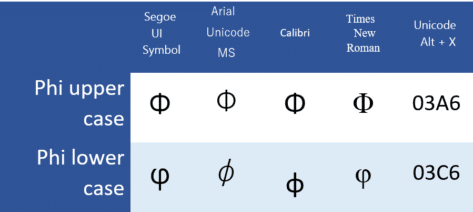
Type Phi uppercase Φ or lower φ in Word and Office
Insert the Phi uppercase Φ, and Phi lowercase φ / φ symbols in Microsoft Word, Excel, PowerPoint, or Outlook. Both in Office for Windows and Office for Mac. Phi (uppercase Φ / lowercase φ / φ) is the 21st letter of the Greek alphabet. The uppercase symbol has various uses, such as the cumulative distribution function of standard normal deviation in statistics. The lowercase symbol has […]

Up arrow ↑ symbol in Word, Excel, PowerPoint and Outlook
How to insert the Upwards arrow ↑ into Microsoft Word, Excel, PowerPoint or Outlook. Both in Office for Windows and Office for Mac. The upwards arrow ↑ symbol is used for various purposes. It can notate a mathematical symbol for ‘undefined’, for very large integers or in medical notation it can mean increased. Of course, there are plenty of uses in graphics and design elements especially […]

Banana 🍌 emoji in Word, Excel, PowerPoint and Outlook
Insert the Banana 🍌 emoji into Microsoft Word, Excel, PowerPoint or Outlook. Both in Office for Windows and Office for Mac. There’s also a Banana icon in modern Office apps. How Banana 🍌 looks in different fonts. Only two Segoe fonts support the Banana emoji; Segoe UI emoji (color or black) and Segoe UI Symbol. […]