Office 2021 is the personal and small business ‘perpetual licence’, non-subscription version of Microsoft Office. For Windows and Mac.
Office LTSC (Long Term Servicing Channel) is the volume licence ‘perpetual licence’, non-subscription version of Microsoft Office for organizations, companies and governments. Also for Windows and Mac.
The features in Office 2021 and Office LTSC are very similar, if not the same.

Make Contact Groups with CC and BCC in Outlook
Here’s how to make Outlook Contact Groups work with both CC and BCC’s as well. Outlook Contact Groups are a way to combine a list of contacts under a single name. They are often used in business but are also useful for individuals or families. For example groups like: ‘Regional Managers’, ‘Branch Staff’, ‘Neighbours’, ‘Club […]

8 ways to share calendars or events in Outlook
There are at least eight ways to share an entire calendar or individual appointment in Outlook software. Sharing can be ‘live’ and connected. Any changes or updates to the event or calendar are automatically sent to everyone sharing. Or it can be a ‘one-off’ item. A special attachment which is emailed or a little .ics […]
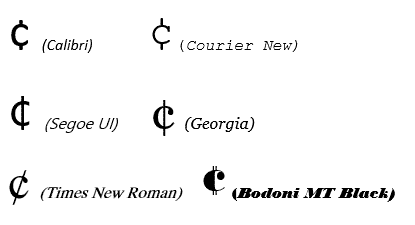
Cent ¢ symbol in Word, Excel, PowerPoint or Outlook
How to type the Cent symbol ¢ into Microsoft Word, Excel, PowerPoint or Outlook plus any Windows program. Cent ¢ shortcut Word and Outlook The Cent ¢ symbol has an inbuilt shortcut in Word and Outlook: Ctrl + /, C Hold down the Ctrl key while pressing / then type C (upper or lower case). […]

One person Comments in Word
Adding comments to Microsoft Word documents isn’t just for groups, use them yourself for your own reminders and side-comments while you’re working on a doc. Word has a feature to let you add ‘side’ comments to documents – comments that don’t show up in the final document, don’t effect the formatting yet stay with the […]

Get the most persuasive font in Microsoft Office
Baskerville has been decreed the most persuasive font after an experiment by Errol Morris and the New York Times. Happily, a very similar font is available to all Microsoft Office for Windows users. In an interview in Fast Company, Errol Morris talks about the experiment where people were asked to rate the same text, but […]
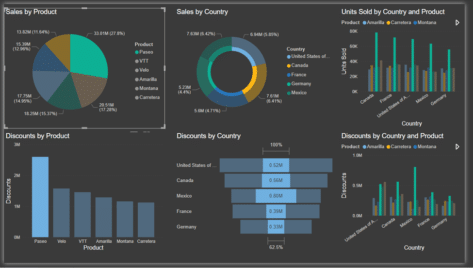
Getting into PowerBI with the free desktop app
Get started and understand Microsoft’s Power BI using the free desktop app. Here’s how to setup Power BI and some of its nifty tricks to delve into and make sense of data. All without the hassle of a ‘free’ trial. With plenty of buzzwords such as data-driven culture, business intelligence, analytics, metrics, KPI and our […]
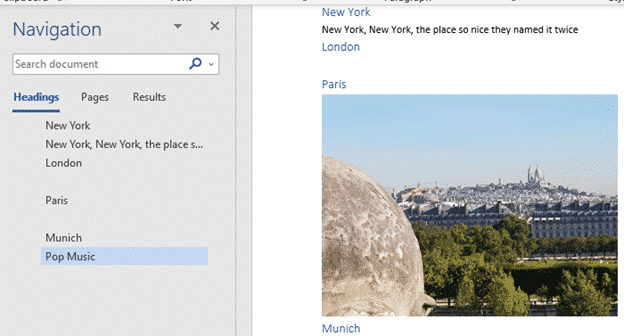
Blank spaces in Word navigation pane
What causes blank spaces in the Word navigation pane and how to fix them. The Navigation Pane in Word shows the Headings in a document but sometimes has the unexpected. Blank lines or text not in a heading. But sometimes blank spaces appear, like between London and Paris above. Why is that happening? The Navigation […]

Checkered Flag 🏁 symbol in Word, Excel, PowerPoint and Outlook
Insert the Checkered Flag 🏁 into Microsoft Word, Excel, PowerPoint or Outlook. Plus other alternatives available in modern Microsoft Office like icons or stock images. As its name suggests, the Checkered Flag emoji 🏁 shows a flag with a black-and-white checkerboard pattern. It’s often used to represent vehicle racing, challenges, or accomplishments. How Checkered Flag […]
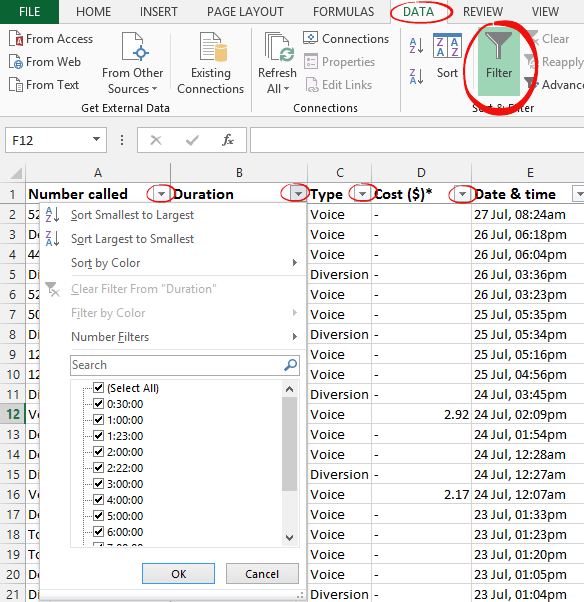
Quick Excel list sorting and filter buttons
Any Excel worksheet that has lists with headings on the top row can quickly get pull-down menus to filter or sort the data. For a regular Excel worksheet, go to the Data tab and click the Filter button. This adds extra pull-down menus to each of the headings. For an Excel Table, the filter buttons […]

Use Pantone Colors in Office documents
You can translate a Pantone PMS code or name into something Microsoft Office; Word, Excel or PowerPoint understands? Sometimes you’re given a specific color using the Pantone color scheme. Most commonly this happens for a corporate logo. The Ford car company specifies ‘PMS 294C’ for their blue logo. McDonald’s uses PMS 123C and PMS 485C […]
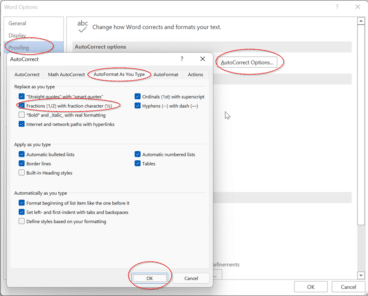
Typing some simple fractions automatically in Word and Outlook
As part of Word’s Autocorrect settings, some simple fractions will show as a symbol when you. For example, if you type in 1/4 and then space straight afterwards it’ll show as ¼. It’s done automatically from File | Options | Proofing | AutoCorrect Options | AutoFormat as you type | Fractions (1/2) with fraction character […]

Typing common fractions in Word and Outlook
Fractions like 1/2 1/4 3/4 can look better in Word and Outlook as ½ ¼ ¾ that can be done for other common fractions too ⅘ ⅚ ⅐ ⅛ among many. Either type directly with a shortcut or using AutoCorrect. We have a full table of the fractions available as symbols. As you may know, […]

Make your own fractions in Word and Outlook
There’s an easy way to make a good looking symbol for any fraction, no matter how unusual it might be. There are symbols and shortcuts for common fractions but beyond that you need a little Word trickery. But not very tricky because all you need is on the Home tab. Superscript then Subscript Use a […]

Thumbs Down👎emoji in Word, Excel, PowerPoint, and Outlook
Thumbs Down or Dislike 👎 can be typed into Microsoft Word, Excel, PowerPoint or Outlook. Both in Office for Windows and Office for Mac. Thumbs Down symbol 👎 or emoji is used to suggest disapproval or dislike. Partnered against Thumbs Up / Like 👍 symbol. How Thumbs Down Sign 👎 looks in different fonts. Here’s […]

Zero-day Windows security bug spreads to Europe and USA
The serious Windows and Office security bug is now used to target organizations in Europe and USA. Despite plenty of warnings, Microsoft still doesn’t have a fix, just ‘mitigations’. Last week Office-Watch.com told you about “Follina, or CVE-2022–30190” a relatively simple hack that exploits a security bug in Microsoft’s own Microsoft Support Diagnostic Tool (msdt). It’s […]

Calculate age and other interesting facts using Excel and DateDif()
All you need is a birth date or starting date and Excel can figure out the age, next birthday, days to next birthday or when you reach a milestone like 10,000 or 15,000 days. That’s just some clever tricks with DateDif(). How old is someone or something? To calculate the age, we will need to […]









